



Some days you wake up and think, “Today I’m gonna be margarine. You won’t believe it’s not butter. I’ll ship a screen so silky smooth they’ll think it was powered by Morgan Freeman’s voice.”
Just me? Right.
Anyway. I woke up. Vengefully. Sherlocking. Apple’s had it too easy for too long. It’s time somebody Sherlocked them. Apple Photos. Everyone hates the redesign. I don’t even remember what it used to look like. But I can do better.
I have a lot of photos. I need to sprint to stand still; following the yearly upgrade cycle just to maintain enough storage space for all the pictures of my kids. SwiftUI will not be invited to this party. I know enough about its performance when it comes to complex scrolling feeds.
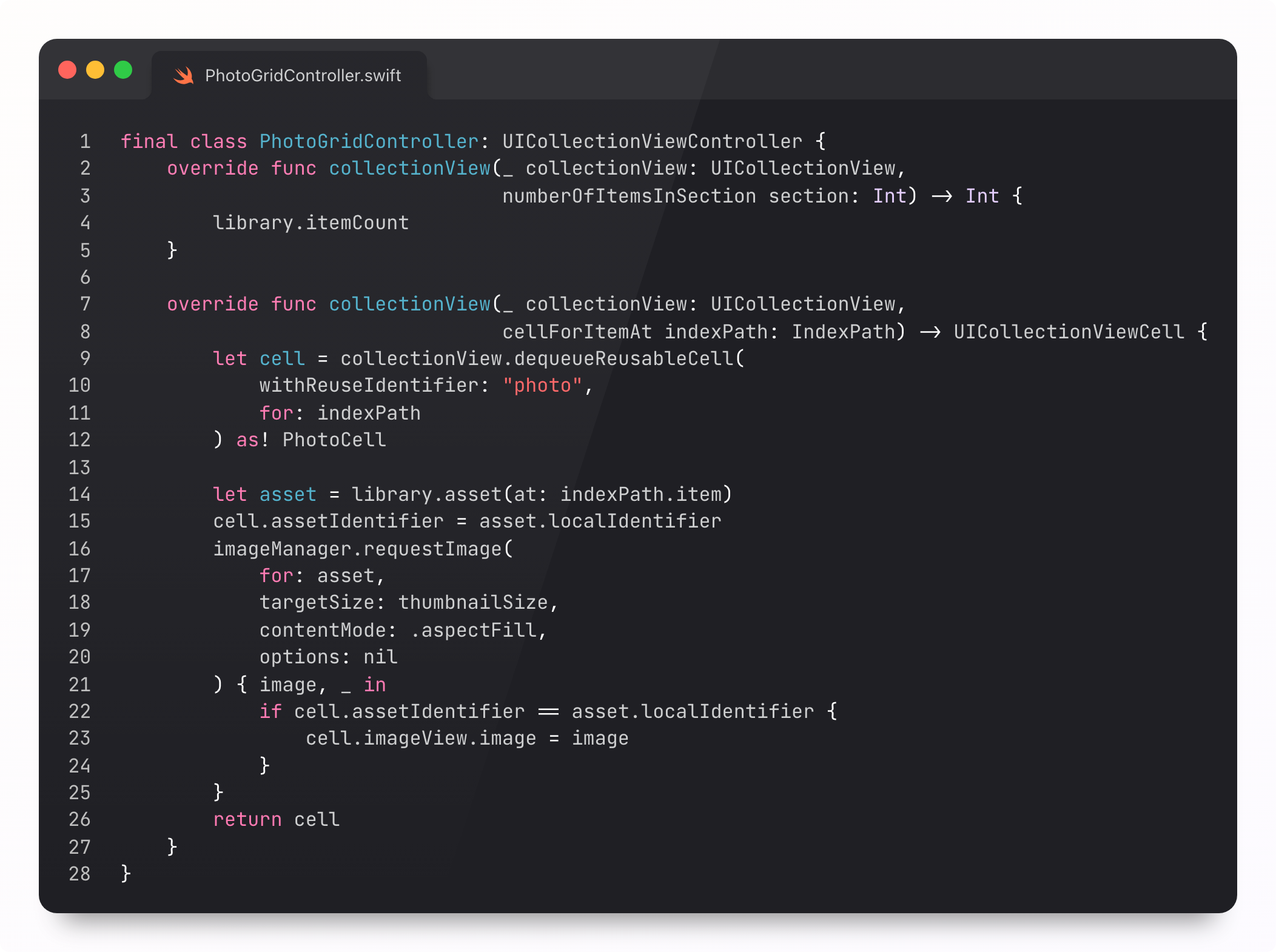
UIKit is my go-to for smooth scrolling. I reached out for my trusty UICollectionView. My old friend. My legal guardian. My emergency contact.
Oh.
OH.
F*ck.
So… that wasn’t ideal.
What went wrong here? Why was my feed locked up, with more hitches and hangs than successful on-time frame renders?
And how can we do this properly?
Today, we’ll answer these questions, and demonstrate the right tool for the job: you hold onto UIKit scroll physics, but offload all the real rendering: GPU. Metal. 120fps.
This article is packed full of so much knowledge, your email client will cut it off. Read on my website here.
UIKit Did Nothing Wrong
The UIKit trace, in my slightly montage-parody-flavoured video, was all hang, all the time. Even Spiegel would consider it a “potato”.

I’ll say anything to make my subscribers happy. I’ll praise SwiftUI. I’ll praise UIKit. I’ll take down SwiftUI. Twice. I’ll tell you UIKit sucks. All year, I’ve been telling you UIKit is the one when it comes to performance, so why lie?
It’s not a lie. But engineering is about knowing the right tool for the job. Especially in the current landscape, where an agent can spit out plausible syntax like it’s nothing.
UIKit is really good, most of the time. With an infinitely scrolling feed of photos, or a collection view of, say, 5 columns, it’s solid. Here’s the same app, but magnified.
This is great. On my entry-level iPhone 17, boasting a chonky 3nm A19 chip, it runs fine zoomed out to 15 columns as well. It’s only at 31 columns (I copied the zoom levels from the Photos app) where it falls apart.
This is thousands of visible UICollectionViewCells onscreen. Placing a cell in the collection requires overhead from layout, reuse, PhotoKit callbacks, image view assignment, and Core Animation commits. Fine with a few columns, but it adds up.
Instruments explained where all this work was happening:
UICollectionView.layoutSubviews ate ~46% of main-thread samples.
collectionView(_:cellForItemAt:) was in ~35% of samples.
PHImageManager.requestImage(...) hit about ~24%.
Eagle-eyed viewers can put away their hmm, actually: several main-thread samples are on the same call stack and so they can add to more than 100%.
My UIKit version wasn’t even that ambitious, lazing about at a paltry 60fps target, with a stonking 16.67ms frame budget. A hitch happens anytime the UI render loop fails to prep a frame on time.
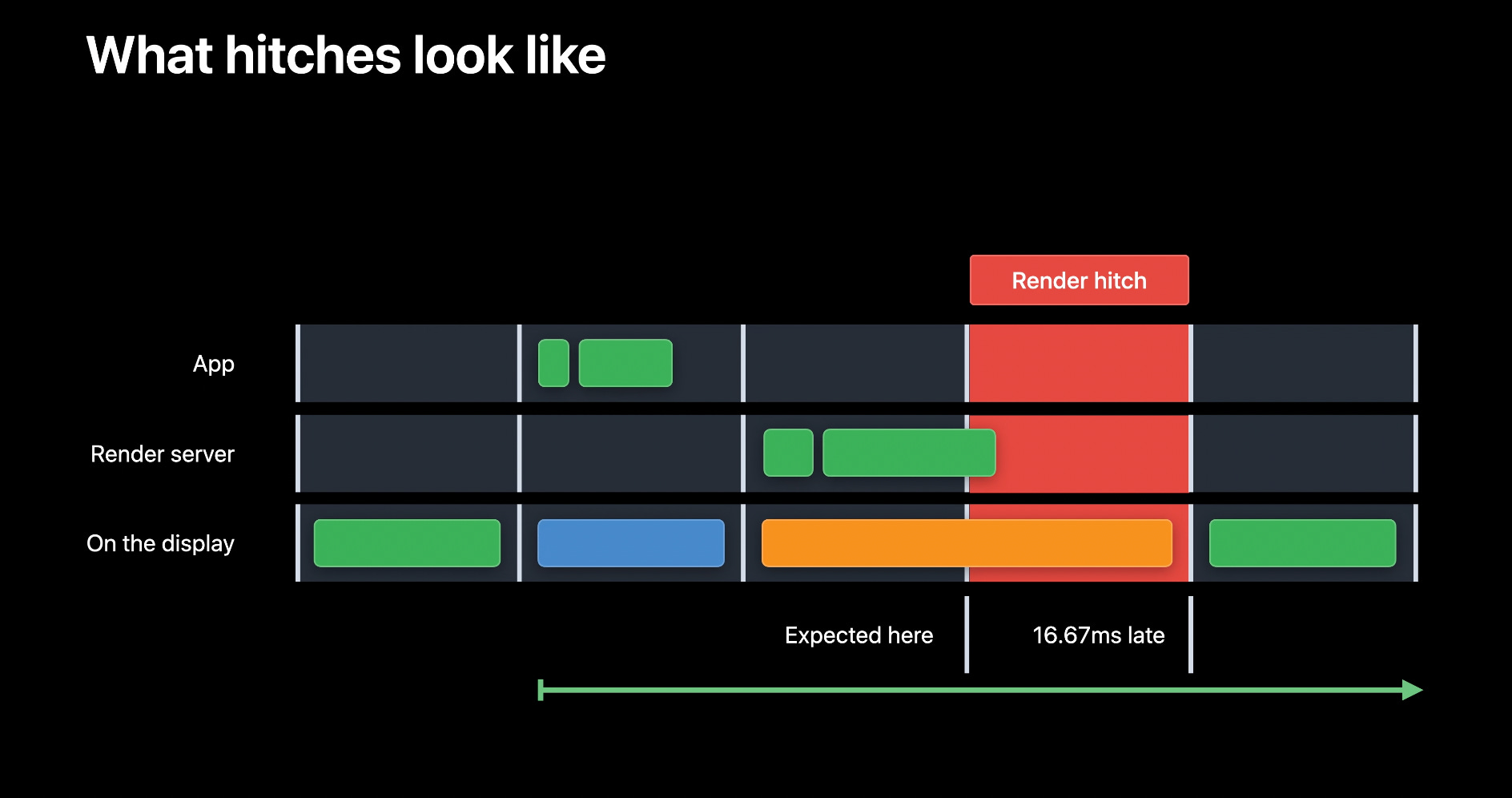
Under 5ms of hitches per second is “good”. A billion hitches per second is “bad”. Zero is the target. So how do we get from this…
…to this:
It’s all about the Metal.
This article is exclusive to paid members. But.
If you want to scratch the itch, I have a few really good, related, free articles:


Paid members get lots of nice things:
⚓️ Access my full library of 50 paywalled articles (including this one)
🚀 Read free articles a month before anyone else
🧵 Master concurrency with my full course and advanced training
🧑🚀 Get a free copy of my new eBook, “Land your iOS Tech Job”
❤️🩹 Support independent, sometimes funny, tech writing
The forbidden fruit tastes the sweetest, non? Especially when it’s free. Unlock your 2-week free trial today:
