


I’ve intentionally avoided treading the worn-out arguments about MVC, MVVM, MV, VIPER, and your favourite homegrown solution. I don’t consider it a gap in my blog content, because…
They aren’t very interesting to write about.
I don’t consider this proper “architecture”.
Your choice of screen-level file layout is just about consistency. Orienting yourself in an unfamiliar part of the codebase. Pick one, and stick to it. That’d be the whole blog post.
Proper Architecture™ is about the building blocks of our system, and how they fit together. It’s as much art as science. Draw boundaries and boxes across your codebase, and gerrymander until your dependency graph sparks maximal joy.
Today, we’re going down my long-awaited hit-list:
The what and why of modular iOS architecture.
Getting on the same page vis-a-vis dependency graphs.
The good, the bad, and the ugly architectures I’ve experienced in 10 years.
How I utilised this experience to design Granola’s modular architecture.
By the end, I hope to transfer some of my architectural instincts to you.
Contents
What is Modular iOS Architecture?
Many great iOS codebases begin as a big ball of stuff. One app, one target, one module, one project. Everything lives in one place, and making a new feature, service, or model is as simple as writing a file into a folder.
This works surprisingly well for longer than you’d think, but then you might start to feel the codebase pushing back on you.
Build time
As a monolithic module grows, small changes might invalidate a larger portion of the dependency graph (uh, dependency blob?). Incremental builds become… less incremental, code completion inevitably sloooows down, and Xcode struggles to cache reusable build outputs.

Code quality
With one module, you often cannot enforce meaningful boundaries at interfaces, because internal code (the default access control) is visible everywhere within that module. You need discipline and lots of private methods to avoid spaghettification.
You know what I mean if you’ve ever shamefully tasted that sweetest forbidden fruit: turning that private function internal just so the unit test can speak directly to it.
It’s also mildly cruel to deprive junior developers of their first change to legitimately use the public keyword. Or better, public private(set). You feel so badass the first time.
Organisational problems
Often an architecture grows to reflect the shape of the organisation maintaining it. Companies with a platform team will often have a big Core module. “Feature teams” will have modules split up along pod lines.
When teams, pods, tribes, scrums, etc, are divided by feature ownership, but the codebase has no corresponding boundaries, it gets muddy fast. Who owns those services, that model, or this infra? Engineers may step on each other’s toes, re-implement solutions twice, or design wholly different APIs.
Modular solutions
Dividing your app into modules gives your iOS app clearer boundaries between features and services, making the codebase easier to understand and explain. It allows you to enforce encapsulation, encourages reuse, and draws straightforward ownership boundaries across modules so tons of devs (or agents?) can work in parallel.
Modularity improves build times (usually!!*) by limiting how much code has to be recompiled after a change. If you edit one top-level feature module, Xcode can reuse its cached build outputs for non-dependent modules, compile independent modules in parallel, and cache more granular outputs.
*There can be too much of a good thing. Make your dependency graph too complex and interconnected with many tiny, poorly-bounded modules, or create loooong, deeply-layered chains of dependencies, and you’ll just slow things down instead.

We waited an appropriately long time to refactor Granola: I’ll go into more detail soon, but our ultimate modular redesign was motivated by a combination of 1) team growth and 2) some very specific pushback we were experiencing from the codebase.
Tooling and Libraries
When you want to modularise your app, the default is SPM. It used to be bad. It’s good. I like Tuist. Rolling raw Xcode projects are probably fine if you get Claude to manage the boilerplate. CocoaPods and Carthage are mostly-deprecated, you maniac. Don’t touch Buck or Bazel unless you are willing to open that particular Pandora’s box, and maintain it forever.
When you create a module, you need to choose whether you’ll use a static, dynamic, or mergeable library. These are incredibly important for modularisation, but very out of scope for this article. To make a long story short, pick between them to balance build speed, bundle size, and launch time. To make a long story long, you can read this classic of mine:
Static, Dynamic, Mergeable, oh, my!

If you want to embarrass a senior iOS engineer, ask them to explain the difference between Dynamic Frameworks and Static Libraries.
The Dependency Graph
One important concept in modularising an app: the dependency graph. Consider the modules as boxes or nodes along a graph. Yes, the data structure (you thought LeetCode was a waste of time?!). One node can’t compile unless all its dependencies, or imports, are compiled.
Your app builds the leaf nodes at the bottom of the graph, then modules depending on them, then modules depending on them, recursively, all the way up to your top level app module that ties everything together. While it can parallelise a lot of this, you can’t build a node without its dependencies. You get it.
This is why spaghetti architectures can slow down your builds: one tiny change can invalidate the dependency graph of dozens or hundreds of modules importing it across your graph.
Some of the architectures we’re looking at today are optimised with the Xcode Build system in mind. This is actually the core insight behind Tuist’s TMA and “Feature Interface” API contracts:
If your module’s public interface stays the same, modules depending on you will often not need recompilation, even if your module changes internally.
Modular Architectures I’ve Seen
I first wrote about modular architecture 2.5 years ago, somewhat early in my blogging career. For a while, I was embarrassed to share it, because I evangelised an architecture that had some serious scaling issues. Amateur hour. I’m more nuanced these days. Simple can be better.
Let’s take a look at some of the architectures I’ve experienced over 10 years of engineering, and dozens of projects.
Single Module
Not much to say about this tbh!
Prior to 2019, every app I built was a single module; as is almost every indie project I touch today. If build times aren’t a problem, or you’re working alone, why take the time?*
*That said, I often ask my agent to split up my projects if I get where I want to outside of my token limits. It makes me happy, even if I’m the only one who cares.
Core Module Architecture
If you ever decide to modularise your app, but you don’t have much time, this is usually how you’ll start. It’s a 2-parter:
App, containing features and your top level target.
Core, with everything else: models, networking, persistence, auth, utils, analytics, and shared UI.
This approach is nice for multi-target apps. In The Side Hustle From Hell, we foolishly tried to create a 2-sided marketplace, with apps for car mechanics and punters whose engine just conked out. On iOS and Android. 4 apps. Zero users.

The Core module is also a natural fit for Kotlin Multiplatform or organisations with a dedicated platform team.
Layered Modular Architecture
The first time I saw this architecture was on a top-secret electric car project which, I found out while in the pub, got abruptly sh*tcanned. An extremely cracked engineer, who rapidly left our company for more money, built a 3-tier layered app architecture with FeatureKit, ModelKit, and NetworkKit.
It was the first modular app I’d touched. And the most exciting thing I’d seen.
This architecture groups common functionality together into layers that serve the data requirements of the layer above, enforcing a highly unidirectional data flow through each layer.
App
↓ ↑
Repository
↓ ↑
Networking
This architecture made an impression. I adopted the same structure for Bev, my original magnum opus (back when that word meant something). The top-level Bev module imports a Repository, which in turn synthesised the most up-to-date data from both our local Database and Networking modules.

This is nice for very simple projects, but begins to get tricksy once you add authentication, analytics, models, business logic, arbitrary services, and utilities. Where do you place those?
Unless your project remains very simple, you will feel the codebase nudging you towards a multi-modular setup inside each layer.
Naïve Feature Modules
Feature modules are the divergent evolution of your initial Core module. Instead of focusing on Layers and business logic, you might want to split your top-level UI layer into many; usually one module per feature.
My first startup, Carbn, eventually got here after playing around with a Core module to start with (rolling pure .xcprojects!), and my subsequent role at Gener8 had the same shape, set up using modern SPM.
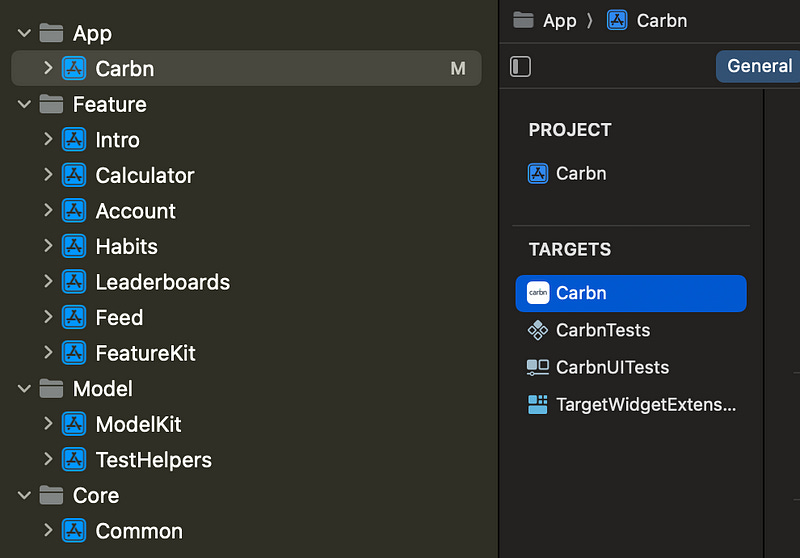
If you work on a legacy app that wants to modularise, and you aren’t thinking that hard about it, you’ll probably land on feature modules. It offers nice ownership boundaries, excellent build time benefits, and two screaming weaknesses that I didn’t explain properly in my first architecture article.
The problems with feature modules
“Where do we put shared business logic?”
It’s nice to give feature modules ownership over their own models and services, but suddenly you’re contending with awkward refactors whenever another feature needs it.
Eventually, you either throw models, services, and logic back into a shared Core module, or endure an uncomfortable hybrid with some in the Core and some domain-specific stuff living in the features.
This is the first bit of resistance from your codebase you should feel, and keenly. Business logic and services mostly want to live in their own modules. Architecture wants to be consistent, and having to think hard about where to put your new model or service is a sign of a bad architecture.
“How do we reuse these screens?”
At Gener8, our clean SPM-defined feature modules worked great: we had a coordinator per module that could transition you between any screen in the module, or kick off a new flow to enter a new module.
Until, one day, I was asked to present UI from our Rewards module on the Home screen.
F*ck!
My beautifully-designed feature module architecture fell apart here. I had to create a low-level shared shim protocol, inject it at the top level, and wrap it in AnyView to allow Home to present the typed Rewards UI element.

This is another burning red flag 🚩. Creating a tiny shared protocol to let one screen talk to another is the quintessential architectural pushback I’ve been blathering on about. This… worked… but the codebase was not happy with the way I was torturing it.
This solution was, fundamentally, a factory protocol, but I couldn’t have articulated it at the time.
Both of these problems were solved in codebases I worked on later in my career.
Service & Orchestration Layers
Earlier this year I played around with the RevenueCat SDK for an article. It was a good article. I have yet to have somebody appreciate my lasagna joke.

The RevenueCat payment SDK integrates into your app, and so has no “feature” modules per-se, but it’s a masterclass of simple, neat architecture, and shows us exactly how to handle shared, complex business logic.
The SDK is a layered monolith of services that sit at different levels of abstraction.
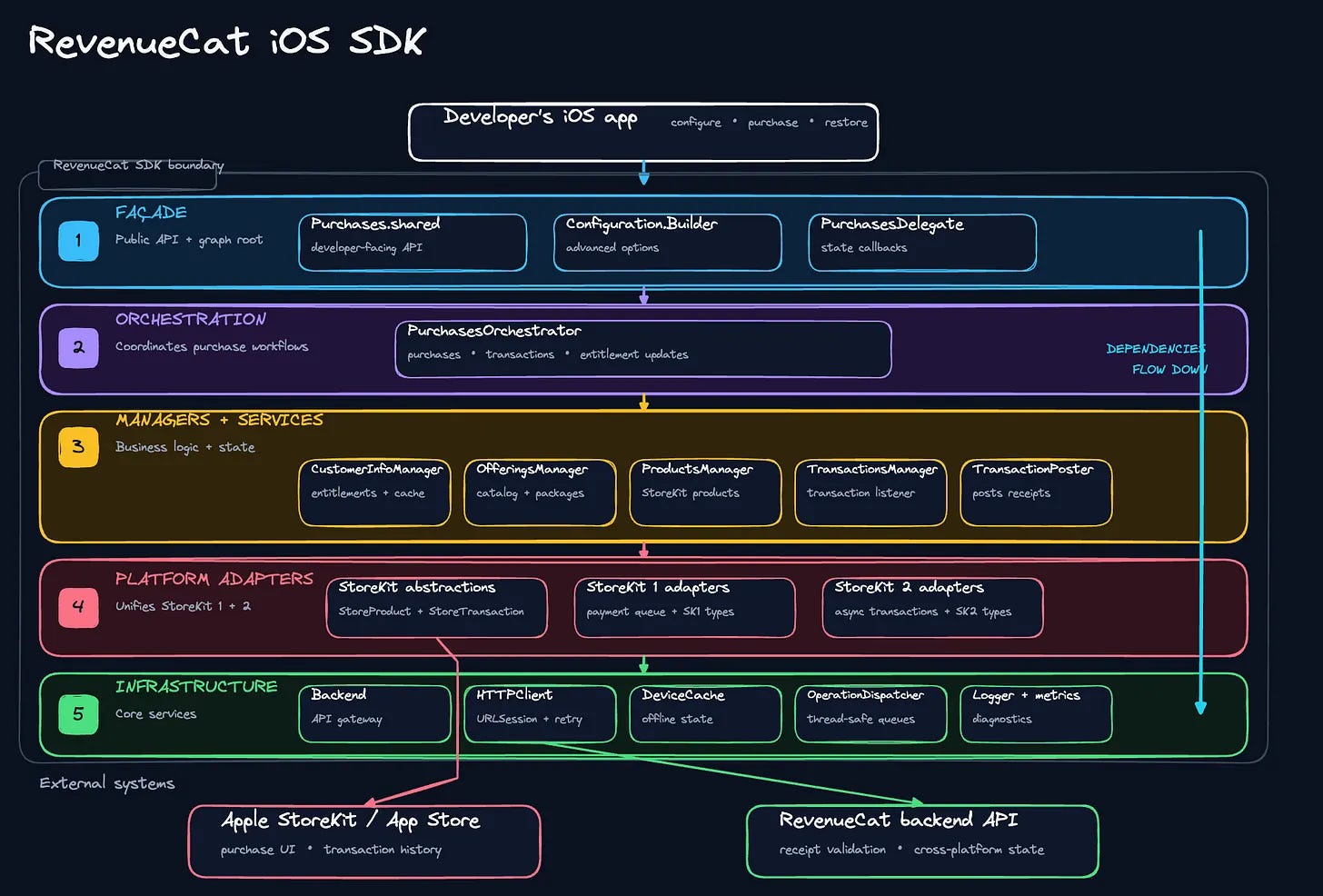
The Façade layer exposes a public API to developers.
The Orchestration layer ties together sets of individual services.
The Services layer encapsulates units of domain-specific business logic like payments, products, and customer info.
The Infra layer has non-domain-specific utilities like networking, caching, and logging, that would feel at home in any app.
The services don’t speak to each other: it’s the orchestration layer which links them together and moves between them during, say, creating an in-app subscription. Sibling utilities in the infrastructure layer don’t import each other, but are used by services in the layers above.
This is what I was missing when wrestling huge Core modules, domain-specific services inside feature modules, or splitting out a middleware God module holding all my logic. Each job can be its own module. The hard part is layering them together into a neat dependency graph.
Feature Modules with API Contracts
The naïve implementation of feature modules creates awkward architectural issues when trying to reuse screens. This does not have to be the case.
Tuist’s blog post, The Modular Architecture™, is (until now?) the canonical resource on a clean app architecture. The core principle is being able to build, test, and try out features quickly without being tied to building the whole app. They recommend that each module in your app creates 5 targets: Feature, Interface, Tests, Testing (mock data), and Example (a tiny target to interact with the feature in isolation).
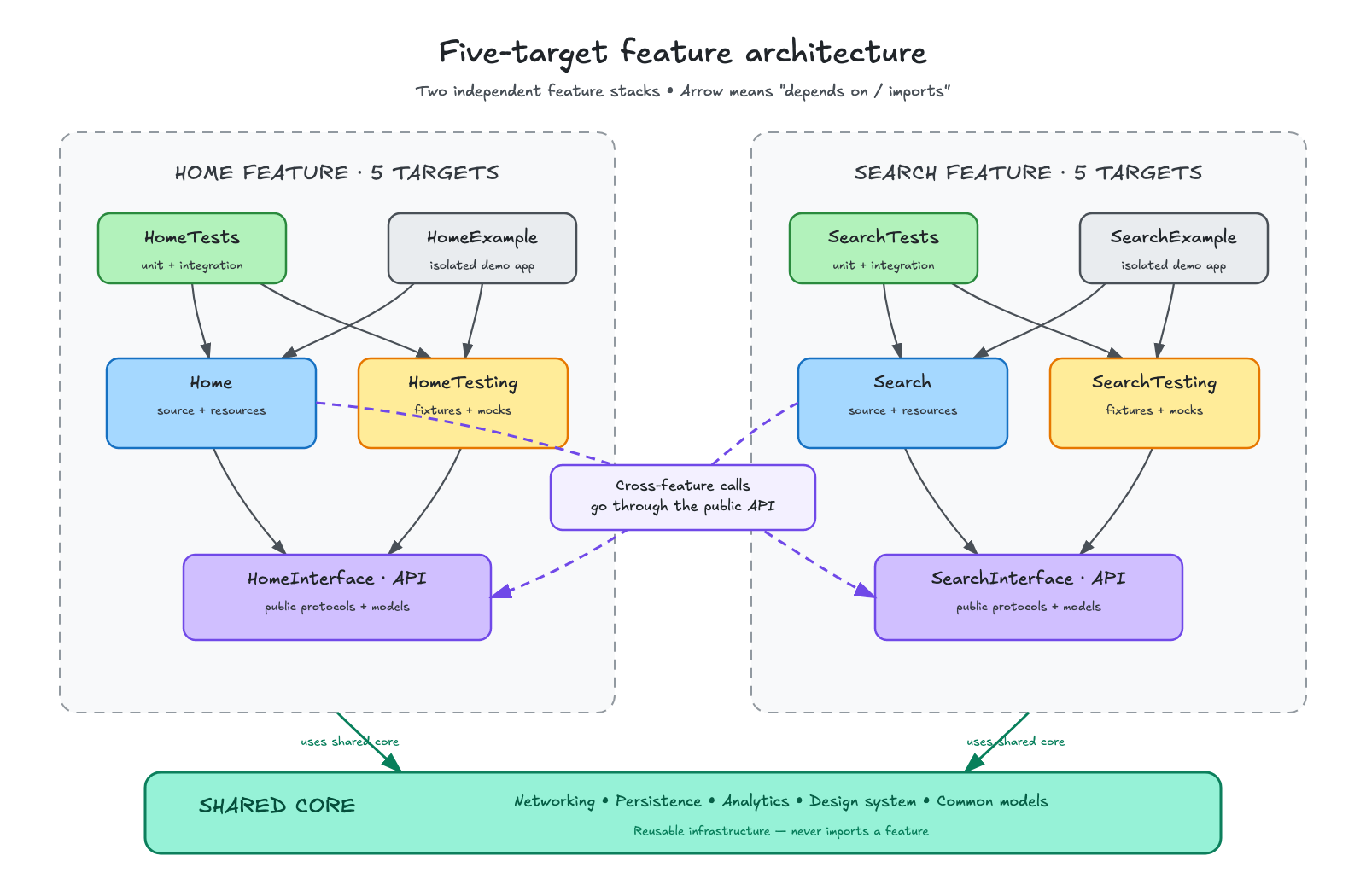
There’s a lot more to it than this, but I’ll focus on the important insight I mentioned earlier: when your feature module exposes a single public API, you achieve 2 things:
Any other feature module can import this API and present any screen.
External modules only depend on the API, so the incremental build times of feature changes are miniscule.
This API module can be as simple as a screen factory protocol that returns views, or a public enum representing all your navigation routes.
// HomeAPI module

import UIKit

public protocol HomeScreenFactory {
    func makeHomeScreen() -> UIViewController
    func makeProfileScreen() -> UIViewController
    func makeSettingsScreen() -> UIViewController
}
This technique is known as a feature interface or an API contract. The interface itself gets implemented in your feature module proper.
(Naturally, take this architecture with a pinch of salt, because the Tuist guys are trying to sell you modules. I jest of course, I love Tuist).
Hyper-modular Architecture
We used API contracts at my previous company, a social media challenger, which had (by far) the most modularised codebase I’ve ever worked on.
Feature modules were broken up into (deep inhale) an API module, UI module, a feature module, a “playground” module, and a service implementation module, (plus unit test targets for each service implementation).
Originally evolved from TMA, each incremental module added to the architecture solved a problem:
UI modules allowed us to use SwiftUI previews with mock data (notoriously flakey in modular codebases).
Playground modules allowed us to build example apps per feature and test rapidly.
Separate service implementation modules enabled us to hot-swap the underlying persistence framework used in our App Clip.
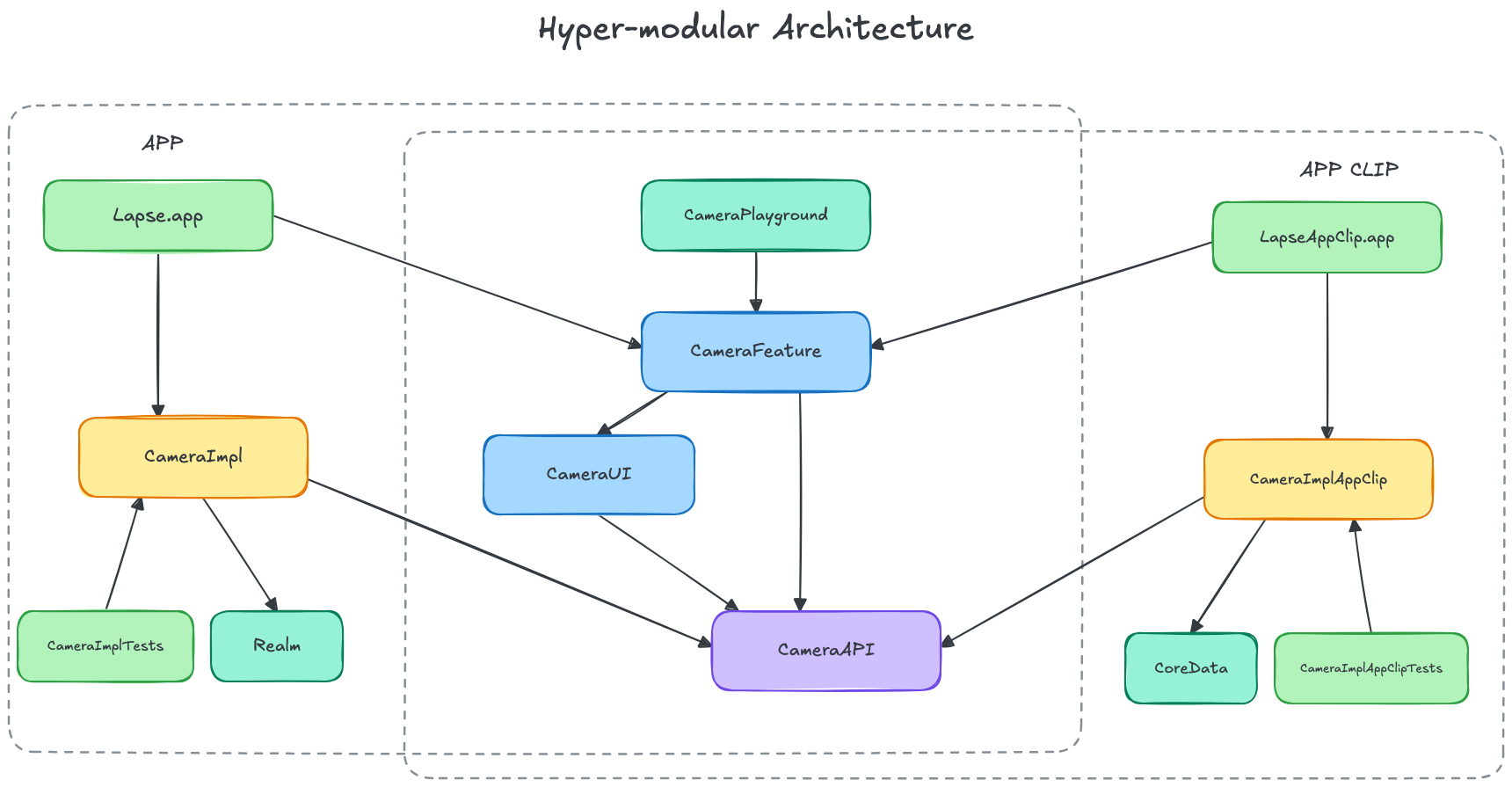
I go into detail about this app clip here, it was a damn cool optimisation puzzle.

This hyper-modular architecture was extremely flexible and powerful, but we accepted a lot of complexity in return. To maintain consistency in the architecture, even tiny single-screen modules introduced 8 targets to our dependency graph before writing a line of code.
How I Designed Granola’s Architecture
Like I always say… look at the trade-offs and profile your code before copying something you read on the internet!
A POC with big dreams
The Granola iOS app grew naturally out of a demo hacked together by Jonathan, one of our fullstack engineers, to work out if transcribing meetings on-the-go had legs.
It did!
Like all good startups, the team optimised for speed-of-validation. The v0.1 prototype was built that proved one thing: customers were desperate to get Granola in their pocket. Granola went looking for some experienced iOS hands to bring it to production.
This (sensible) approach meant that the early Granola iOS app didn’t have the most refined architecture: it was a big app target containing feature code, persistence, and services; with a few modules broken out underneath.
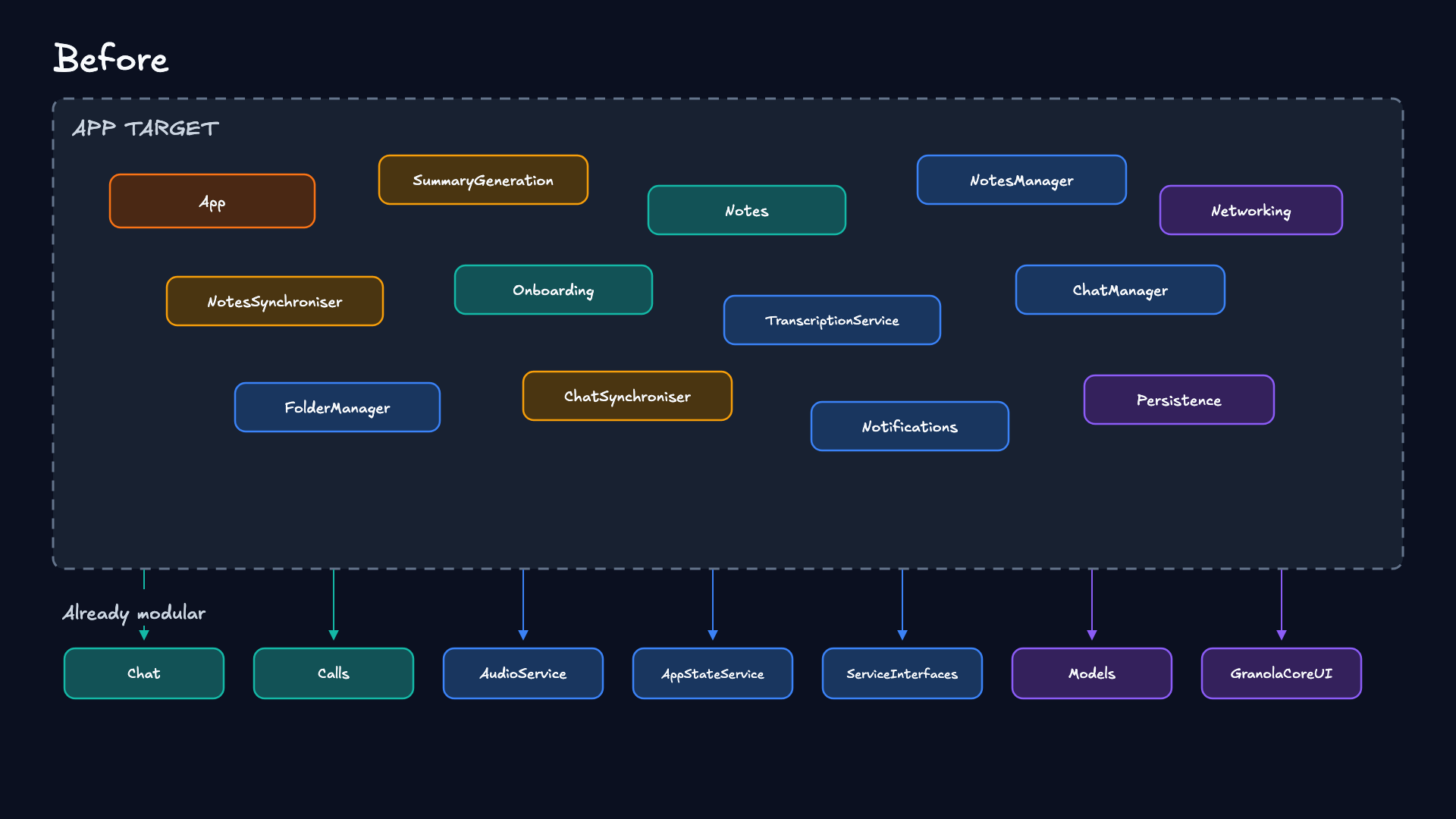
When I joined in January, my tech lead and I were in total agreement on 2 major architectural pieces:
We should kill SwiftUI and migrate to UIKit navigation.
We should modularise properly at some point.
Killing SwiftUI was easy to justify for several immediate product benefits: rebuilding a few screens in UIKit and improving performance, and also unlocking access to interactive transitions via UIViewControllerTransitioningDelegate.
Modularising had a few prerequisites: implementing proper dependency injection, reworking our navigation architecture, and, critically, setting up screen factories for each feature: these would become our Feature Interfaces.
Architectural Pushback
The moment came just before growing the iOS team: re-modularising the whole app might cause a lot of conflicts, and we don’t want to force someone to learn our architecture twice.
Simultaneously, I felt a serious stab of architectural pushback while implementing our agentic chat feature. Our agent has the power to call tools and edit your meeting summary, returning an updated version.
But to make this work; I had to apply the edit via an awkward new service interface our low-level ServiceInterfaces module, because the NoteManager persistence service lived in our top-level app module.
public protocol MeetingNoteToolEffectStore: Sendable {
    func applyEdit(
        documentId: String,
        textToReplace: String,
        newText: String
    ) async throws -> MeetingNote
}
This protocol was not inherently bad: it was a sensible dependency inversion that let us ship the feature without jailbreaking our architecture. But, by now, you should be able to identify this as a code smell.
Our lower-level services had no proper modular homes. NoteManager was screaming to break out into its own module.
This is My Design
So. I laid out my plan. I took the learnings from all my past experience:
The Feature API pattern from The Modular Architecture.
The strictly-layered service orchestration of the RevenueCat SDK.
My battle-scars with hyper-modularity drove me to prioritise simplicity.
I was working on this, to-and-fro, for a few months before we implemented it all. I maintained a diagram, on Excalidraw, just a little like this one, demonstrating the beautiful architecture we could achieve on the horizon.
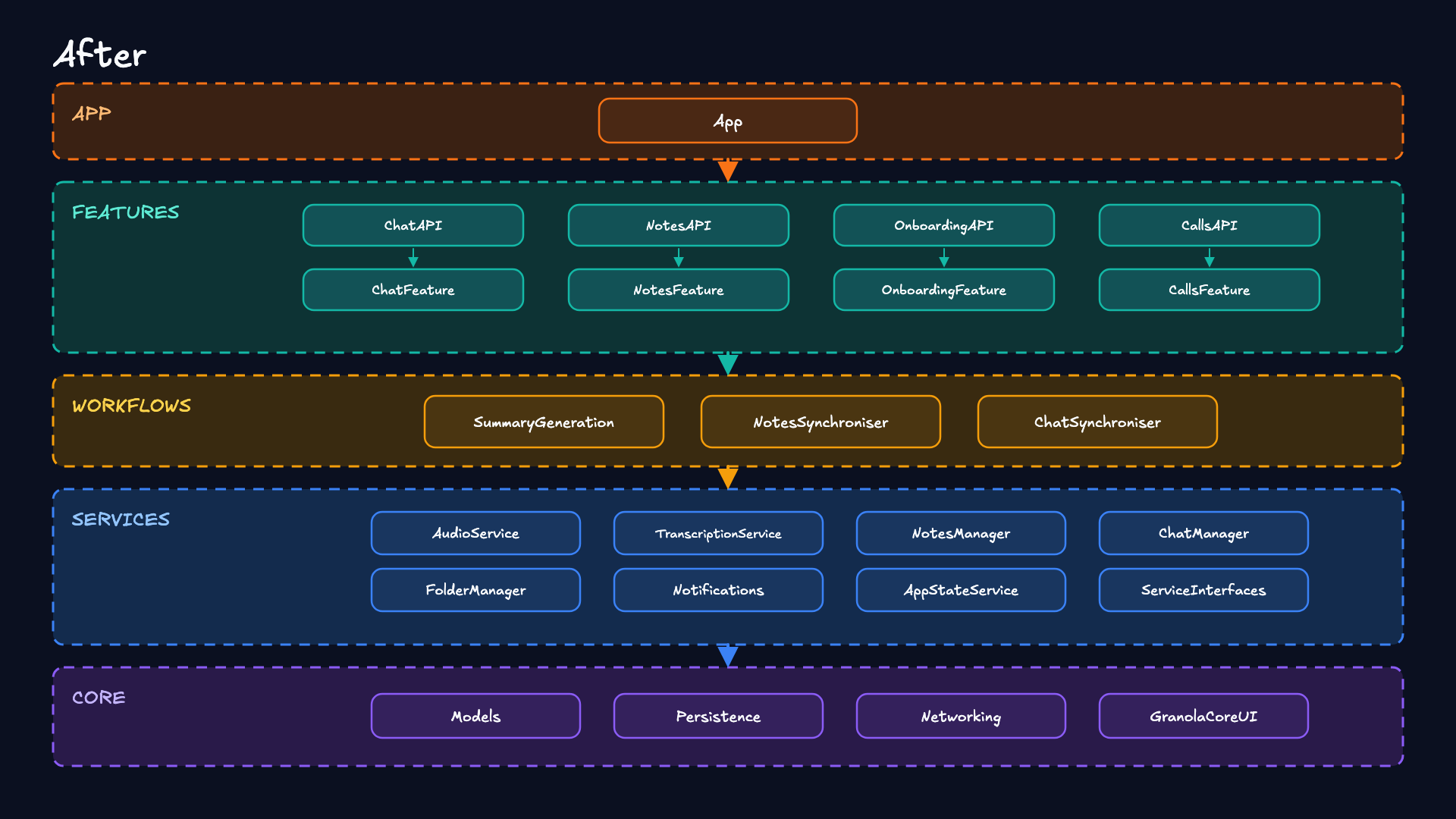
App sets up the scene, handles deep-links, and wires up dependencies.
Feature modules expose APIs so any other feature can use them freely.
Workflows orchestrated several lower-level services to perform complex actions like generating your meeting summary, or syncing your notes & folders with our backend.
Services contained domain-specific business logic like our NotesManager and AudioServices.
Core held leaf dependencies that didn’t depend on anything else.
The big win here is that we no longer need to think very hard when defining a new module. Is it a feature? Boom. Feature layer. Is it a generic utility that doesn’t depend on anything? Core. Does it tie together a bunch of domain-specific functionality? Kapeeche. Workflow.
The Big Refactor
This doesn’t have to be a big bang. With agents and a lot of verification, we can work through the refactor pretty reliably, managing all the cookie-cutter import malarkey automagically.
If we’re careful with layering, this work can get done across multiple passes; maybe even one PR per module. You might be able to refactor 1 layer per day if you hustle. I started from the leaf modules that don’t depend on anything, and slowly worked my way up the dependency graph.
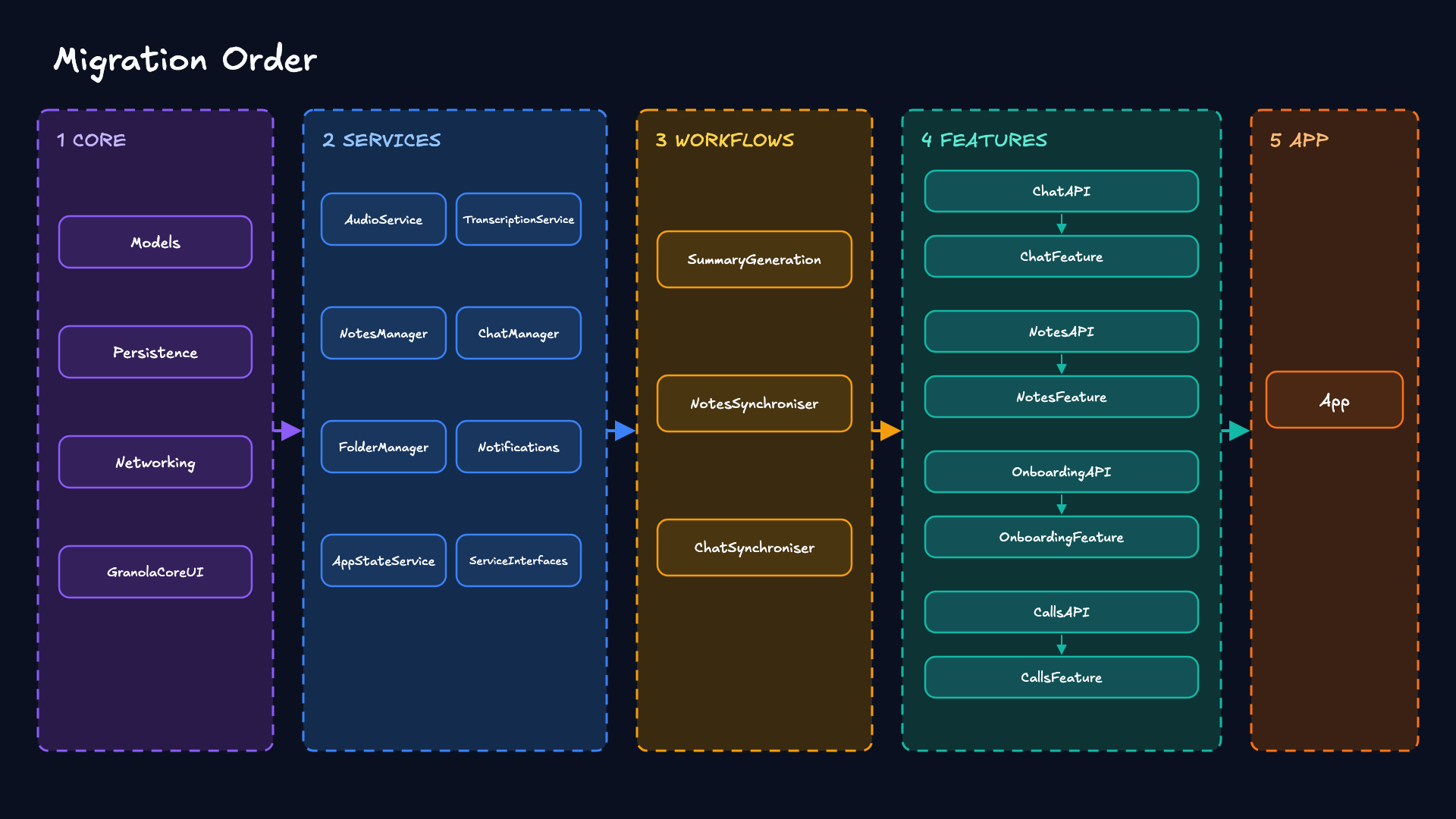
There’s nothing like sitting back and looking at your dependency graph after a hefty refactor. Feels like victory.
🔔 Last Orders 🍺
I‘ve been obsessed with modular architecture ever since the 2019 NSLondon presentation at Revolut where I learned about feature modules for the first time. I still have the notes somewhere. Couldn’t find them. I tried.

I’ve had blitz weeks where I implement a major refactor project to get over a build time hurdle. I recall days allocated to breaking a module in twain to help slim down an oversized app clip.
What’s fascinating to me is that, at somewhere like Revolut, splitting modular architectures up like this used to be a staff-grade project; a major architectural undertaking that would keep a team busy for months and months.
Today, it’s just an everyday task you can delegate to an LLM.
The actual implementation is the easy part. The design is what takes 10 years of experience to create. Nothing beats experience, and experiencing dozens of architectures through different jobs, side projects, and conference talks helps create a wonderful taste for what works and what doesn’t work.
If you enjoyed this article, please consider becoming a paid member and supporting my work. You get:
⚓️ Access my full library of 50+ paywalled articles
🚀 Read free articles a month before anyone else
🧵 Master concurrency with my full course and advanced training
🧑🚀 Get a free copy of my new eBook, “Land your iOS Tech Job”
❤️🩹 Support independent, sometimes funny, tech writing
Great stuff! Thanx! Btw, should not you have dependency inversion in the API modules? It looks like API depends on the feature, but it should be other way around?
Can you screenshot your Xcode folder tree? Curious if you group by layers, how many packages you have, etc.