


Every iOS dev has a soft spot, or perhaps a weak spot, for Swift reference counts. This stems from the fact that we've all survived countless interview questions about it:
For your first job, you’ll no doubt be asked the classic “what's the difference between a value type and a reference type?”
As you grow to mid-level, maybe you’ll be asked “how is a weak reference different from an unowned reference?”
Perhaps if you're ever interviewed by me (a sadist, and not the saucy 50 shades of grey kind), I’ll throw out “why was the side table introduced?”
Reference counting is fundamental to the Swift you write every day. By understanding how something really works, down to the bit level, you have the theoretical foundation to eviscerate any interview curveball I can lob at you.
So today, we’re spelunking again through the low-level guts of the Swift Runtime, to find out the answers to questions like:
Where are the bits that make up strong, weak, and unowned reference counts stored?
Why are weak references less performant than strong and unowned references?
How does an unowned reference crash if it's accessed after deallocation?
Are unowned references always more performant than weak references?
Once you’ve digested this article, you’ll be able to flip the interview table, and make me your bitch.
Never Fail An Interview Again → (start here to quickly see the answers) ←
Quick primer on the Swift Runtime
If you’re new to Jacob’s Tech Tavern, let’s quickly check we all understand what the runtime actually is. It's a C++ library that gets linked to your app at launch, and contains a bunch of basic language functionality like “allocating an object on the heap” and “knowing what type things are”.
And, most relevantly, automatic reference counting.
ARC was built into Swift from the start, but was only introduced to Objective-C in 2011. Before this, developers were manually managing their memory with explicit calls to retain, release, and @autoreleasepool.
You can see the Swift runtime in the source code. It’s not even that much code! All the code involved in reference counting lives in the runtime. Actually, even just a few files inside the runtime: HeapObject.cpp, RefCount.h, and RefCount.cpp.
If you’re keen to learn more about memory allocation and the Swift runtime internals, check out this absolute banger of an article.
Now we have the gist, we’re going to start exploring each kind of Swift reference.
Strong References & Bit Counting
To fundamentally understand reference types, let’s begin with HeapObject.
HeapObject
Every reference type is stored in a block of memory on the heap, accessed via a reference (or pointer) to the memory address. That’s why printing a reference type looks like this:
0x0000d14dba7fIt’s the 64-bit memory address that contains the actual data.
All these objects stored on the heap are laid out like this:
+-----------------------+
| HeapObject            |  <- header struct
| - metadata (isa) ptr  |     <- type information
| - inlineRefCounts     |     <- reference count bits
+-----------------------+
| Instance Data         |  <- The actual data for your object
| - field1              |
| - field2              |
| - ...                 |
+-----------------------+
The HeapObject is the header block for the object, stored contiguously in front of the memory itself. It stores type metadata and the reference counts. HeapObject itself is a simple C struct. Here's the actual definition:
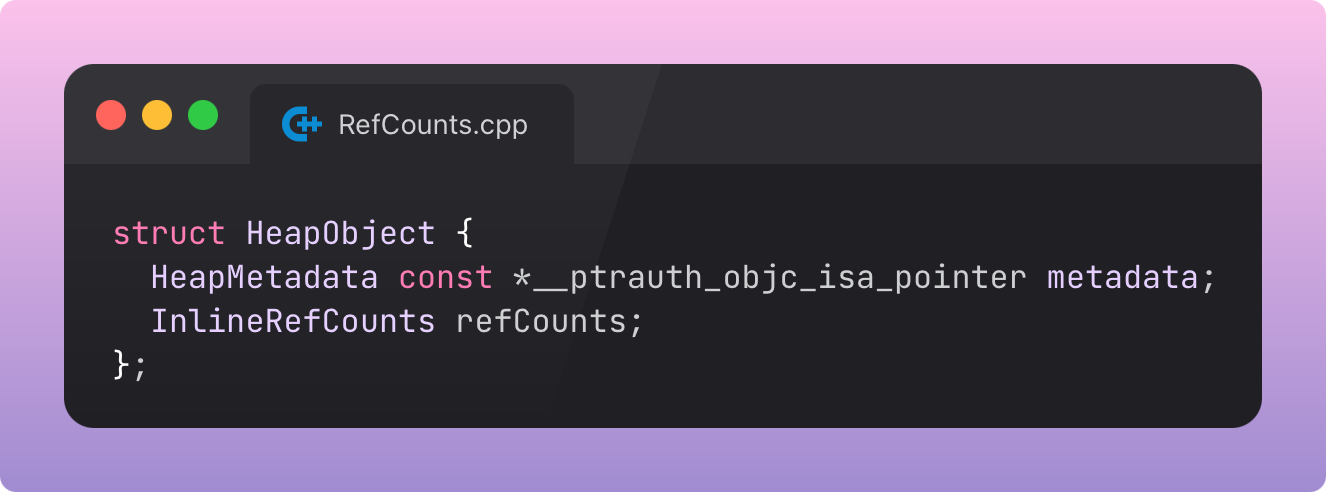
These two “words” of 64-bit* data are packed contiguously in front of every object on the heap. HeapObject is therefore a slightly confusing name, since it behaves more like a block of metadata for the actual object on the heap.
*To make life easy, I’m going to assume everything is on 64-bit devices.
The metadata pointer, or isa pointer, tells the runtime what type this object is, powering dynamic dispatch, reflection, and the type(of:) function.
But we’re looking for the bits I promised. These live in the other property, InlineRefCounts. This is inline because instead of a pointer to metadata, this property stores the reference counts as part of the HeapObject struct.
Retaining a HeapObject
When you strongly reference a heap object in Swift, the compiler inlines calls to the runtime ABI function, _swift_retain(). This is what increments the reference count. Here's the code:
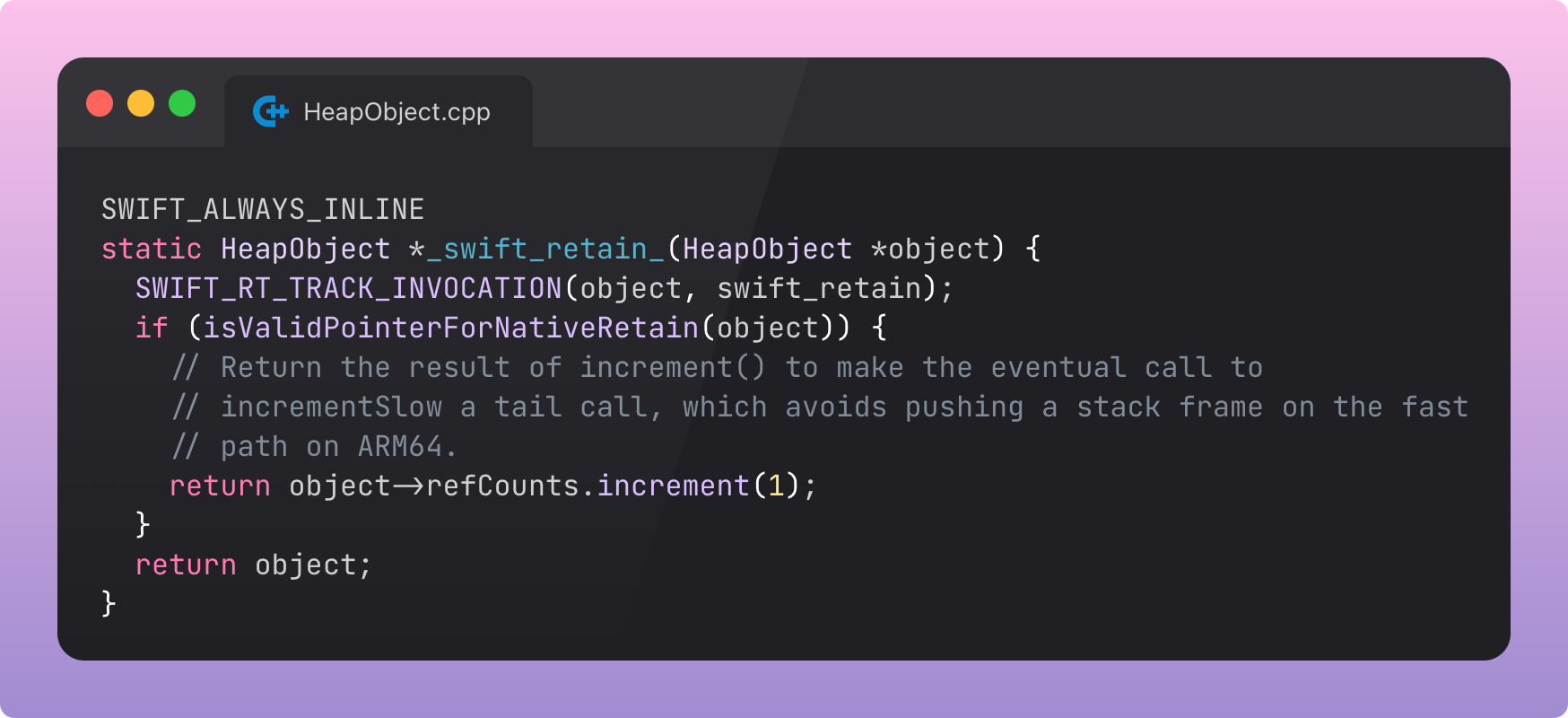
Pretty… simple… almost brain-dead in how straightforward it is, right? Just accesses the HeapObject’s refCounts property and calls the increment(1) method, to increment it by 1.
Before we go deeper, let’s understand the actual, physical, bit layout of these ref counts:
Every Bit Counts!*
(*except the flags)
The bit layout of inlined ref counts takes a moment to get your head around, because it’s mixed in with a bunch of flags related to the heap object’s lifecycle state. We can see it defined here, as part of SwiftShims, in RefCounts.h. Unless you are fresh off a computer science course, you may not intuitively know what these bits look like. I’ll go ahead and illustrate with bitmasks.
Bit 0: “Pure Swift dealloc” flag. If set (1), the object can be deallocated purely via the Swift runtime. If clear (0), it needs to call into the Objective-C runtime for deallocation.
0b0000000000000000000000000000000000000000000000000000000000000001Bits 1-31: Unowned reference count. I wonder where unowned(unsafe) is stored?*
*Turns out unowned(unsafe) refs aren’t counted at all! They just point to the data. Damn, that does sound pretty unsafe tbh.
0b0000000000000000000000000000000001111111111111111111111111111110Bit 32: “Is deiniting” flag. This is set when deinit is called, and helps block deallocated objects from getting into a weird state at the end of their lifecycle.
0b0000000000000000000000000000000010000000000000000000000000000000Bits 33-62: “Strong extra” reference count. This is “extra” because when an object inits, the reference count is (logically) treated as 1 even when this whole (physical) field is zeros. So, “extra”. That’s why this count gets one less bit than unowned.
This optimisation saves a clock cycle or two for every initialisation, saving the system from having to perform a single-bit incrementation operation every time you allocate something. The strong reference count already begins at 1.
As an application developer, it beggars belief that you’d put so much design energy into saving a single clock cycle. But when we aggregate these hertz up across every single Swift object that gets instantiated, throughout the whole of time and space, the optimisation starts to make sense. Compiler engineers operate on another level.
0b011111111111111111111111111111110000000000000000000000000000000Bit 63: “Use slow RC” flag. This bit is flipped when one of the inline reference counts, either unowned or strong extra, overflows and fills up past capacity. This means a count of about 2³⁰, or about a billion, references.
More commonly, the bit will flip when a weak reference is created.
The presence of this flag tells the runtime that the side table (keep reading) is being used for storing reference counts, meaning we are using “slow RC” (ref counting) due to the pointer indirection whenever the count is accessed.
The activation of this flag re-contextualises the rest of the bits in the InlineRefCount: the runtime reads the non-flag bits as a pointer to this side table instead of treating them as inlined reference counts. Now that’s what I call efficient bit-packing!
0b1000000000000000000000000000000000000000000000000000000000000000If bits aren’t your thing, you could have said something before I got really into the crunchy details, pal. But here’s a handy, less meandering, diagram documented in RefCounts.h:
Storage layout:

  HeapObject {
    isa
    InlineRefCounts {
      atomic<InlineRefCountBits> {
        strong RC + unowned RC + flags
        OR
        HeapObjectSideTableEntry*
      }
    }
  }
Incrementing the RefCount
Now we can come back to truly understand what happens with this incrementation operation we encountered in the _swift_retain_() method:
object->refCounts.increment(1);This leads to the increment() method in RefCount.h:
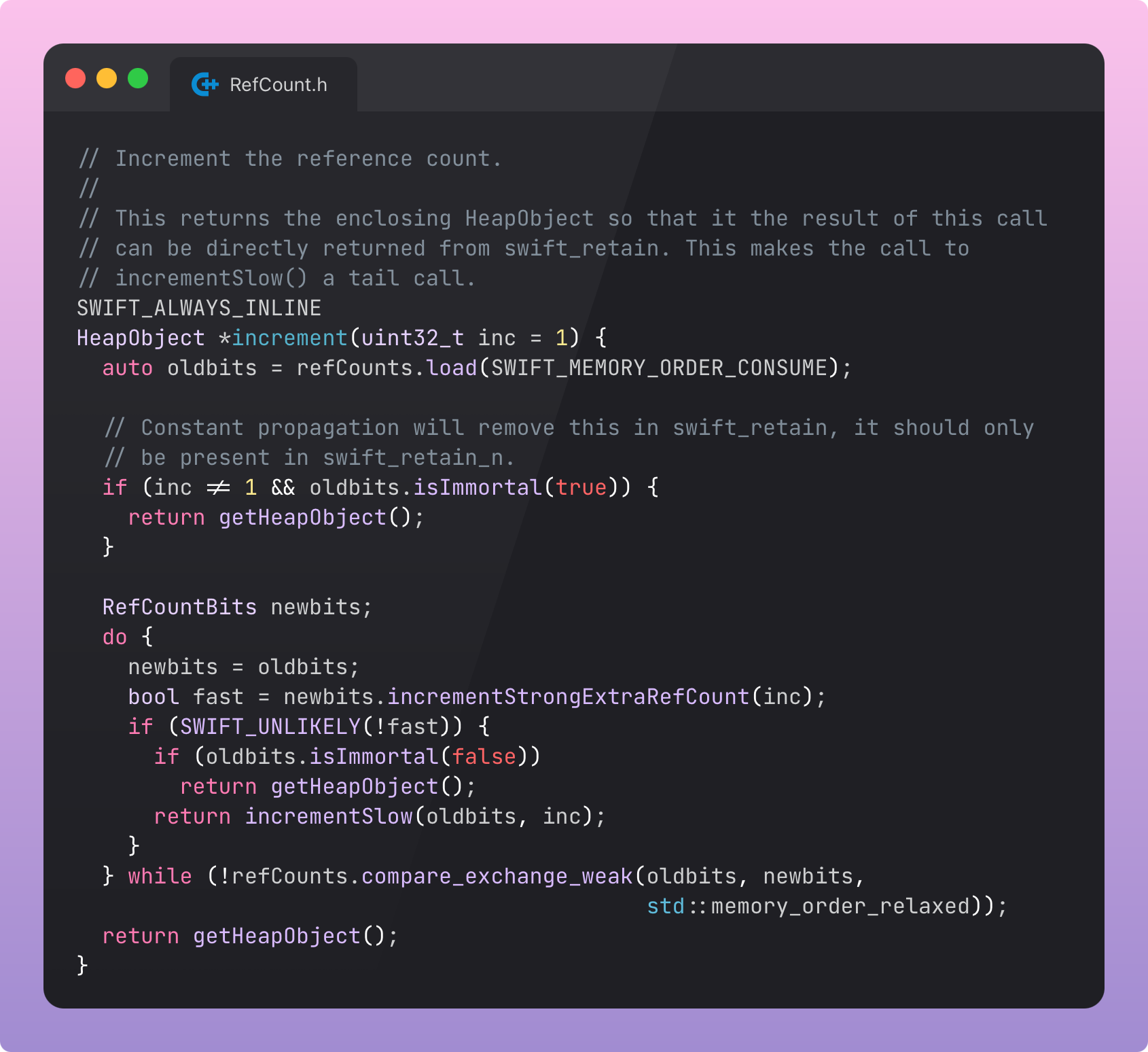
Most of this logic is handling the case where the strong reference count overflows and a side table is needed. But for now let’s follow the fast path, incrementStrongExtraRefCount().
I looked into what
SWIFT_UNLIKELYwas and had to write an aside because it was so cool. It’s a branch prediction hint to the compiler. It helps tell the compiler that the “fast” path is way more likely, so it can optimise this code path with the expectation that it’s almost always the one that gets used. This means the hardware can speculatively execute the likely branch, basically borrowing free clock cycles from the future.David Smith on Mastodon kindly explained the double negative via his profiling experience:
if (SWIFT_UNLIKELY(!fast)is used because skipping the branch entirely simplifies the resulting assembly code.
This finally leads to the actual bitwise incrementing operation, which should hopefully feel a little clear by now.
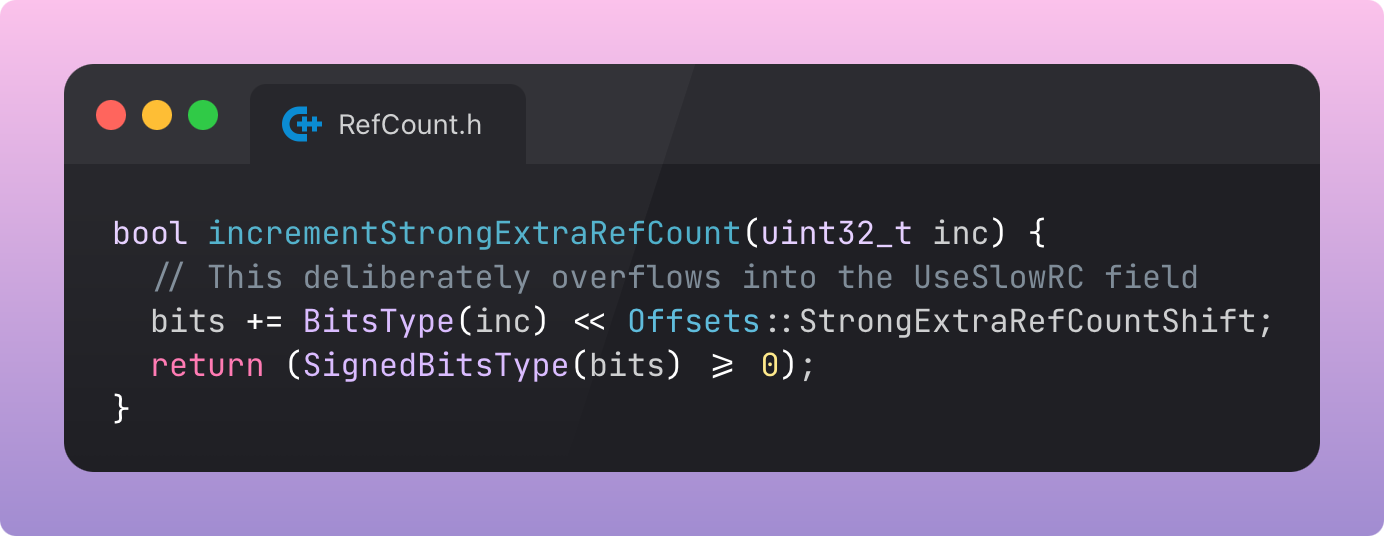
The function is simply adding the increment (inc) to the inlined bits.
As long as the bits don’t overflow, it returns true, telling the increment() method that it’s using fast reference counting.
Offsets::StrongExtraRefCountShift is the bitwise shift that moseys the counting operation up towards the 1s and 0s at slots 33-62, where the strong extra ref count is stored.
Slow Reference Counting
“Deliberately overflows into the UseSlowRC field” betrays an elegant design choice: when the 30 bits of the strong ref count all fill, they overflow. This automatically flips the next bit, the “high bit” at the end of the 64-bit word, where the “use slow RC” flag lives. This triggers the slow path and side table allocation.
Weak References & Side Tables
Here's where things get interesting.
Well, actually, I guess I hope it was already interesting. But, like, extra interesting.
To learn side tables, we must begin by understanding how weak references were implemented in the original version of Swift, and the problem this caused.
Pre-Swift 4
From Swift 1.0, up until Swift 4.0, objects stored two reference counts separately: a strong count and a weak count (which also counted unowned refs).
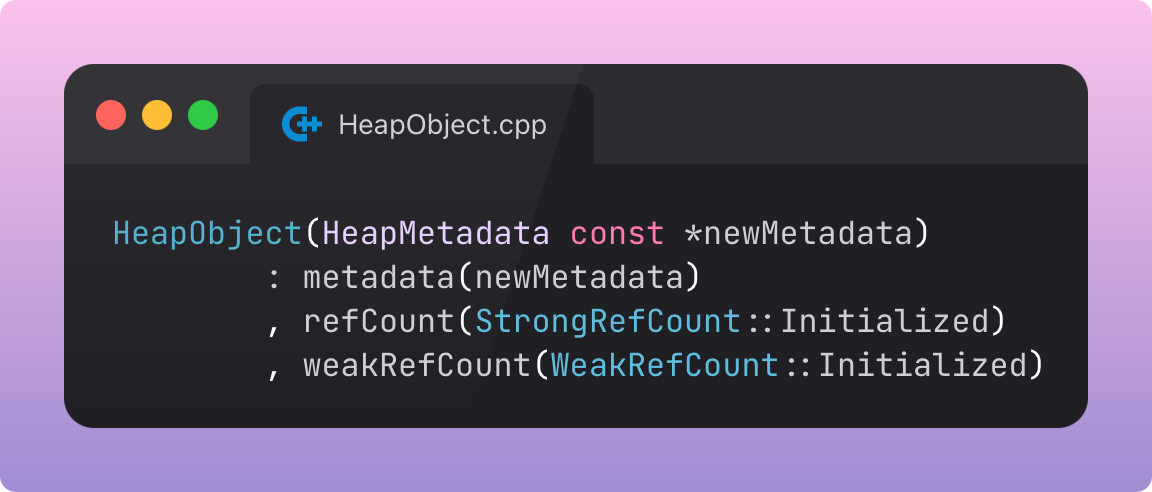
When the strong refCount went to zero but there were weak references remaining, the object was deinitialised but not deallocated: it stuck around in a “zombie” state.
The weak references still worked. The runtime nilled them out on access (or crashed, if an unowned reference was used), and decremented the weak refCount. It was only until all weak refs were accessed that the zombie memory could be deallocated.
This was a simple and performant implementation for weak references, but meant that a lot of memory could be hogged by these zombie objects.
The Side Table
With Swift 4, weak references were built different.
Now, when any weak reference is created to an object, the side table is created:
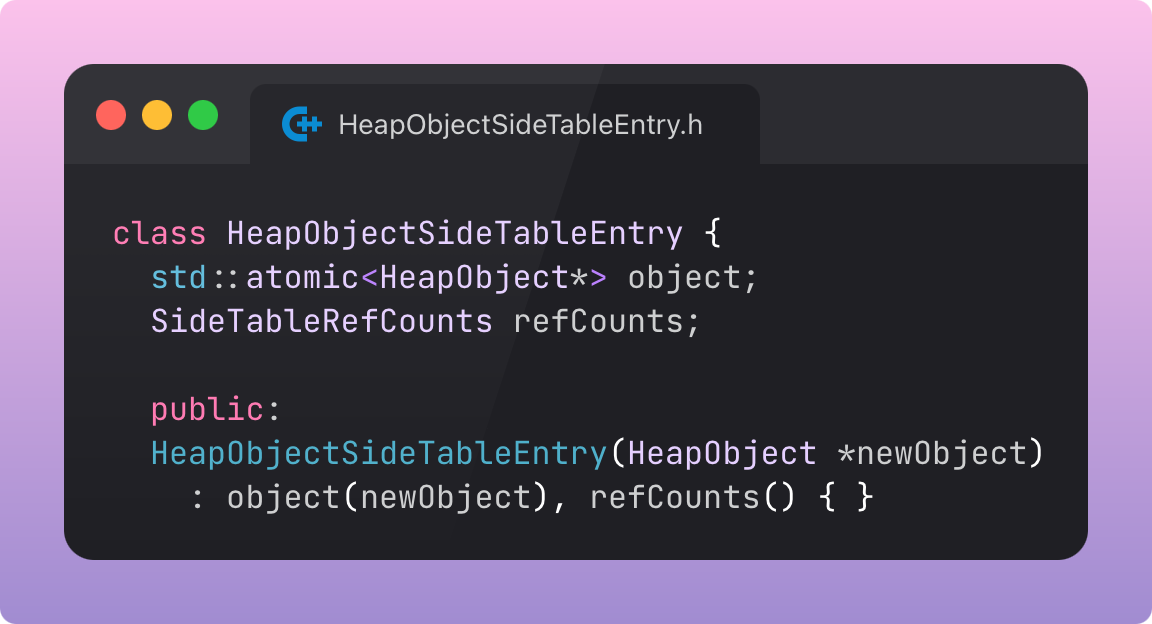
This is a separate heap allocation that contains:
A pointer back to the original object (HeapObject*)
Its own set of strong, unowned, & weak reference counts, plus flags (SideTableRefCounts)
Like the original InlineRefCounts, this is just a small object containing metadata about the object: reference counts & flags. Unlike HeapObject, which acts as the header portion of the object’s memory, the side table exists separately in memory.
When a weak reference is created, or any refCounts overflow, the InlineRefCounts struct is replaced by a pointer to this side table, with all the relevant reference counts copied over. Therefore the object and table both point at each other.
Critically, weak references point to this side table, not the object itself.
To create the side table, the InlineRefCountBits are loaded and used to set up the side table in RefCounts.cpp:
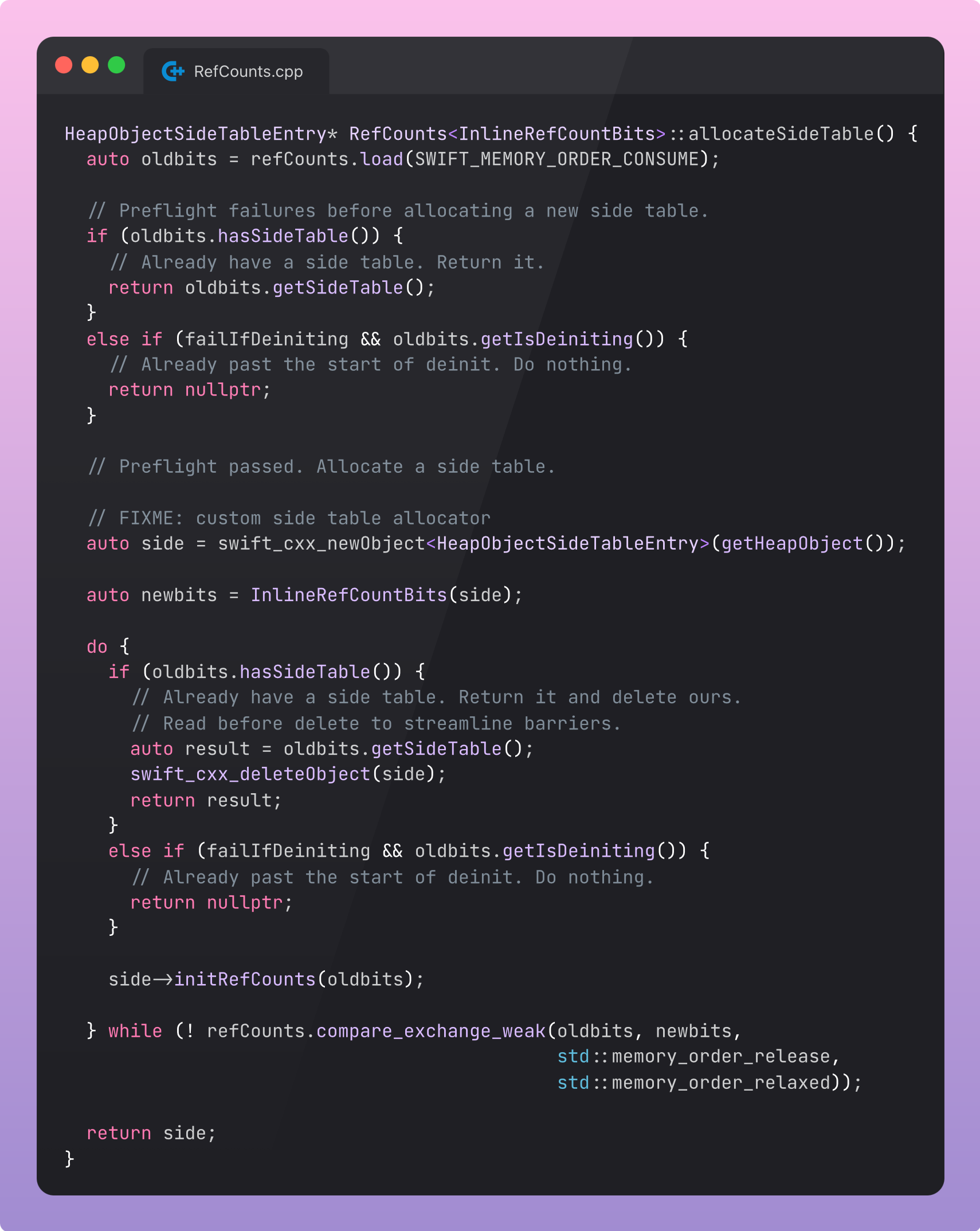
The side table handily solves the problem of zombie memory.
Now, when an object only stores weak references, it is deinited and immediately deallocated. The side table may live on, and weak references can continue to access it, returning nil if the object is gone.
Let’s refer again to the handy doc-comments in RefCounts.h to get a mental picture:
Storage layout:

  HeapObject {
    isa
    InlineRefCounts {
      atomic<InlineRefCountBits> {
        strong RC + unowned RC + flags
        OR
        HeapObjectSideTableEntry*
      }
    }
  }

  HeapObjectSideTableEntry {
    SideTableRefCounts {
      object pointer
      atomic<SideTableRefCountBits> {
        strong RC + unowned RC + weak RC + flags
      }
    }
  }
Now let’s understand why weak references are considered less performant than strong (or unowned) references.