


When I start a new job, I like to quickly make a name for myself as the “app size” guy.
This means proactively investigating the app bundle, proposing steps to make it slimmer, and implementing them in our next release. I do this for a few reasons:
It’s easy.
It’s quick.
It’s fun.
Hopefully, nobody else thought to do it yet *if it’s a startup.
It’s visible and comprehensible to non-technical stakeholders.
Especially if your work impacts install rate.
Today I’m showing you a new, free, open-source, fully private, in-browser tool to help you optimise your own app bundle. I’ll explain how it works, and along the journey we’ll go through a real-life worked example: how I optimised Granola’s iOS app size by ~40% in my first week.
By the end, you’ll have a clear to-do list to optimise your own app and look like a total genius in the process.
Sponsored Link
Recently shipped an app? Enter it in Shipaton 2026
Recently launched a mobile app? Put it in the spotlight at Shipaton 2026 — RevenueCat’s global hackathon for builders who ship real apps to real stores. Compete for over $1M in prizes and show the world what you built. Entries close September 30.
Contents
OpenBundle
OpenBundle is a cool new tool that analyses your app bundle and gives you recommendations for the most impactful ways you can optimise your app size.
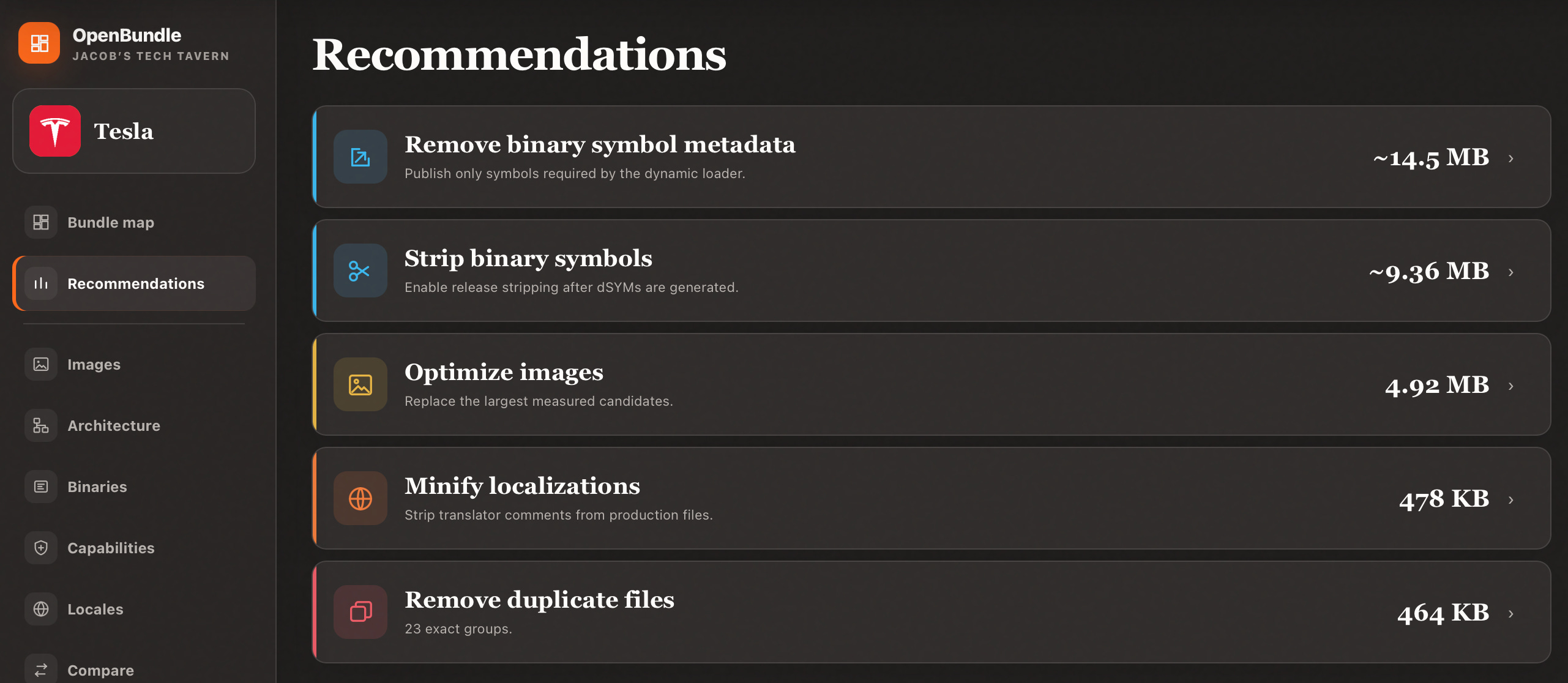
It’s open source, lives entirely in your browser, works fully offline, and has no backend, so your privacy is guaranteed.
How it works
An .ipa is basically a .zip file containing your app: code, frameworks, and resources. OpenBundle runs in your browser (running CPython via Pyodide) to expand the archive into a temporary filesystem, and processes every file to record their:
path in the bundle
size (zip-compressed and uncompressed)
SHA-256 hash

Mach-O files, containing compiled Swift code, are parsed to read segments & sections, symbol tables, load commands, dyld export tries, linked libraries, run paths, build versions, encryption states, code signatures and entitlements.
Asset catalogues are parsed (using Rust tooling in WebAssembly), exposing asset names, dimensions, scales, encodings, opacity, sizes and image payloads. Browser image decoders can then lazily display previews, content hashes and real compression measurements.
OpenBundle now reconstructs the bundle’s directory hierarchy: Compiled code and assets are summed up to compute their parent folder’s size, and laid out in a hierarchical treemap: area represents data size.
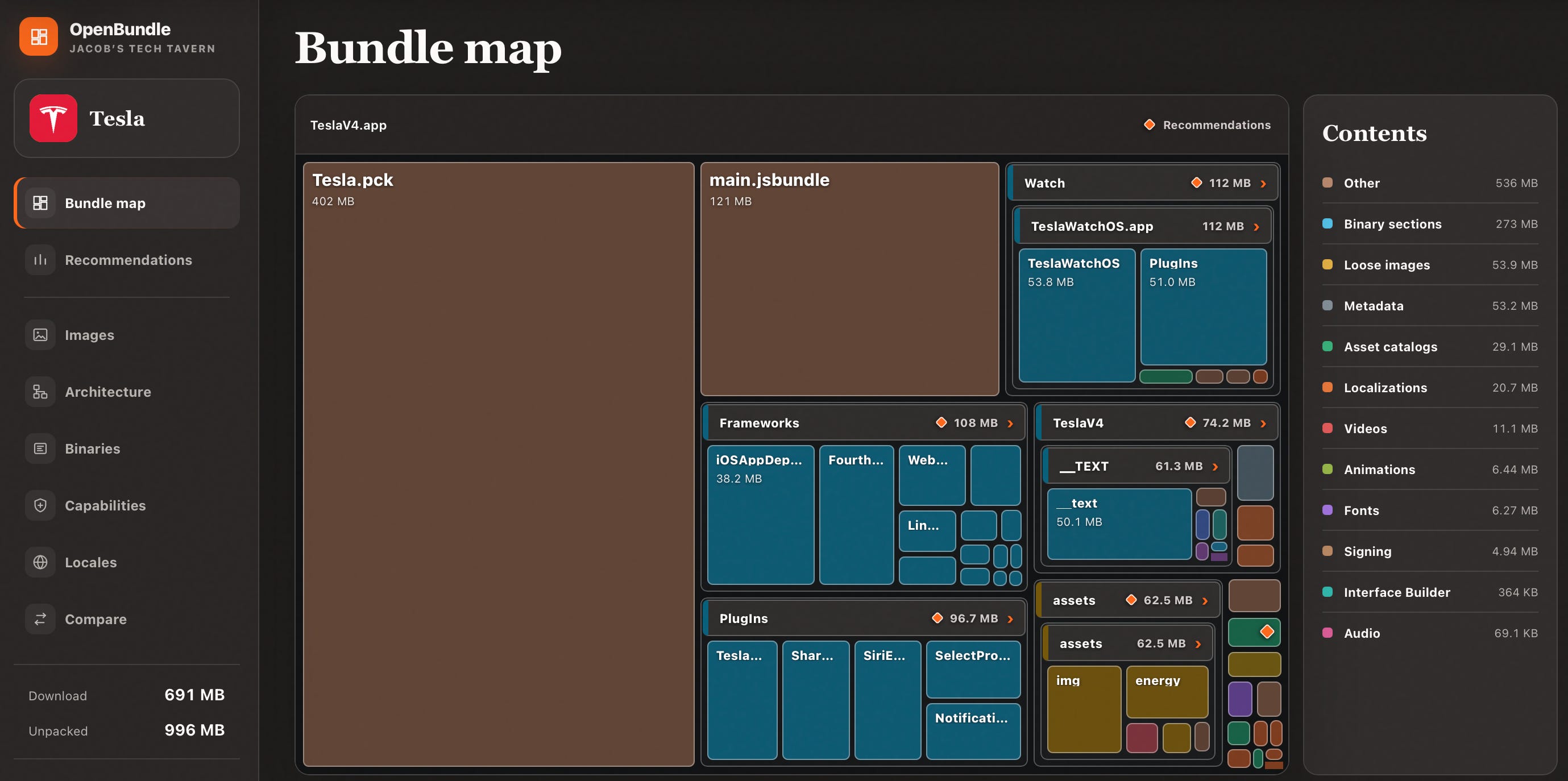
If you think Elon couldn’t get any worse, he built a bloody React Native app
The rest of this article takes you through a real-life worked example of optimising an app bundle, which I implemented in my first week at Granola.
The Low-Hanging Fruit 🍒
Here’s your actual motivation: I wasn’t exaggerating above; between waxing lyrical about someday migrating away from SwiftUI and re-architecting our app modules, I did try to actually contribute something concrete in my first week at Granola.
Let’s look at some bundle-size X-rays. There are 2 numbers we care about:
Install size is how much disk space the thinned variant of your app takes up (before documents or data). Download size is the minimum amount of over-the-air network data required to install.
Before
80.9 MB install
48.4 MB download
3.5 hours of work later…
After
58.8 MB install (27% less)
28.1 MB download (42% less)
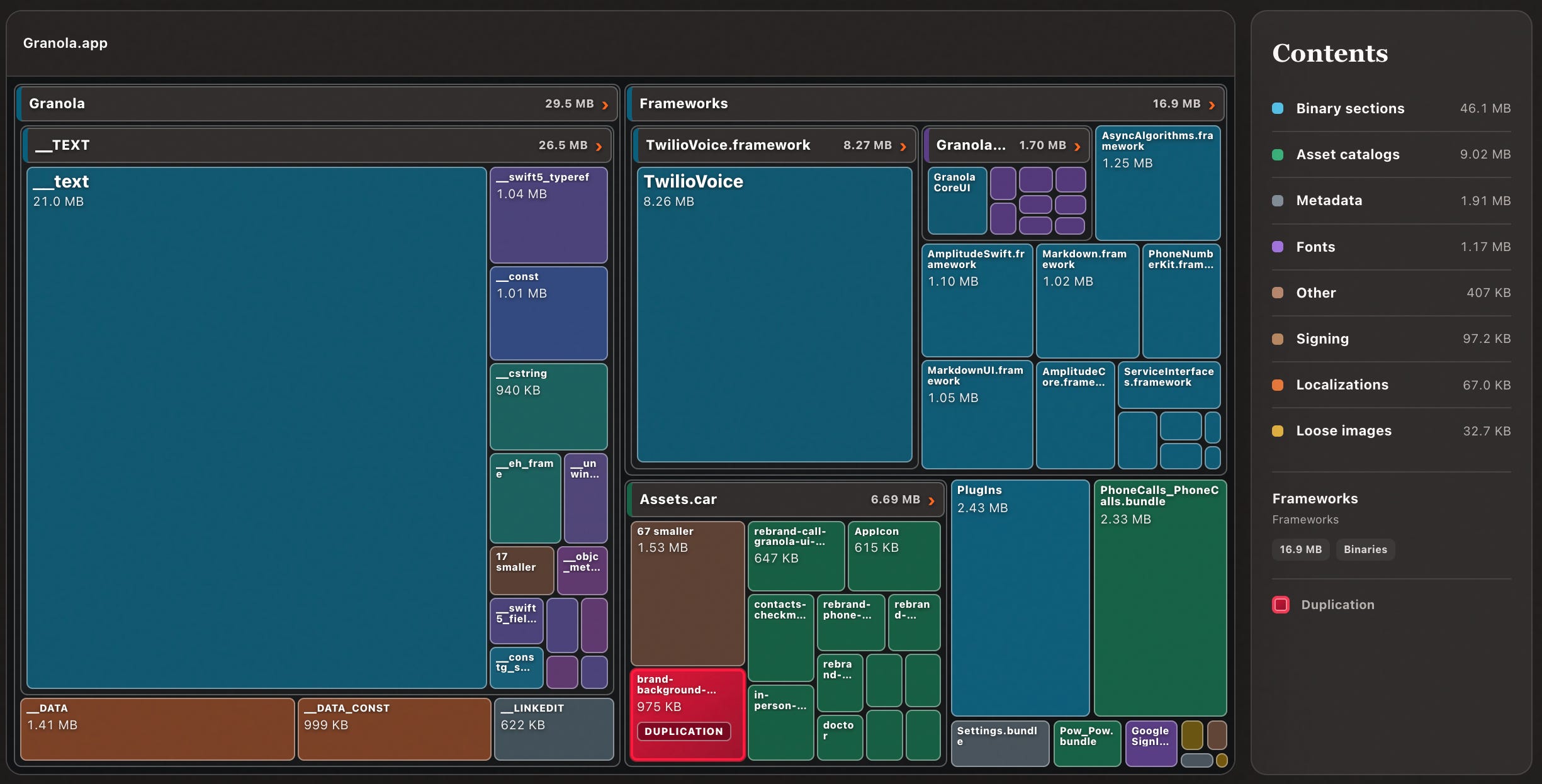
I achieved this through 5 straightforward fixes: low-hanging fruit that can apply to nearly every app:
Handling duplication
Optimising asset sizing
Removing binary symbols and symbol metadata
Choosing between dynamic and static
(if needed) picking your Swift optimisation modes
Duplication
This is simultaneously the most common app sizing issue, usually the heftiest, and most obvious. Fortunately, it’s also easy to fix with zero repercussions (usually!).
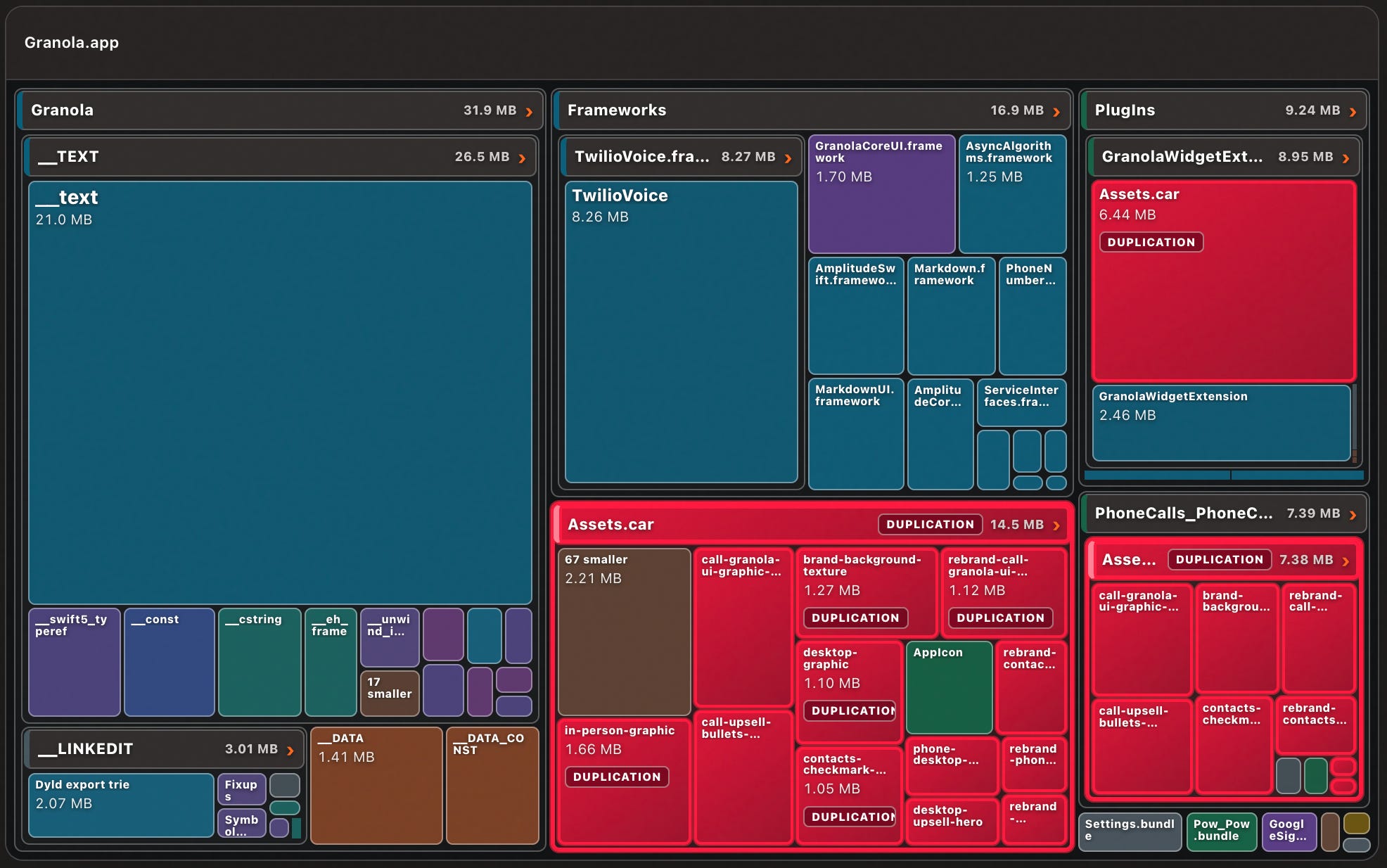
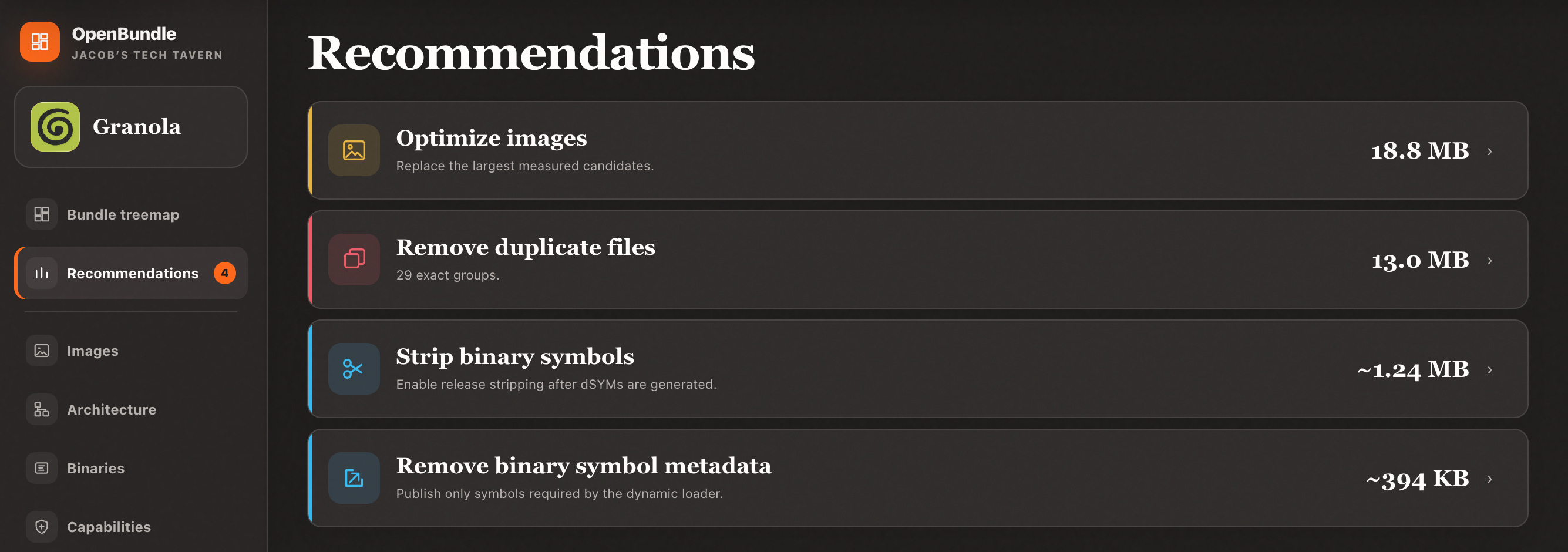
I noticed that Granola had a lot of asset catalogues highlighted in red, flagging them as duplicates.
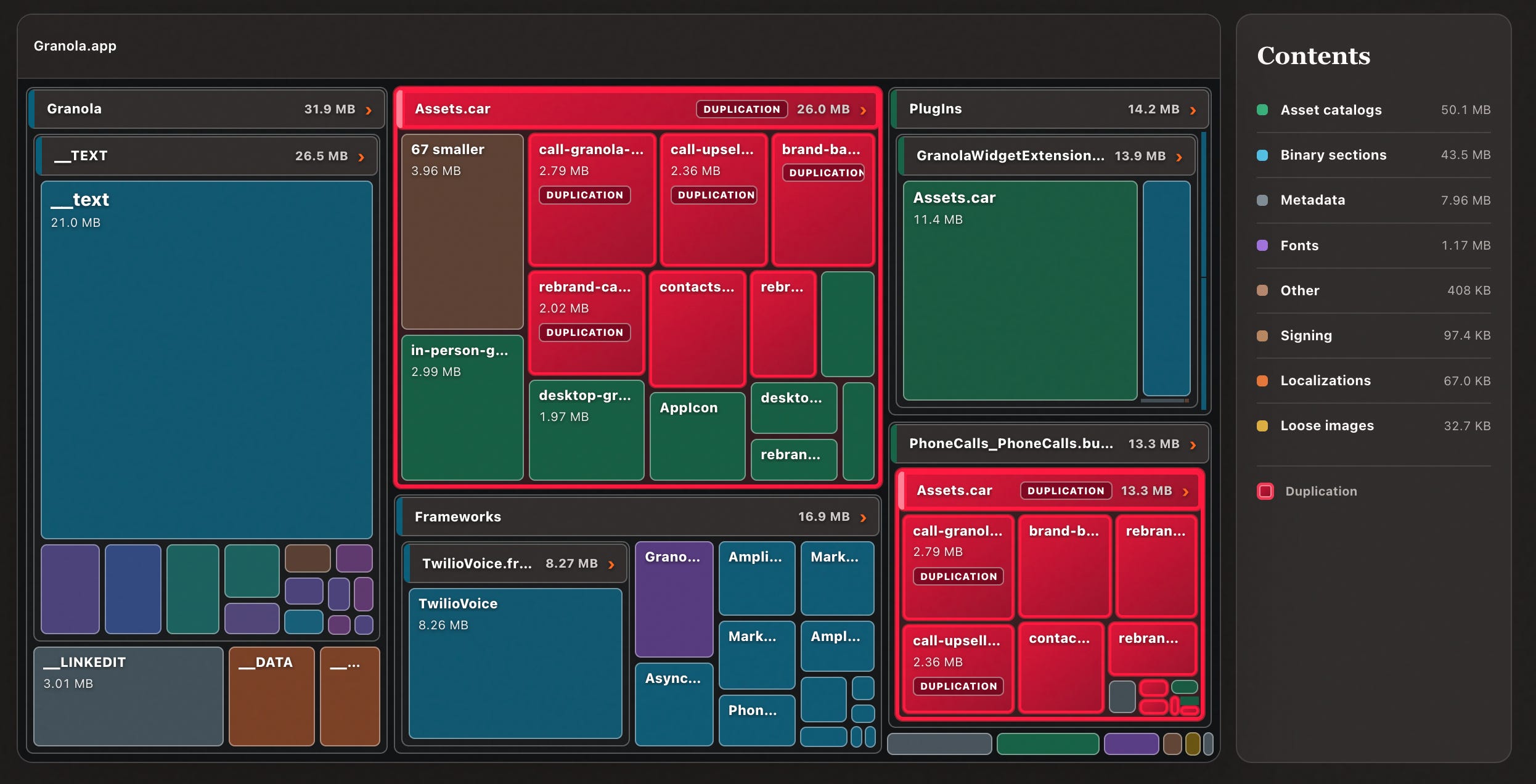
Lo and behold, this is directly flagged in the recommendations.
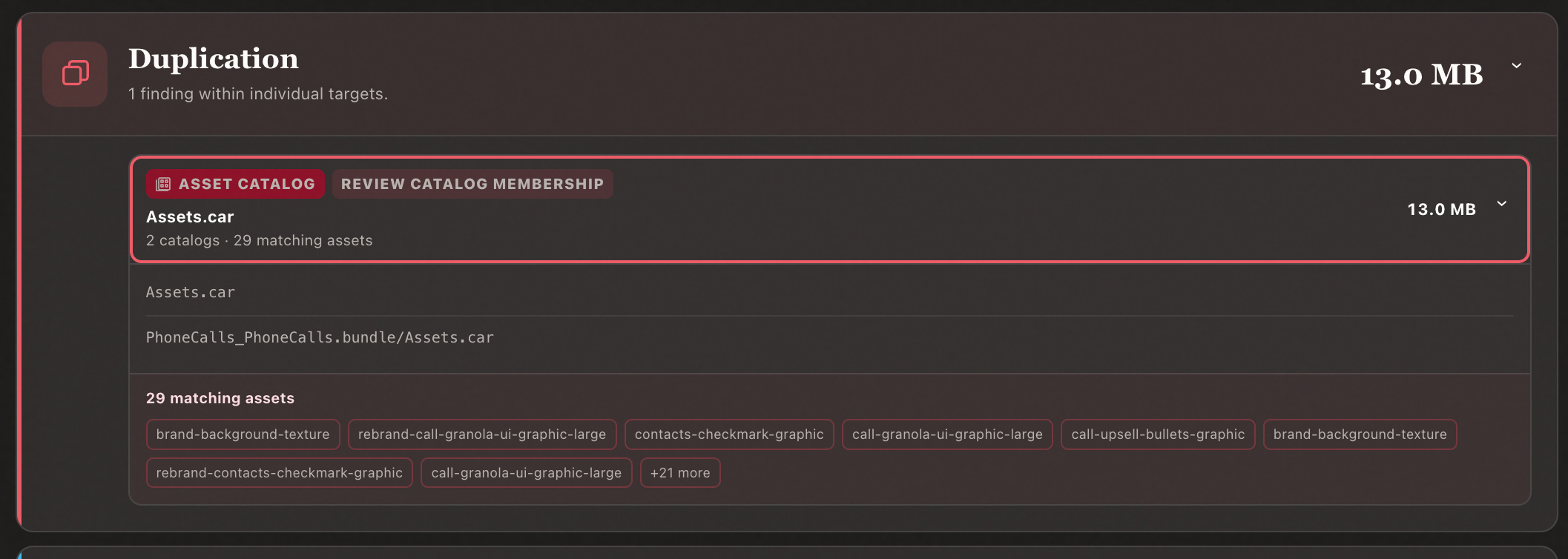
What’s going on here?
Consider you have a second target in your app: a watch app, a widget, or perhaps a notification service extension. This often shares UI elements from your main app, usually a big shared UILibrary or DesignSystem module.
This is also, probably, where your biggest shared asset catalog lives.
Are you getting it?
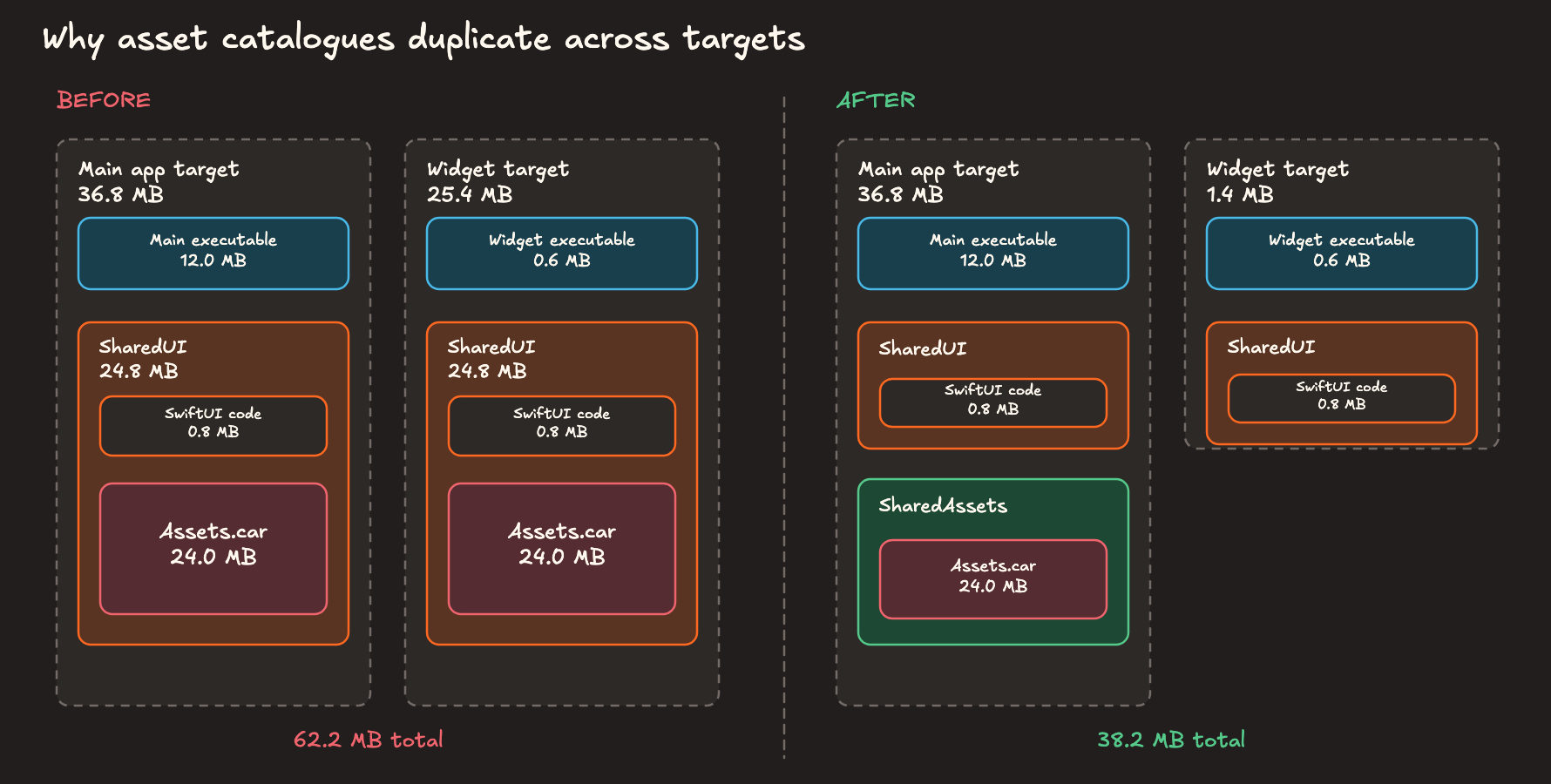
You can fix this pretty easily by splitting shared Assets out into its own module, allowing the other target to import our design system code without statically copying the whole asset repo.
Or, bear with me here, if you prefer to avoid mucking around with your modular architecture and globally refactoring your assets, you can opt to suffer a tiny amount of code duplication to get your design system code, if you choose to accept the maintenance burden to keep them in sync (or want to jerry-rig some tooling to flag up changes).
It’s possible to share code between targets without duplication if we use dynamic linking - more on this later - but asset catalogs quite enjoy being static and are kind of a pain in the bum to convert into dynamic xcframeworks.
Duplication issues aren’t always trivial to fix, mind you.
Perhaps you share a full feature betwixt app and app clip, with a very deep underlying dependency graph. I once had to split a large existing module into 2 parts for exactly this reason, so one half fit onto a tiny 15MB app clip.
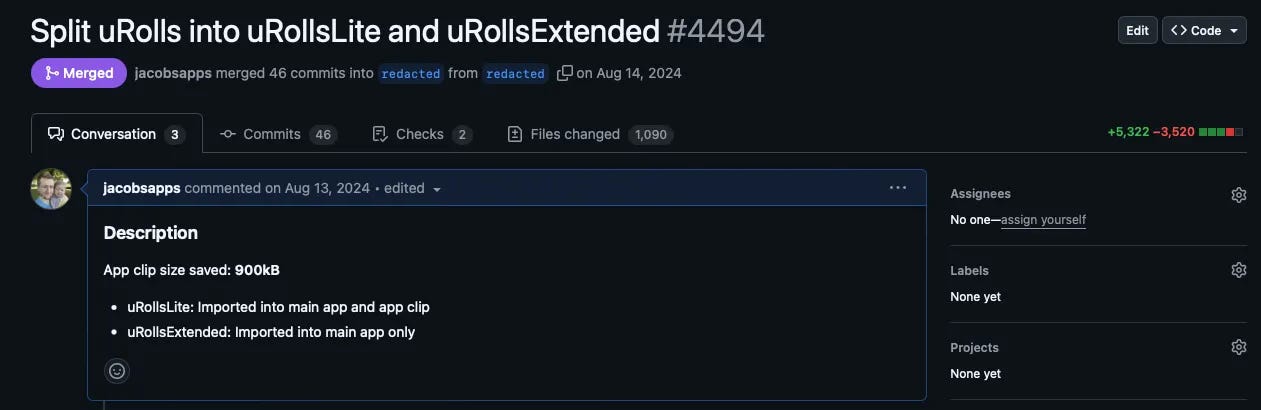
I almost didn’t mention, probably, the most common form of duplication: flat-out using the same asset in multiple asset catalogs across modules. This isn’t ideal, and you should probably find a lowest-common denominator module to share the asset, but also unless it’s a video the difference will be pretty negligible.
How OpenBundle does it
OpenBundle checks for duplication by hashing each file, and grouping these by their runtime bundle and byte size in a hash table.
If a bundle contains the same hash with the same size, we can pretty confidently highlight them as duplicates. If multiple bundles contain the same hash, it flags them for manual review.
Asset Sizing
This is the most obvious optimisation once I point it out to you, but there is a bit of nuance to unpack here.
Often the biggest optimisation we can recommend is simply compressing our images more efficiently, for example from png to heic.
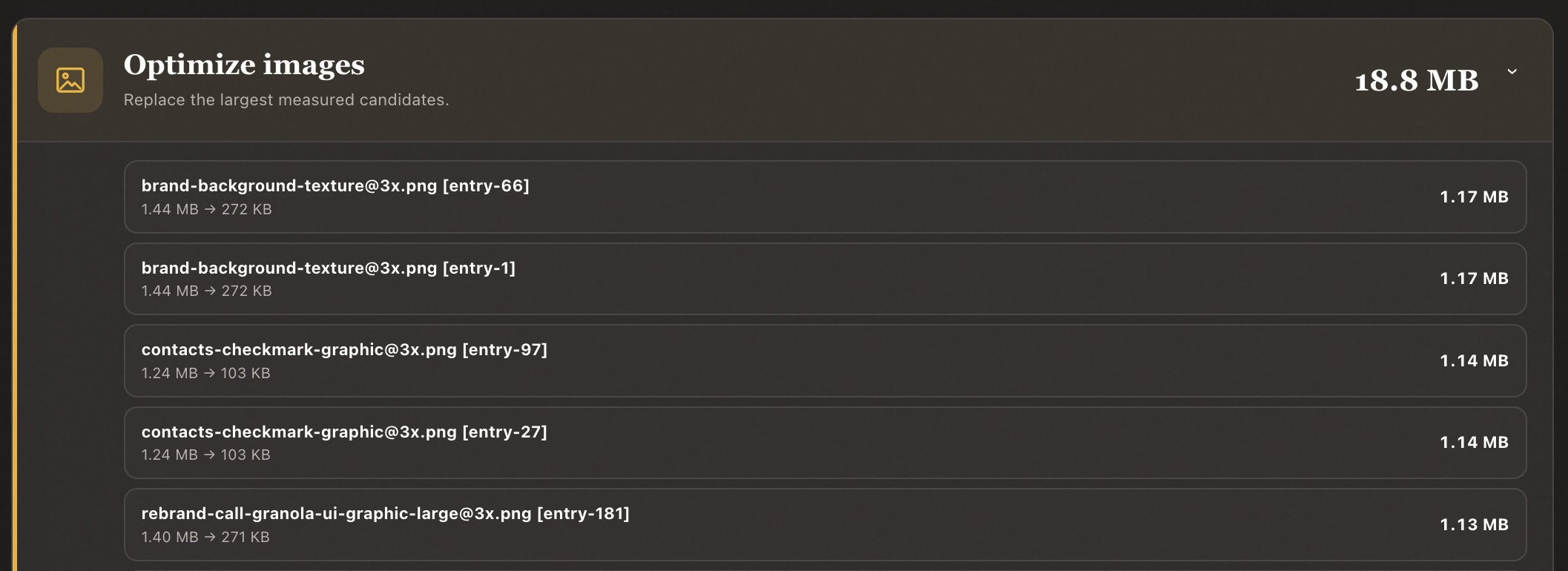
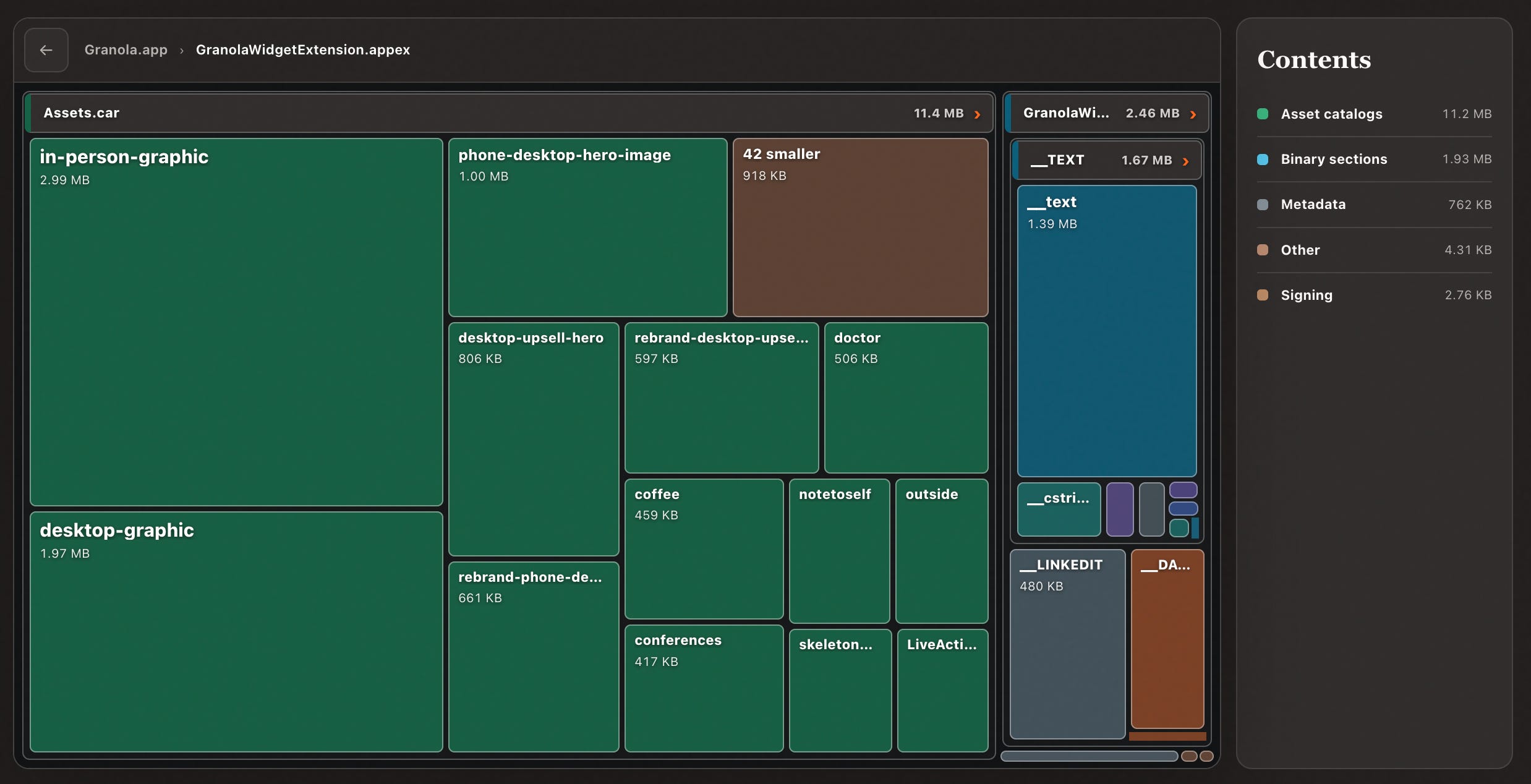
Make sure to look carefully at the Assets.car unbundling in the treemap diagram directly, since you often find a few images taking up ‘surprisingly’ large amounts of space. Audit a few images yourself and work out if you can downscale or compress them without losing any visual fidelity.
Back in my first startup, Carbn, we stupidly exported some illustration assets as SVG, dramatically expanding these small images to insane 4MB sizes in the bundle. A very easy fix that saved us ~25MB in a single day.
Naturally, when compressing image assets, you probably want a designer to sign off on it: throw a side-by-side before and after onto an HTML page to ensure no quality is lost.
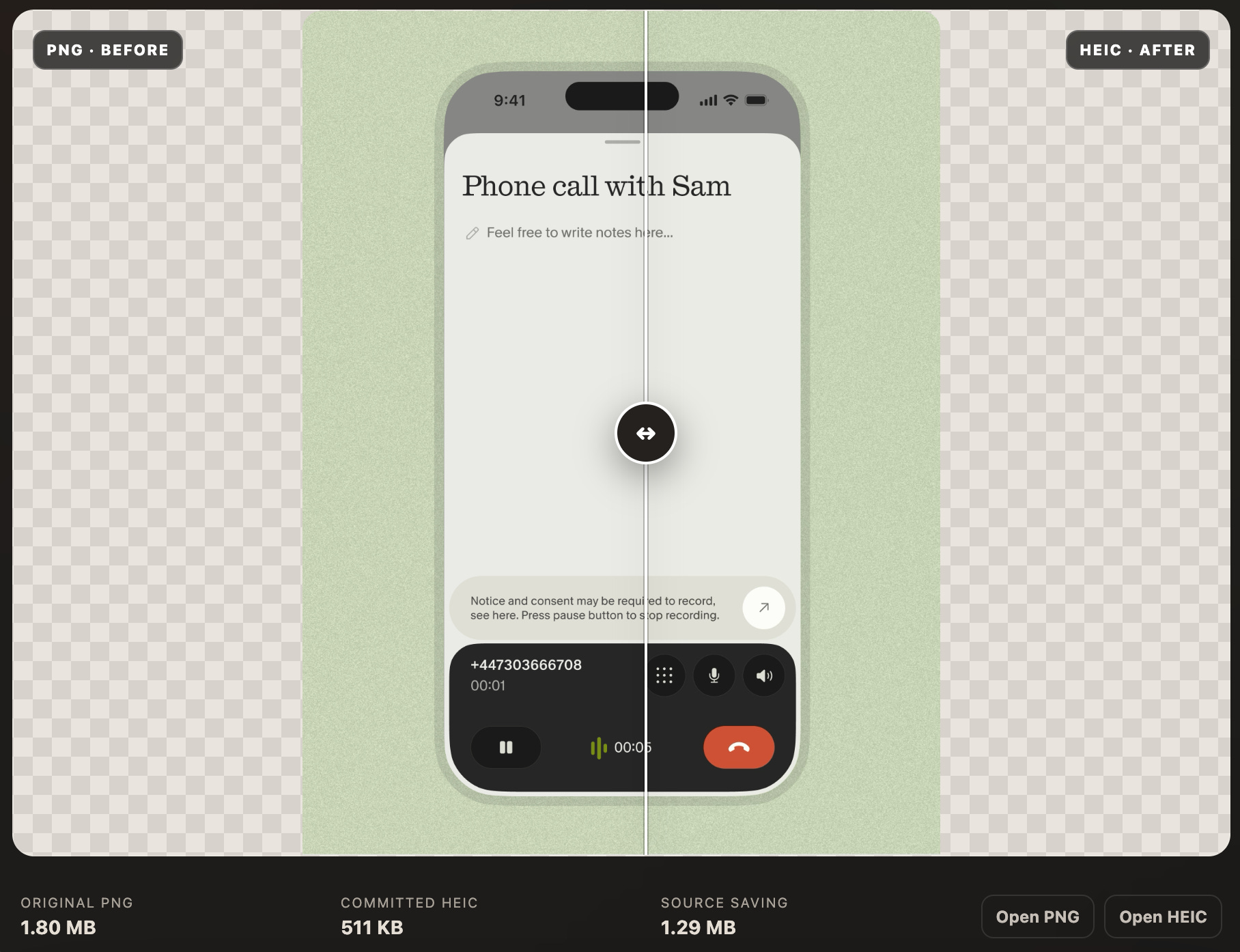
There is, ultimately, a trade-off before blindly replacing all your png with heic. The latter, while more space-efficient, can decode from disk a lot more slowly. As always, profile your code before listening to some guy on the internet.
Here’s an easy heuristic: PNG is great for interface assets and HEIC is best for photographic assets.
There are a few other image optimisations to consider:
Avoid loose image assets in the bundle: asset catalogs enable app thinning.
Videos are always heavy: work out the minimum resolution that still looks good on an iPhone or iPad screen.
Many assets can be offloaded via background assets, on-demand resources or your own CDN.
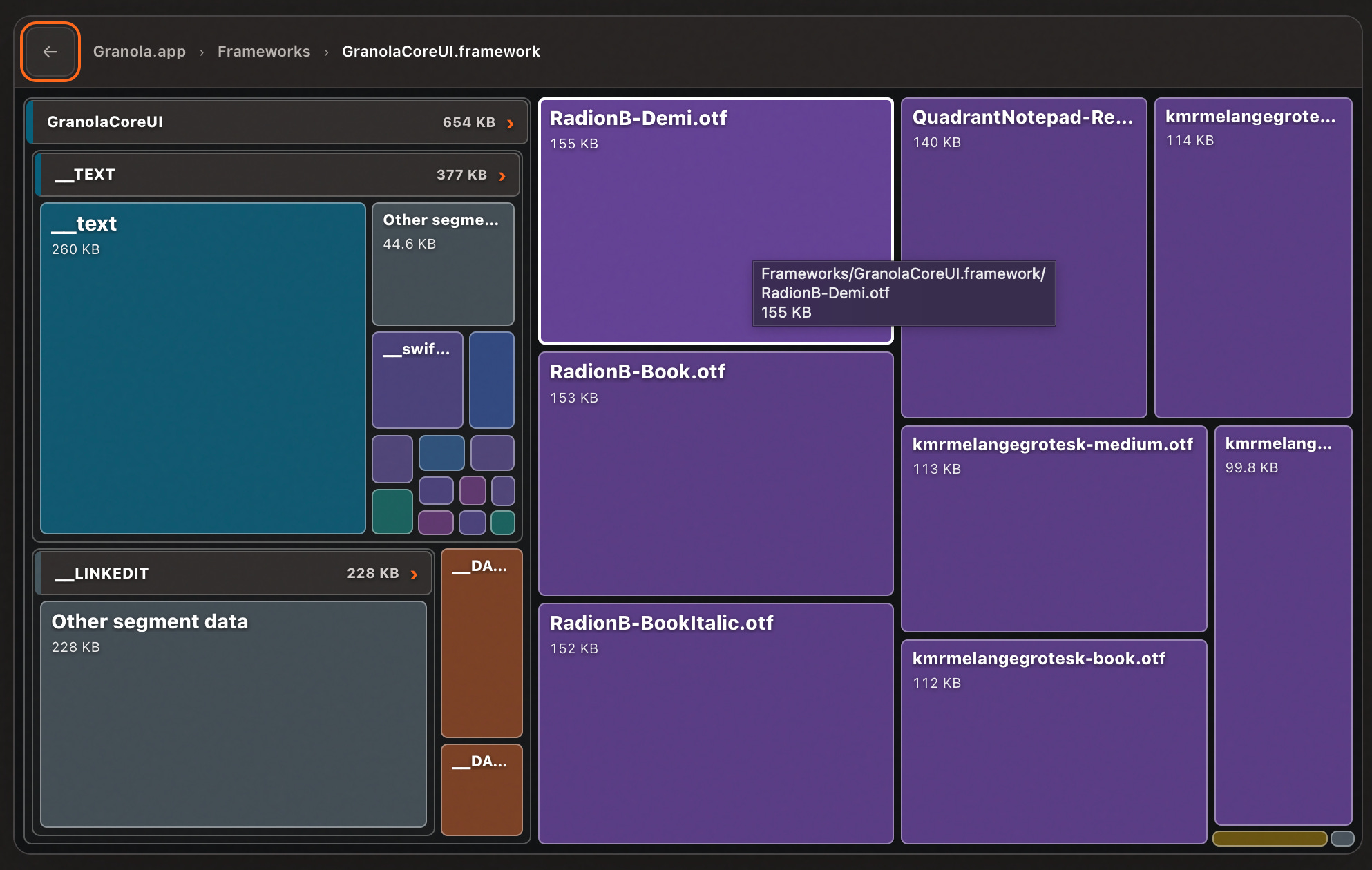
Assets are more than images and videos: if your font file is taking up 500kB, it probably contains letters from Greek, Cyrillic, or Arabic alphabets. Unless you’re very well-localised, you can open up the .otf in FontForge and trim the file yourself.

Fonts are handily highlighted in purple so you can easily investigate. Unless I’m really trying to squeeze the optimisation lemon I won’t worry too much if a font is under 200kB.
How OpenBundle does it
OpenBundle measures potential compression savings the obvious way: it picks the 80 largest assets, and generates an 85%-quality HEIC (or, if there is no alpha channel, JPEG) and checks the potential saving. It also searches for loose assets by finding files with @1x, @2x and @3x names and computing the difference when the smaller ones are thinned out.
Binary Symbols
Binary Symbols and Binary Symbol Metadata are the twin bundle-nerd issues that cruft up your bundle due to some quirks of the compilation process. If you know what you’re doing, they can be removed “for free” without changing your app.

But what are binary symbols?
“Symbols” are names attached to functions, classes and variables inside your compiled Mach-O binary. For a function doSomething(), it might be stored under a slightly mangled name like _$s5MyApp11doSomethingyyF.
The final stage of Swift compilation, static linking, resolves references in each binary, and notes down imports from external frameworks.
At launch, dyld (the dynamic linker) maps the app and frameworks into virtual memory, rebases these addresses, and binds the external imports from before into actual runtime memory addresses.
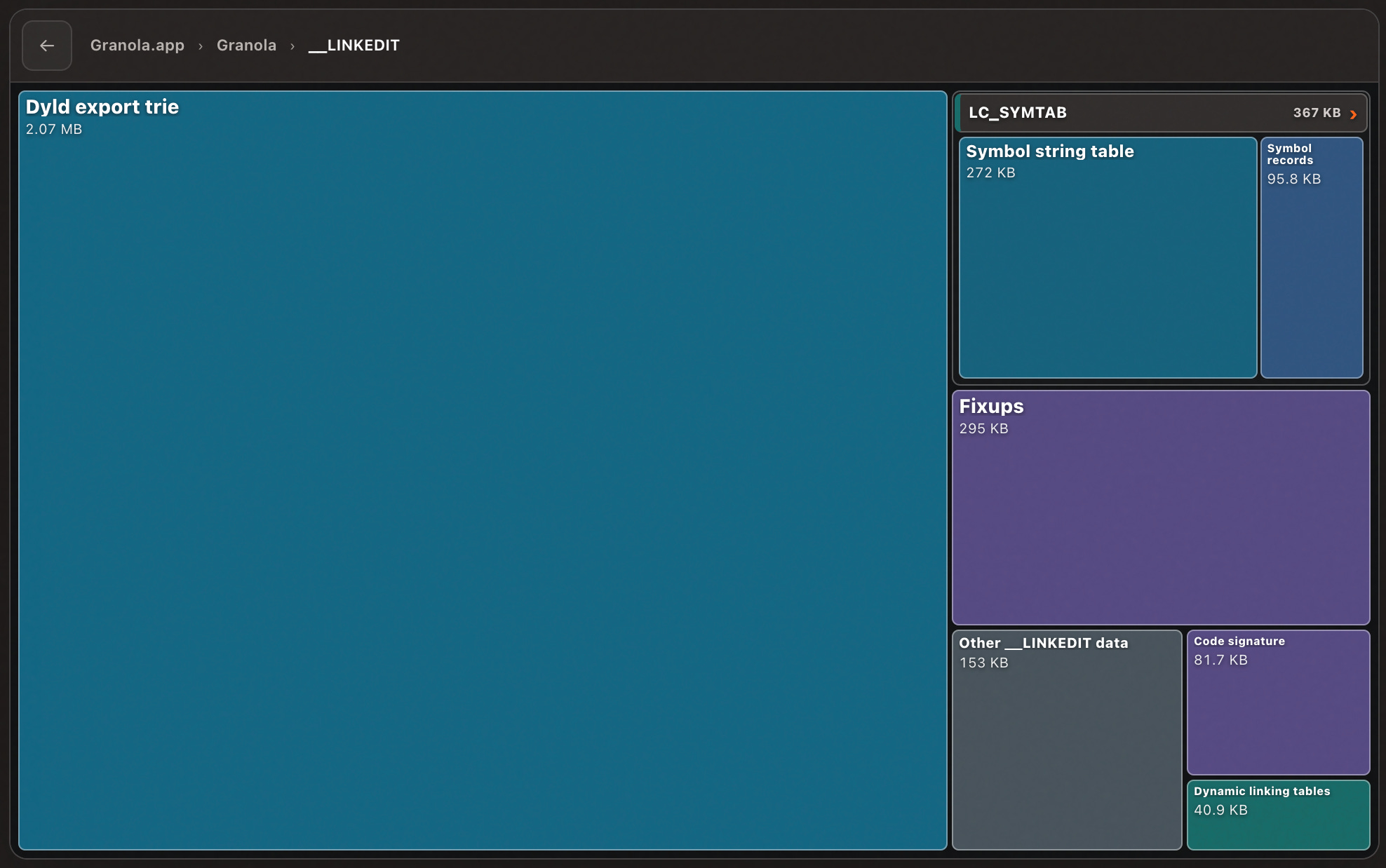
__LINKEDIT is a segment of your binary that contains data produced by the static linker, and used by the dynamic linker. But not all of it is needed for your app to work.
Stripping binary symbols
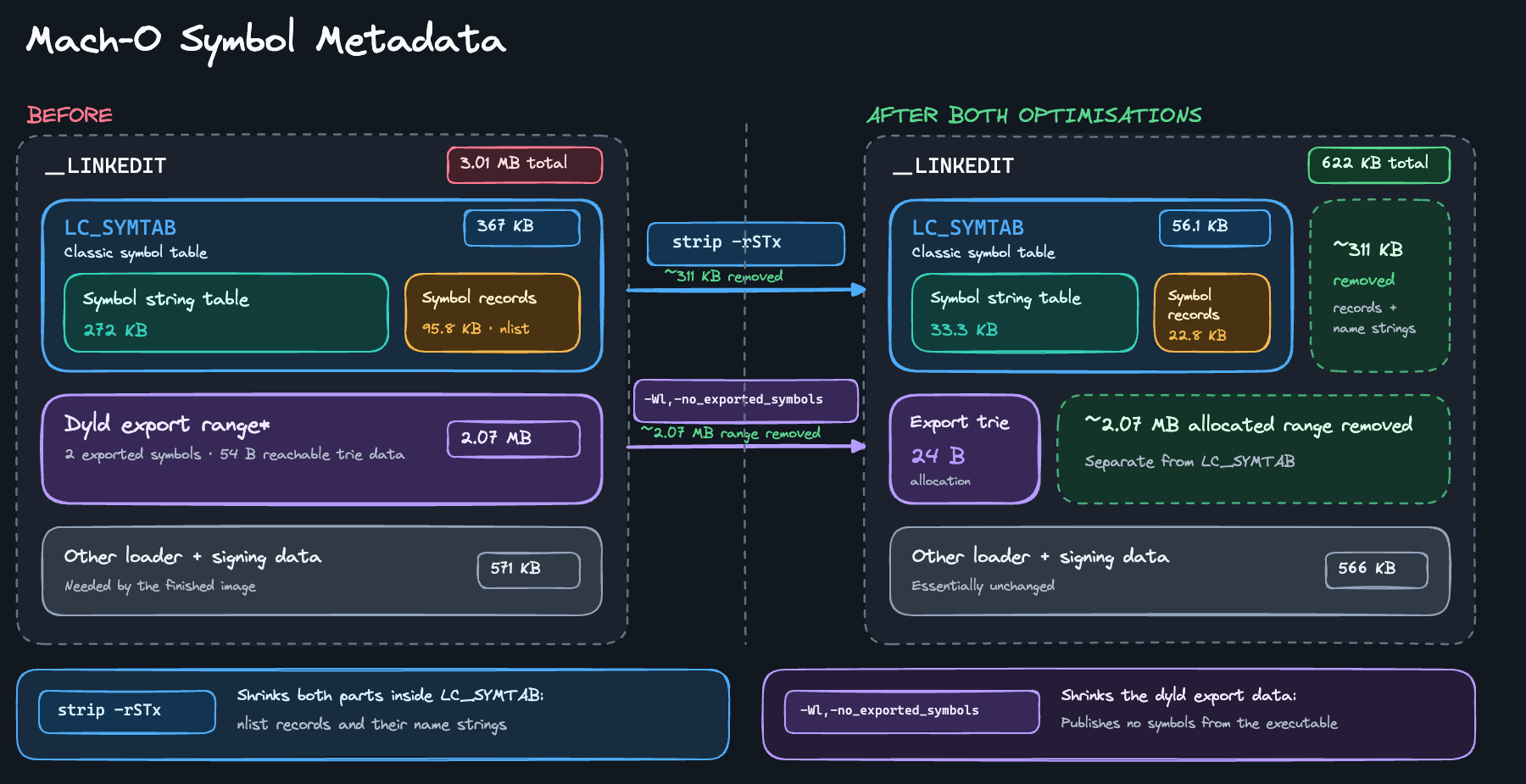
__LINKEDIT contains nlist symbol records that describe each symbol in a module, and string tables that contain their names; grouped under the LC_SYMTAB load command that references them at launch. You can think of a string table like a dSYM file: it takes garbled symbols and maps them to readable functions, classes, and modules.
The string table metadata is helpful for debugging, but since Xcode 14 deprecated bitcode, it’s no longer stripped out on the server-side, meaning your bundle ends up with a bunch of unnecessary cruft.
We can remove these symbols using the UNIX strip command
strip -rSx TechTavern.framework/TechTavernThis removes symbol-table entries that are useful for debuggers but aren’t needed to run the app. That includes symbol-table entries (-S) and local symbols (-x). It keeps any records marked as ‘potentially looked up at runtime’ (-r).
We used to strip generated Swift symbol names too (-T), but this is broken as of Xcode 26.3.
We apply this in a build script that strips the executable, loops through and strips symbols in each embedded framework, then re-signs each one.
#!/bin/bash

set -euo pipefail

[[ "${CONFIGURATION}" == "Release" ]] || exit 0

PRODUCT="${TARGET_BUILD_DIR}/${WRAPPER_NAME}"

strip_binary() {
  [[ -f "$1" ]] || return 0
  echo "Stripping: $1"
  xcrun strip -rSx "$1"
}

# Strip this target’s executable.
strip_binary "${PRODUCT}/${EXECUTABLE_NAME}"

# Strip and re-sign its directly embedded frameworks.
for framework in "${PRODUCT}/Frameworks/"*.framework; do
  [[ -d "$framework" ]] || continue

  executable="$(/usr/libexec/PlistBuddy \
    -c "Print :CFBundleExecutable" \
    "${framework}/Info.plist")"

  strip_binary "${framework}/${executable}"

  if [[ "${CODE_SIGNING_ALLOWED:-NO}" == "YES" ]]; then
    /usr/bin/codesign \
      --force \
      --sign "${EXPANDED_CODE_SIGN_IDENTITY}" \
      --preserve-metadata=identifier,entitlements,flags \
      --generate-entitlement-der \
      "$framework"
  fi
done
Critically, this has to run after creating a dSYM (so our crash reports are readable) but before code signing (because we can’t tamper with the binary after signing). Therefore, we set this as an input file:
$(DWARF_DSYM_FOLDER_PATH)/$(DWARF_DSYM_FILE_NAME)/Contents/Resources/DWARF/$(EXECUTABLE_NAME)This flags to Xcode the dependency on a dSYM file first existing. We also re-sign the frameworks that are modified in this script.
Symbol metadata
Symbol metadata is also part of __LINKEDIT, but handled a little differently. We’re talking about the dyld export trie. This is an index of symbol definitions that can be resolved by other binaries.
But for your top-level main app target (or widget, app clip, watch app, etc), other binaries aren’t using it! This export trie is generated as an unnecessary defensive default*, bloating millions of badly-optimised apps.
In the olden days, we could add a linker flag telling the linker not to export any symbols:
OTHER_LDFLAGS[config=Release] = $(inherited) -Wl,-no_exported_symbolsBut, since a pretty nasty footgun with this flag in Xcode 16, Apple has now implemented this properly as a first-class build setting:

As well as dramatically shrinking the export trie, this can also make the symbol table smaller, and can even improve dead code stripping: since the static linker uses externally visible symbols as reachability roots.
If you like pictures, this might simplify these two rather complex explanations:
How OpenBundle does it
OpenBundle models strip -rSx by classifying the nlist records into “debug symbols” and “stuff we need”, then computing how much we can save by deleting the unnecessary metadata. OpenBundle also walks the dyld export trie in your top-level targets and extensions to figure out how much space we can save if we don’t let Xcode export these symbols.
Dynamic vs Static Frameworks
Modules in your app might be statically linked or dynamically linked. This refers to how the code gets accessed: statically linked modules are compiled directly into your binary, and dynamic modules are linked at runtime, by dyld, when your app launches.

Dynamic libraries are great for efficiently sharing code between multiple top-level targets, but there is a drawback: Dynamically linked code might not have optimal dead-code stripping, because the compiler and static linker can’t know which public functions are actually going to be used.
Code in your own libraries will probably be mostly utilised, but this is super important when it comes to third-party dependencies. The Factory library used for dependency injection is a great example: as a dynamic framework, alongside all the framework metadata, it is 200kB overall. When linked as a static library, it took up a minuscule 15kB.
This is a surprisingly common issue, because most developers aren’t super careful when deciding whether dependencies should be static or dynamic.
⚠️ Don’t go blindly assuming you can make all your dependencies static for free gains. When we did this with our 8.3MB Twilio framework, the bundle actually got bigger (with most code folded into the main Mach-O executable).
The static archive packed the SDK into one enormous object file, TwilioVoice-arm64-master.o, which probably made it hard for the linker to perform any meaningful code stripping optimisation.
How OpenBundle does it
OpenBundle finds dynamic frameworks by checking the Mach-O MH_DYLIB file type. It parses the dylib load commands from each binary, and works out which binaries use which frameworks. We can then flag a framework for potential static optimisations when we know it’s only resolved by one binary.
This post is required reading before mucking about with static and dynamic frameworks:

Swift Optimisation Mode
Swift itself provides a way to reduce the size of our bundle: optimisation modes. While the default release configuration optimises for speed, we can set a flag to request the compiler optimise for a smaller binary size instead.
This softens several of the aggressive code-level speed optimisations performed at the SIL stage such as loop unrolling and inlining.

When I was looking for a way to squeeze the final few bytes out of a 15MB App Clip, this optimisation mode helped get us over the line with a ~2% improvement.
OpenBundle doesn’t really do anything for this, but this is a nice lever to keep in your back pocket for emergencies.
Automation & Regressions
Without keeping on top of size, you risk causing an unexpected incident in the future.
Back in the day, when the cellular download limit was 100MB, Uber nearly blew up when they performed a YOLO rewrite in Swift 2.2. The compiler was not quite there yet, and the binaries were way bigger than Objective-C. For something like Uber, cellular downloads were a huge proportion of their growth.
Even today, you can run into issues with cellular limits (about 200MB) impacting your download rates. My App Clip work had an insane limit of 15MB. Apple didn’t tell us when we were over this limit, it would just stop being installable via QR code (our entire growth plan!).
The App Thinning Size Report, created alongside an export, is a nice summary of install and download size of each thinned variant for your app and other targets. Bolt some automation onto your CI infra to sleep better at night.
#!/bin/bash

search_dir="$1" # build directory for our bitrise builds
file_name="App Thinning Size Report.txt"
input_file=$(find "$search_dir" -type f -name "$file_name" 2>/dev/null)

uncompressed_sizes=()

while IFS= read -r line; do
    if [[ $line == "App size:"* ]]; then
        uncompressed_size=$(echo $line | sed -n 's/.* \(.*\) MB uncompressed/\1/p')
        uncompressed_sizes+=("$uncompressed_size")
    fi
done < "$input_file"

IFS=$'\n' sorted_sizes=($(sort -nr <<<"${uncompressed_sizes[*]}"))
unset IFS
size=${sorted_sizes[0]}

# Check the size and update the comment accordingly
if (( $(echo "$size >= 15.0" | bc -l) )); then
    echo "🚨 App clip size is $size MB @ios-devs"
elif (( $(echo "$size >= 14.7" | bc -l) )); then
    echo "⚠️ App clip size is $size MB"
else
    echo "✅ App clip size is $size MB"
fi
This sent out a Slack message whenever we got close to the limit.

How to spy on your competitors
Now you know how to analyse your app bundle. But I can tell you, it’s a lot more fun to analyse someone else’s app bundle.
The first step to inspecting an app bundle is, naturally, obtaining a bundle you want to inspect. So hop to the App Store and download it directly to your device.
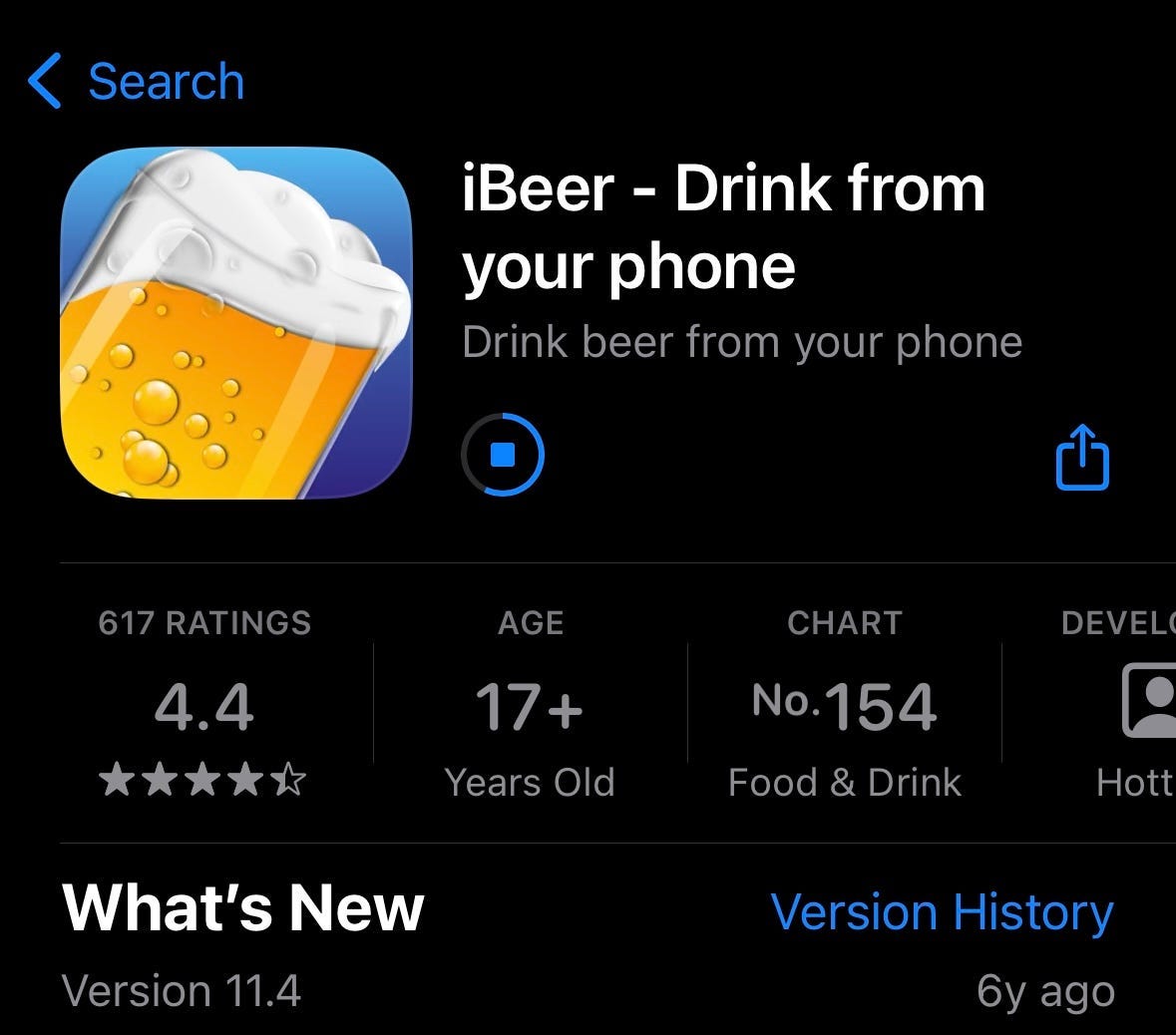
Apple intentionally makes it hard to look at the actual file on the device. On your Mac, you need to download Apple Configurator. Connect your iPhone with a cable and make sure you see it appear in Apple Configurator.

Click on your device, tap “Add”, then “Apps”. You should see a list of all the apps downloaded onto your device*. Now you simply locate the app you want.

Search for /Users/[your-username-here]/Library/Group\ Containers/K36BKF7T3D.group.com.apple.configurator/Library/Caches
Once you’ve added the app, open /Assets/TemporaryItems to find the application container.

In Apple Configurator, with an app selected, you can hit the “Add” button to download it to your Mac. The .ipa file will appear in the TemporaryItems/MobileApps folder (briefly!) — copy it to your main file system so we can start playing with it.

Now we have the .ipa, chuck it into OpenBundle for analysis.
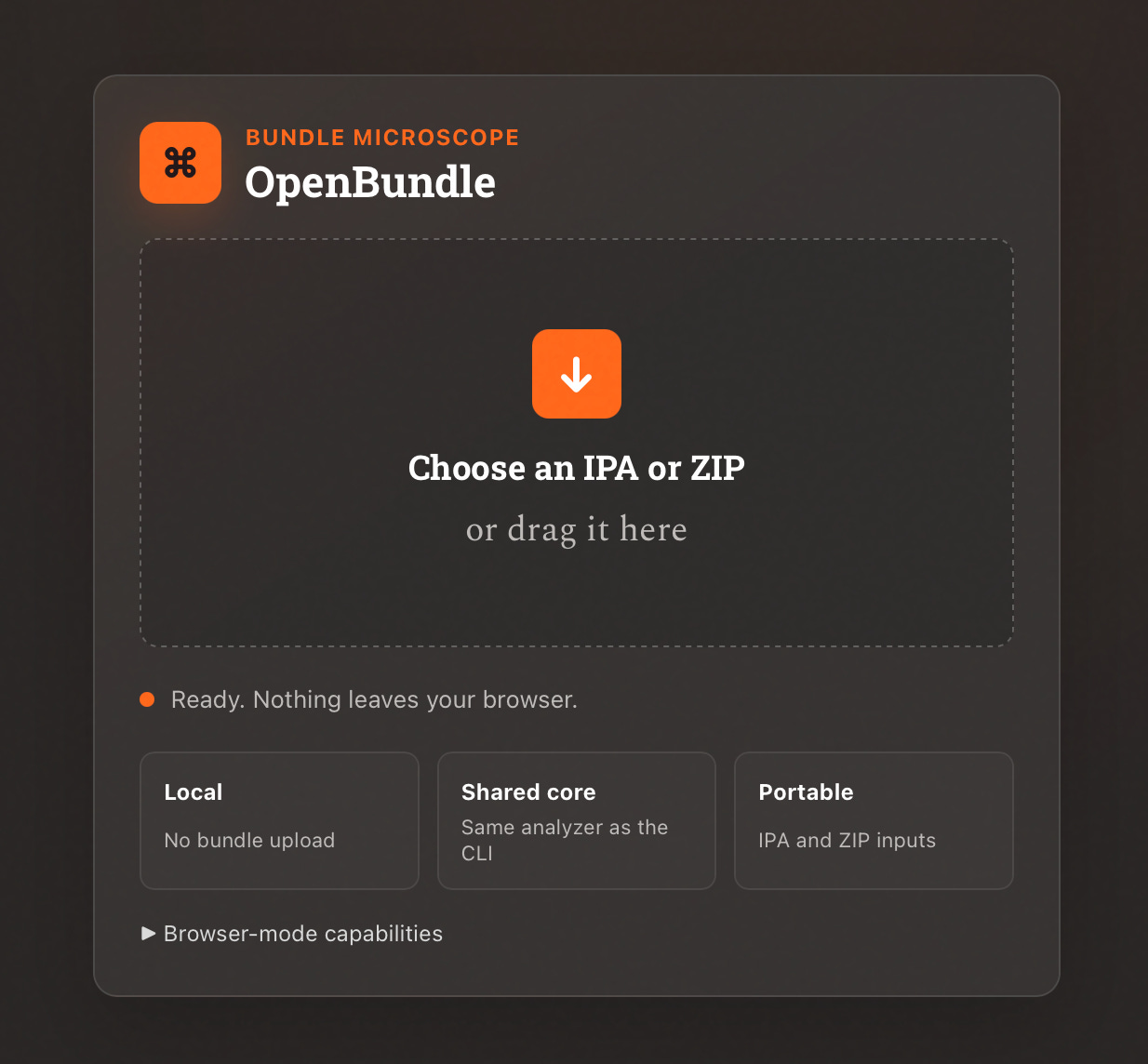
Then proceed to roast your competitor on the work Slack…

Last Orders 🍺
OpenBundle has a bunch of other cool features I didn’t have time to explain: an image browser, architecture breakdown, permissions & capabilities, localisation checker, and bundle-to-bundle comparison.
This blog post has been about 5 years in the making. I’ve wanted to write something like this since the first time I tested out bundle optimisation tools to make Carbn, my old startup, 46% smaller in an afternoon! Here’s the original 72MB behemoth:
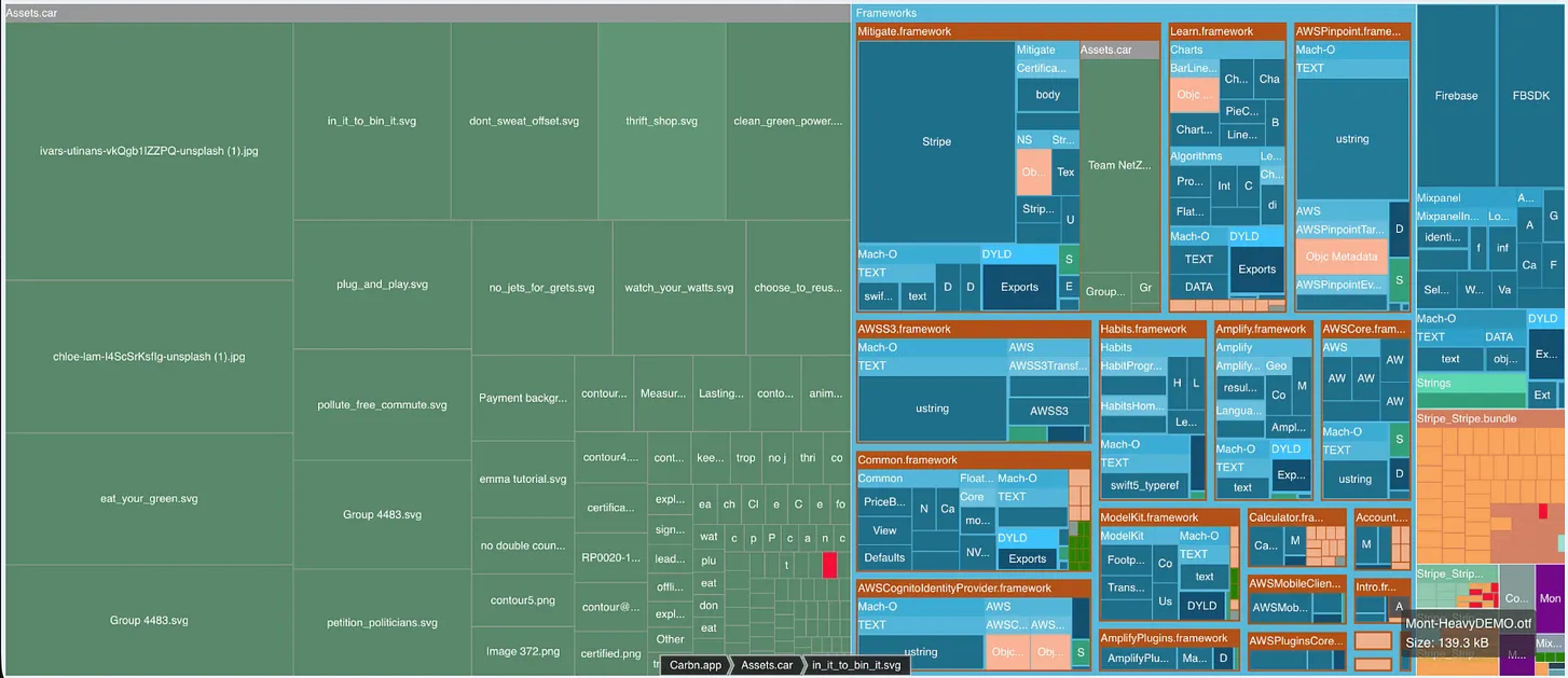
The original working title was “7 dumb ways to increase your app bundle size” or perhaps “the 7 deadly sins of bundle size”. It would have looked something like…
Importing your assets library into an app extension.
Exporting non-vector pngs as SVGs (making them 100x bigger!!).
Using full-definition images for phone-sized headers.
Letting the product manager talk you into bundling videos.
Using Lotties (especially multiple similar ones) for trivial animations.
Keeping unnecessary cruft and metadata in the binary.
Importing sub-libraries you don’t need (Xcode makes this very easy).
As you can see, my articles have got a little more sophisticated over the years.
Anyway.
The important thing is that now you can take OpenBundle, go forth, and become the “app size” guy at your own company. Thanks for reading!
Sponsored Link
Recently shipped an app? Enter it in Shipaton 2026
Recently launched a mobile app? Put it in the spotlight at Shipaton 2026 — RevenueCat’s global hackathon for builders who ship real apps to real stores. Compete for over $1M in prizes and show the world what you built. Entries close September 30.