


It’s nice when people use your apps. It juices your metrics, and, more importantly, brings joy and utility to your users.
But you can even bring joy and utility to your users without them even using the app.
How?
You do stuff in the background.
If we flex our engineering chops correctly, your app can fetch data, perform long-running processing, and even talk to other devices without being asked, or thanked.
Today I’m going to explain what we mean by background work. There’s a near-overwhelming variety of tools and APIs to choose from, each with a role to play. You’ll learn how to apply each tool to each job.
Sponsored Link
Can your mobile release handle AI-generated code?
AI multiplied the amount of code your team writes. But the process that delivers it to users hasn't changed: same release trains, same quality gates, same manual handoffs. Join a live panel w/ mobile engineering leaders on what that volume changes about the release process.
Nov 12, 10am PT/1pm ET. Sign up here.
Contents
The App Lifecycle
It’s been a while since I thought about app lifecycle: it’s one of those things you force yourself to learn when you’re a junior, and becomes second-nature, to the point where you rarely think about it in your day-to-day.
But you can’t comprehend “background work” without a firm grasp on what “background” actually refers to: it’s a specific phase of your app lifecycle.
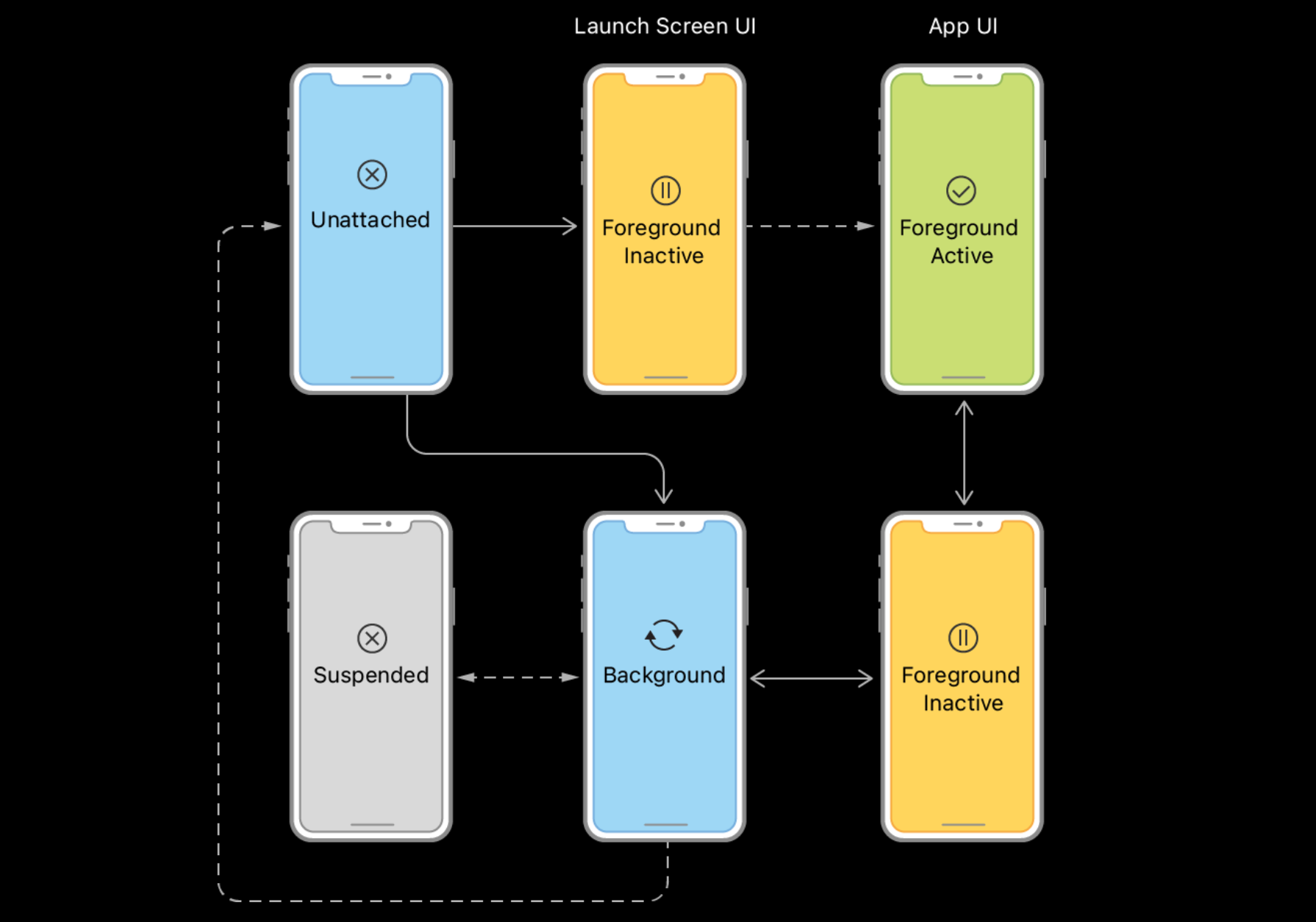
Since the introduction of UISceneDelegate lifecycle, the states are better explained in terms of scenes. With multiple scenes, the ‘overall’ app state for the purposes of background execution is the state of the most active scene.
The important states include:
“Foreground inactive”, where a scene is visible but can’t yet accept touch events. The scene also goes into this state when you get interruptions like phone calls, swipe down notification centre, or transition to the app switcher.
“Foreground active” is the standard scene state for an active app, ready to respond to your users.
After switching away from the app fully, the scene becomes “backgrounded”. Background work is done in this state.
In the absence of work to do, and (critically) permission to run the work, the system will quickly put the scene in the “suspended” state, shutting down execution and saving resources (assuming you don’t habitually force-quit, sorry Antoine).
So. Background execution happens when the app is in the background. Capiche?
Now let’s look at the various flavours of execution you might want to play with.
Buying Time
Many apps have a few critical operations, which you really don’t want to leave half-baked: consider saving a heavy file in a document or photo editor.
beginBackgroundTask asks the system for a little bit more time to finish work while in the background, holding off on suspension.
import UIKit

@MainActor
final class BackgroundTimeService {
    private var backgroundTask: UIBackgroundTaskIdentifier = .invalid

    func saveDraft() {
        backgroundTask = UIApplication.shared.beginBackgroundTask {
            UIApplication.shared.endBackgroundTask(self.backgroundTask)
        }
        let file = URL.documentsDirectory.appending(path: "draft.txt")
        let masterpiece = "It was the best of times, it was the blurst of times"
        try! masterpiece.write(to: file, atomically: true, encoding: .utf8)
        UIApplication.shared.endBackgroundTask(backgroundTask)
    }
}
Typically you get ~30 seconds: query backgroundTimeRemaining for your deadline. Before then, you need to balance each call to beginBackgroundTask with a call to endBackgroundTask, or Watchdog will terminate your app instead of suspending, forcing the app to warm-launch next time and losing all its nicely cached state.
Fortunately, we can initialise the background task with an expirationHandler, a closure that fires just before your time is up. This means we have a backup route to immediately stop pending work, end the task, avoid a termination.
backgroundTask = UIApplication.shared.beginBackgroundTask {
    UIApplication.shared.endBackgroundTask(self.backgroundTask)
}
Delegating work to the System
Loyal readers may be familiar with background URLSession configuration. It’s one of the more common flavours of background execution; allowing a large URLSessionDownloadTask to run in the background.
@MainActor
final class DownloadService: NSObject, @preconcurrency URLSessionDownloadDelegate {
    static let shared = DownloadService()
    private var download: URLSessionDownloadTask?
    lazy var session = URLSession(configuration: .background(withIdentifier: "com.jacob.BackgroundWork.download"),
                                  delegate: self,
                                  delegateQueue: .main)

    func start() {
        let video = URL(string: "https://devstreaming-cdn.apple.com/videos/wwdc/2025/227/4/b4d5d5a5-5c5a-4f37-a4ad-66fea0b6f25d/downloads/wwdc2025-227_hd.mp4")!
        download = session.downloadTask(with: video)
        download!.resume()
    }
}
This background configuration hands responsibility for the data transfer to a system daemon, nsurlsessiond, which runs in a separate process from your app process. When transitioning to a background state, your app can be suspended as normal, then stirred and awoken briefly when the transfer completes through our app delegate:
@MainActor
final class AppDelegate: NSObject, UIApplicationDelegate {
    // ...
    func application(_ application: UIApplication, handleEventsForBackgroundURLSession identifier: String, completionHandler: @escaping () -> Void) {
        DownloadService.shared.backgroundEventsFinished = completionHandler
        _ = DownloadService.shared.session // ensure the lazy session exists
    }
}
After the transfer completes, this delegate method signals a transition in app state from suspension, to backgrounded. The app may also be relaunched* here if the process was terminated by the system*.
*User force-quits, however, cancel the transfer work that’s being done by the daemon background process.
If we have multiple background sessions, we can switch over the identifier to route the completion handler to the right service. Now our didFinishDownloadingTo callback can fire.
@MainActor
final class DownloadService: NSObject, @preconcurrency URLSessionDownloadDelegate {
    var backgroundEventsFinished: (() -> Void)?
    // ...
    func urlSessionDidFinishEvents(forBackgroundURLSession session: URLSession) {
        backgroundEventsFinished?()
        backgroundEventsFinished = nil
    }

    func urlSession(_ session: URLSession,
                    downloadTask: URLSessionDownloadTask,
                    didFinishDownloadingTo location: URL) {
        // move the file to a permanent URL
    }
}
The downloadTask comes into our app via a temporary file URL, so the final step is placing this file somewhere permanent before the app process is suspended.
didFinishDownloadingTo runs first, in the delegateQueue we set on our session. After all queued events are finished, urlSessionDidFinishEvents fires and signals the completionHandler we got from AppDelegate, allowing the app to suspend again.
If you’re hungry to learn more about data uploading, I wrote a primer right here:

Give iOS a TODO List
When we think of background work, we usually think about ‘doing stuff’ for the user when they aren’t looking. It’s a great user experience to come back to an app, and work has been done on your behalf.
This is where the BackgroundTasks framework comes in.
Background Tasks provide an official path to handle processing while your app is backgrounded, staving off suspension to invisibly get stuff done.
You need to do two things to use a Background Task: first, register a closure to run in the background (called a launch handler), then schedule it to run.
Each background task needs its own identifier. When iOS runs your app in the background, it links the identifier to the launch handler that was registered. We specify these identifiers upfront in our Info.plist.
<key>BGTaskSchedulerPermittedIdentifiers</key><array>
    <string>com.jacob.BackgroundWork.refresh</string>
    <string>com.jacob.BackgroundWork.processing</string>
    <string>com.jacob.BackgroundWork.healthResearch</string>
    <string>com.jacob.BackgroundWork.continued</string>
</array>
For some, we also need to set a capability in UIBackgroundModes.
BGAppRefreshTask is great for something like a news app, or a social app. It enables you to refresh and locally cache content while the app is in the background. You can set earliestBeginDate, but the system ultimately gets to choose. It requires the fetch background mode.
We can kick it off when backgrounding the app.
@main struct BackgroundWorkApp: App {
    @UIApplicationDelegateAdaptor(AppDelegate.self) private var delegate
    @Environment(\.scenePhase) private var scenePhase

    var body: some Scene {
        WindowGroup { DemoListScreen() }
            .onChange(of: scenePhase) { _, phase in
                if phase == .background {
                    try? RefreshService.shared.schedule()
                }
            }
    }
}
In our service, we schedule it using a BGAppRefreshTaskRequest.
@preconcurrency import BackgroundTasks

final class RefreshService {
    static let shared = RefreshService()

    func schedule() throws {
        let request = BGAppRefreshTaskRequest(identifier: "com.jacob.BackgroundWork.refresh")
        request.earliestBeginDate = Date(timeIntervalSinceNow: 3600)
        try BGTaskScheduler.shared.submit(request)
    }
}
The request itself looks for the identifier we set. We register this in our service at launch-time. This has to happen immediately at launch, so it’s ready if the app is launched in the background to perform the work.
Registration creates this identifier and specifies the work in a closure. Here, we refresh an RSS feed and cache the results.
func register() {
    BGTaskScheduler.shared.register(forTaskWithIdentifier: "com.jacob.BackgroundWork.refresh", using: nil) { task in
        let url = URL(string: "https://developer.apple.com/news/rss/news.rss")!
        let fetch = URLSession.shared.dataTask(with: url) { data, _, error in
            try? data?.write(to: URL.cachesDirectory.appending(path: "news.rss"))
            task.setTaskCompleted(success: error == nil)
        }
        task.expirationHandler = { fetch.cancel() }
        fetch.resume()
    }
}
BGProcessingTask is for heavier, time-consuming work, which you might not trust a user to keep the app open during. This can include a long data update, data processing, or silent cleanup work.
It needs the processing background mode to work. As before, we schedule it when going into the background, and place the work on the register(forTaskWithIdentifier:) closure. Here, we’re cleaning up the cached RSS data* from before.
@preconcurrency import BackgroundTasks

final class ProcessingService {
    static let shared = ProcessingService()

    func register() {
        BGTaskScheduler.shared.register(forTaskWithIdentifier: "com.jacob.BackgroundWork.processing", using: nil) { task in
            let file = URL.cachesDirectory.appending(path: "news.rss")
            try? FileManager.default.removeItem(at: file)
            task.setTaskCompleted(success: true)
        }
    }

    func schedule() throws {
        let request = BGProcessingTaskRequest(identifier: "com.jacob.BackgroundWork.processing")
        try BGTaskScheduler.shared.submit(request)
    }
}
*I intentionally kept these examples linked, but if you’re paying close attention, you’ll realise this would be very silly in a real app: ordering isn’t guaranteed, and we are both caching and removing this cached data in the background.
There’s also the slightly obscure BGHealthResearchTask, which offers more permissive processing time. It requires a special entitlement which needs to be specially requested from Apple.
How iOS 26 makes life easier
This article is exclusive to paid members, who learn all about background tasks, discover how iOS 26 makes them much more powerful, and also find out a plethora of powerful capabilities you can unlock in the background.
As well as this, you get:
⚓️ Access my full library of 55+ paywalled articles (including this one)
🚀 Read free articles a month before anyone else
🧵 Master concurrency with my full course and advanced training
🧑🚀 Get a free copy of my 109-page eBook, “Land your iOS Tech Job”
❤️🩹 Support independent, sometimes funny, tech writing
