


This is a dual-purpose post.
On the face of it, I’m covering the various chip architectures employed by Apple over the last 50 years, colouring in the technical considerations and the business context.
But, much like I mix my cats’ worm treatment into their food, I am sneakily grinding healthy chunks of learning into the prose: each chapter serves as a framing device for fundamental CPU concepts, growing in complexity. If Android is more your cup of tea, just jump between chapters at will like an overclocked instruction pointer.
Sponsored Link
AI paywall editor: build your paywall by just prompting
Ship better paywalls faster. Just describe the paywall you want, and RevenueCat’s AI agent handles the copy, layout, styling, localization, and optimization recommendations. Read more here.
Contents
Click any of these to skip the intros and start learning.
1977: 6502 Microprocessor and the Apple I & ][
1984: Motorola 68k and the Macintosh
2006: Intel x86 and the MacBook
2020: Apple Silicon and disruptively good laptops
Apple’s core counter-positioning has been firm from their founding all the way to becoming a $4T megacorp: tight integration of hardware and software. This gives them pricing power that OS players (Microsoft, Google) or hardware manufacturers (HP, Dell, Samsung) only dream of.
Maintaining this integration gives them a durable competitive advantage. It allows them to make products that “just work”, and also gives them full control over the ecosystem (ask Meta if that matters).
This control is what allows them to casually migrate their entire chip architecture. They’ve done it three times! There’s often skepticism regarding CPU architecture migrations. Devs get tetchy about you deprecating all their software at once.
With 2005’s move to Intel x86, some commentators even guessed it was a precursor to bringing Apple onto Windows. The horror. But, ultimately, Apple has their reasons: short-term pain for strategic gain. Each new CPU architecture helped Apple compete and differentiate.
Today’s odyssey goes through the 5 key eras of Apple CPU architecture. 1977 up to 2026. I’ll colour in the business context surrounding each migration and bring you forward through the results of each shift.
Along the way, we’ll learn the basics of CPU technology; learning increasingly complex chip design techniques along the relentless learning curve of technological advancement.
This post is full of knowledge, so much so that your email client might cut it off. Read on my website for the best experience.
1977
Chip Family: 6502 microprocessor
Tech it unlocked: The Apple I and Apple ][
1 smelly hippy. 1 big bushy beard. It can only be the 2 Steves.
The Apple I in 1976 launched the company. If you can dust off one of the 200 units ever produced, you’re in luck as it’s the most valuable personal computer in the world (think Ferrari money).
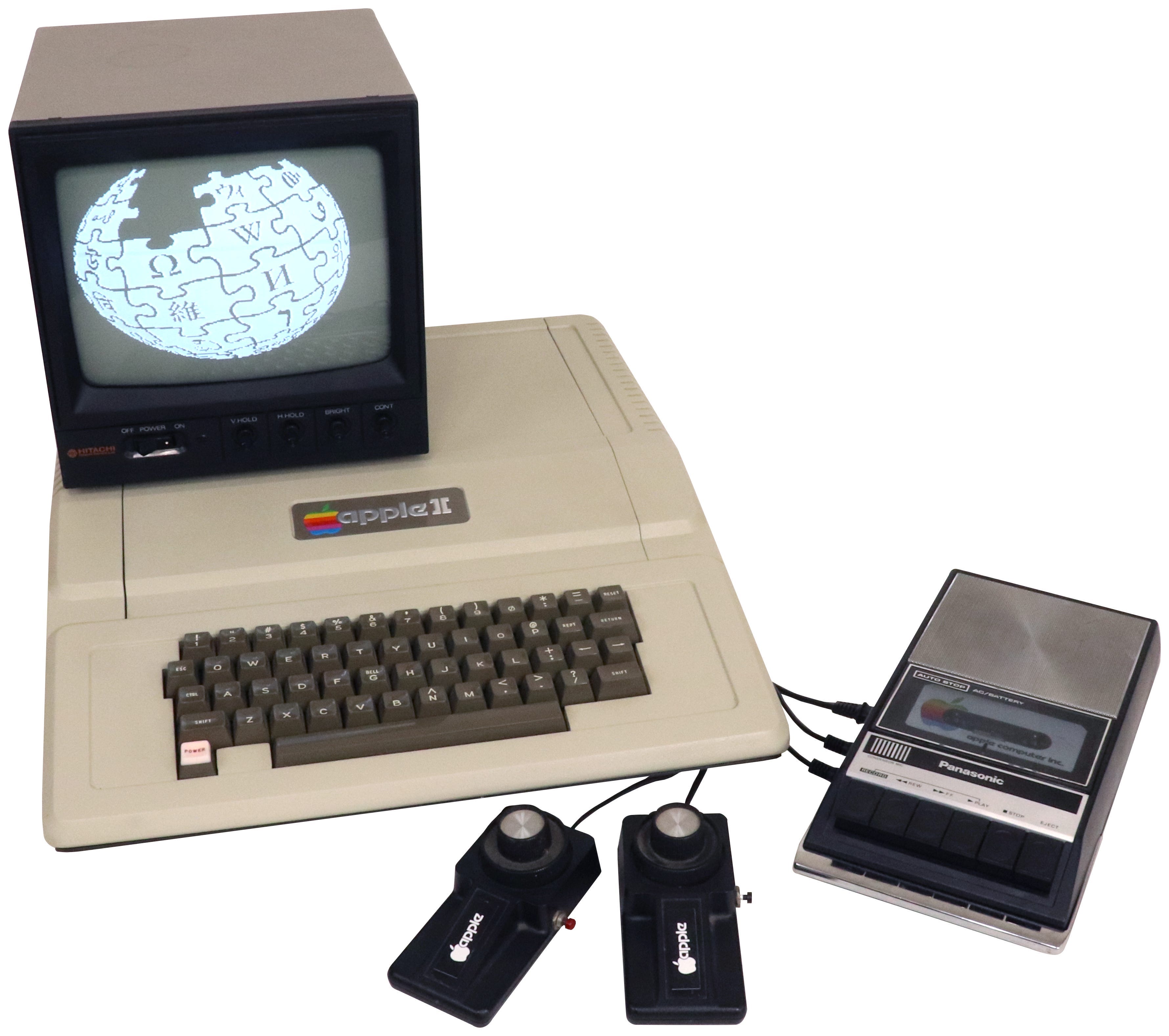
The Apple ][ (pronounced “Apple Two”) was their first smash hit, so good they milked it for 16 years. It truly helped revolutionise the personal computing, uh, revolution.
In the mid-70s, hobbyists orbited a few popular microprocessors like the Intel 8080 and the Motorola 6800. The instruction set architectures of these chip families were the closest thing the nascent world of hobby computing had to an ecosystem.
A few Motorola engineers defected to MOS Technology to build the 6502, which was similar enough to 6800 for Woz to be familiar with it (maybe too similar: MOS flew too close to the sun with the 6501 and got sued for IP theft).
The Intel 8080 and the Motorola 6800 both cost more than $150, which is approximately a fucktillion in 2026 dollars. Therefore the choice of 6502 was not so much strategic and more because it cost $25, and Woz’s stock options had not yet appreciated that much.
He was able to cheaply acquire a bunch of 6502s, cobble together some computers, and write a BASIC interpreter.
BASIC was the “vibe coding” of the day. Hardcore, gruff, staff-engineer archetypes have always looked down on people not doing “proper programming” (6502 assembly) and relying on words instead.
Woz aptly performed the 3 core activities of early computer manufacturers: choosing an off-the-shelf processor, designing hardware around it, and providing a friendly programming environment. These form the foundation of the integration between hardware and software maintained by Apple today.
The Apple I was a neat machine that counter-positioned against the do-it-yourself “kits” popular in the day: a pre-built, quality-tested, plug-and-play board introducing the “it just works” philosophy.
The Apple ][ took this baseline and created a killer consumer product with colour graphics, sound, a plastic case, expansion slots, and BASIC in its read-only memory.
Both used the 6502.
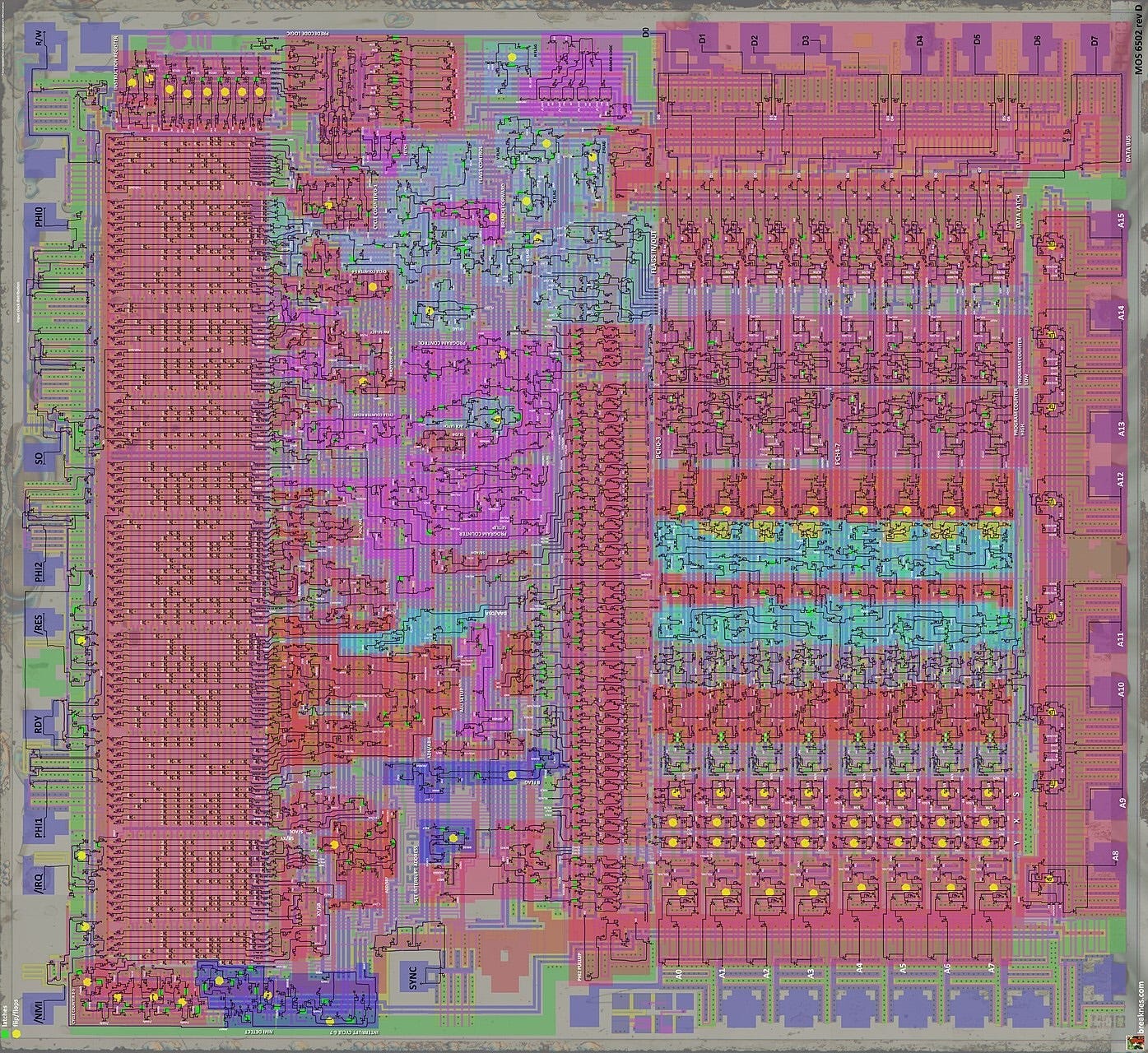
The 6502 was an 8-bit CPU running at 1.023 MHz, with a 64KB memory address space: just a hair more powerful than today’s RyanAir mobile app.
OK: numbers, acronyms, words, blah blah blah. Let’s get on the same page.
The CPU™
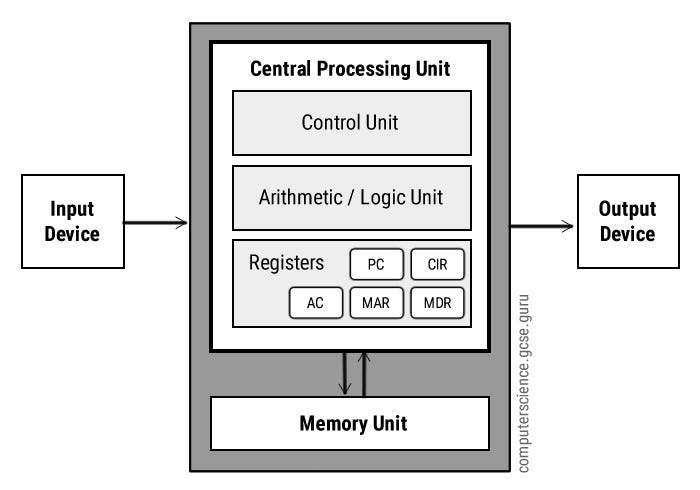
A CPU, or central processing unit, is a device that moves data from computer memory (RAM) into fast temporary memory (registers), runs operations on this data, and then moves the output back into memory.
A control unit takes a feed of instructions, decoding them one-at-a-time, to decide what data moves to which register, and which register’s data should be piped through which logic circuits.
Fundamentally, all software behaves by arranging inputs into the CPU and handling the outputs. Databases. Operating systems. Intelligent refrigerators.
Registers
A register is a tiny speck of storage hardware. When I say “electronic memory,” I mean a circuit which, while powered, is able to hold onto its current value: on or off, 1 or 0. The smaller you can get this circuit, the more data you can store.
This is also, more or less, how RAM works (except there’s a lot more of it).
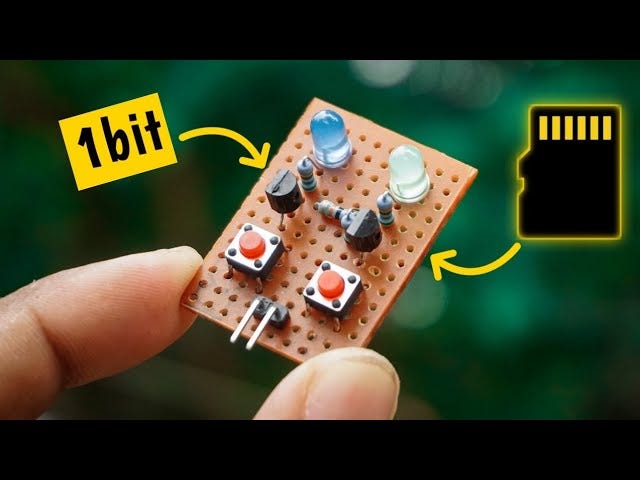
Registers hold a tiny number of bits very close to the CPU processing circuits. They are small, and close, making them really fast, operating at the MHz (or later, GHz) levels of the fully-clocked CPU.
The ALU
The last key piece of circuitry to understand is the Arithmetic-Logic Unit (ALU), the aforementioned “logic circuits” that actually perform these operations. The ALU is fundamentally a collection of circuits that perform simple, specialised jobs, such as:
Adding up binary numbers, e.g.
0010+0101=0111Perform logical operations, e.g.
NOT0000=1111Shift bits around, e.g. left-shifting
0011by 1 place becomes0110
The CPU executes instructions to perform operations on the data in registers, manipulating 1s and 0s which, by the magic of boolean algebra, emerge into useful outputs such as matrix multiplication, collision physics in a video game, or rasterising image data into on-screen pixels.
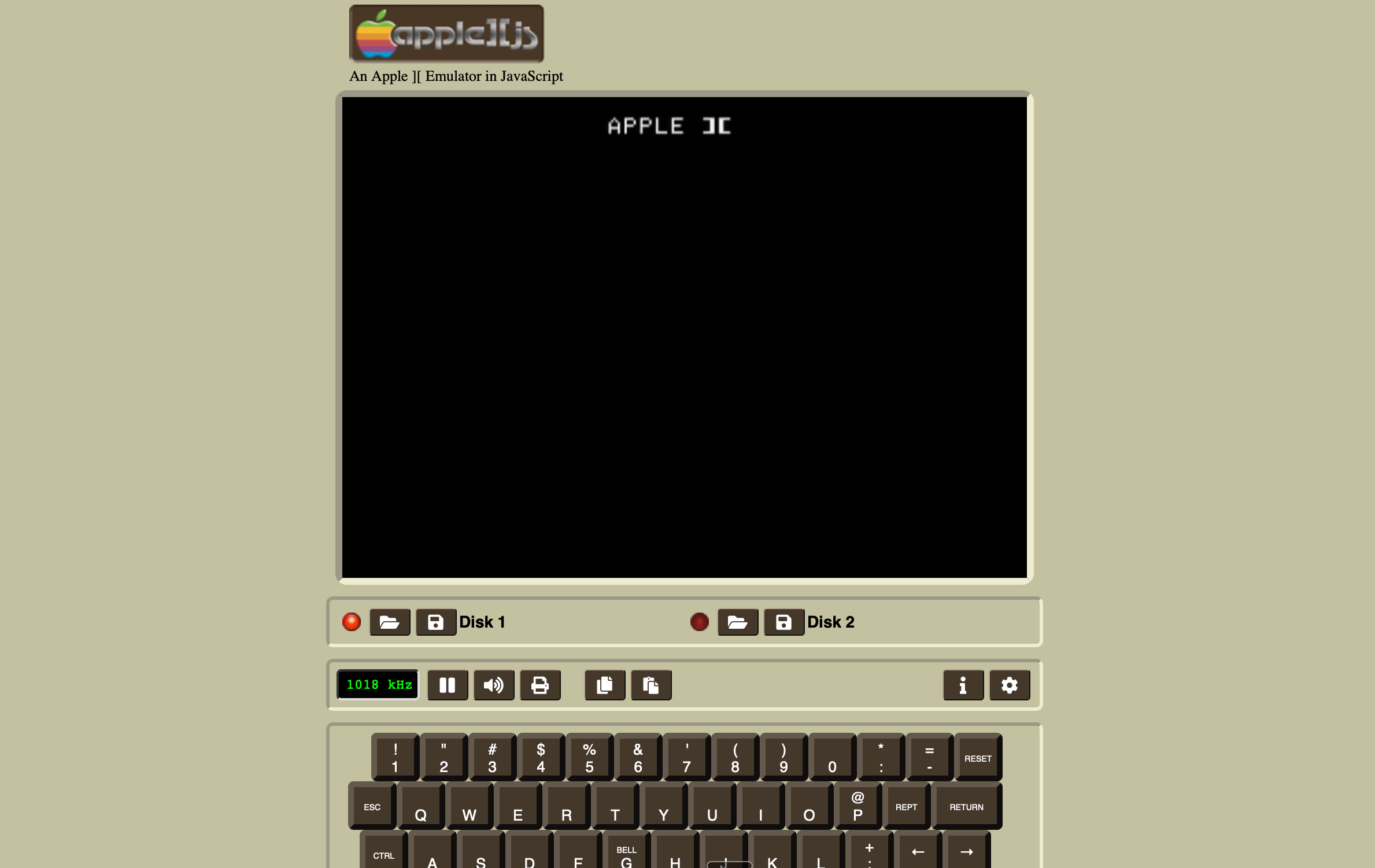
If this section has afflicted you with FOMO, someone built an Apple ][ emulator in JavaScript.
1984
Chip family: Motorola 68k
Tech unlocked: The Macintosh.
1981.
Reagan. MTV. Indiana Jones.
The Apple ][ is a cashflow geyser, but there are barbarians at the gates.
IBM has finally penetrated the PC mass market, precipitating an unprecedented influx of purchase orders for PCs. A young, brash, 24-year-old whizkid named Bill Gates was asked to supply their operating system.
In 10 years, let’s check in on our friends at IBM to see how this move went.
Apple needed a new platform upon which to build their future. Apple’s Lisa is shaping up to be their flagship product. After being a huge jerk to everybody for 5 years, Steve Jobs has been relegated to run the low-end Macintosh project.
Choosing a CPU
Originally planned as a lower-price-tier computer, the Macintosh under Jobs pivoted to focus on one thing: upstaging the Lisa team. Steve got some “inspiration” from his friends at Xerox PARC to bring a cutting-edge GUI to the Macintosh, and demanded advanced hardware to support it.
This isn’t the 70s anymore. This is modern warfare: the early 80s. Your CPU choice is existential. It underpins your OS and the entire software ecosystem you want to nurture. 8-bit is old hat. We need a modern 16-bit processor to compete with IBM. You really have 3 choices available: Intel 8088, the Zilog Z8001, or the Motorola 68k.
8-bit vs. 16-bit
“Bits” of course refers to 1s and 0s, but bits of what? It depends.
8-bit and 16-bit refer to the “width” of various components like:
registers (that store fast intermediate data)
the ALU (that executes operations)
the data bus (that pipes data into, out of, and around the chip)
the address bus (that tells memory which location to read from or write to)
A CPU with 8-bit registers, buses, and ALU circuitry can execute a NOT operation on 00101101 in one clock cycle, inverting its bits into 11010010. A 16-bit CPU can operate on twice as much data per instruction: converting 1010010001011010 into 0101100110100101 in the same tick.
For an address bus, the wires (I think by now it’s etchings) that carry the memory address for any I/O operation, you can’t get far with 8 bits. That encodes 2⁸ different values, or 256 possible memory addresses. Even the hobbyist generation couldn’t really make that work and mostly used 16-bit address buses, offering 2¹⁶ addresses. This yielded the 64KB address space available on the 6502 microprocessor used in the Apple ][.
16-bit is a very broad generalisation, because the chip families in this generation do not line up neatly between registers, buses, and logic circuits.
Endianness
Endianness is a major compatibility consideration when picking a chip architecture. Systems are either big-endian or little-endian, which defines the order in which they store bytes. Consider a number encoded in 16 bits:
41,394, in hexadecimal fashion, would be represented in memory as A1 B2 in big-endian systems and B2 A1 in little-endian systems.
Now that you understand this, I can share what my blog has been building up to for 3 years: my favourite programming meme I ever made.

Assembly Language
Software written for one processor won’t necessarily run on another. Different families of processors naturally contain different instruction sets. This refers to the list of operations that can be performed by the CPU.
A compiler, fundamentally, breaks English computer code down into this “assembly code”. Let’s say you want to add two numbers. Here’s how you might do that in each flavour of assembly that Apple was looking at.
// Intel 8088
mov ax, [1000h]
add ax, [1002h]
// Zilog Z8001
ld r1, @1000h
add r1, @1002h// Motorola 68000
MOVE.W $1000, D0
ADD.W $1002, D0Endianness and assembly come into play in the next chapter, during the first true architecture migration:
Since the instruction sets are different between CPUs, switching chip architecture means all existing software in the ecosystem would need to be re-compiled. If you’re coding a compiler, or generally any code that makes assumptions about endian-ness, you might need to rewrite quite a bit.
Are we all on the same page? Let’s get back to Apple.
Intel vs Zilog vs Motorola
Let’s imagine you’re Apple’s VP of Hardware presenting to Jobs.
Which chip do you reckon you’d pick?
Intel 8088
16-bit internal architecture for registers and logic circuits
8-bit external data bus, plus 20-bit address bus for an INSANE 1MB of address space.
The IBM PC uses this chip architecture, so it has a deep existing software ecosystem.
Low-end price point of ~$35 (in 1983 dollars) thanks to Intel’s economies of scale.
Little-endian.
Zilog Z8001
Pure 16-bit architecture, so luckily I won’t get raked over the coals for mucking this one up.
23-bit memory addressing range supporting a STONKING 8MB of memory
Few PC makers used this architecture, so there was a weak software ecosystem.
Price point of ~$55 in 1983 dollars as Zilog looked to win market share.
Big-endian 🥵.
Motorola 68k
16/32-bit microprocessor: 32-bit programming model and registers
16-bit external data bus.
24-bit memory addressing range supporting a LUDICROUS 16MB of memory.
Atari and Commodore would use this chip architecture, meaning a dev ecosystem might soon flourish.
Mid-to-high-end price point of ~$70 in 1983 dollars.
Big-endian.
Overall, the Motorola 68k appeared to be the forward-thinking choice to show why 1984 won’t be like 1984. The weaker dev ecosystem and compatibility were necessary sacrifices to allow for brand differentiation against the dominant IBM PC.
What’s more, the 68k had a (mostly) orthogonal instruction set, meaning most registers worked for most CPU operations. This is a technical but straightforward bonus: devs don’t have to constantly keep your programming guide open for referencing which instructions work on which registers. This makes developing a lot easier, nice for nurturing a nascent software ecosystem.
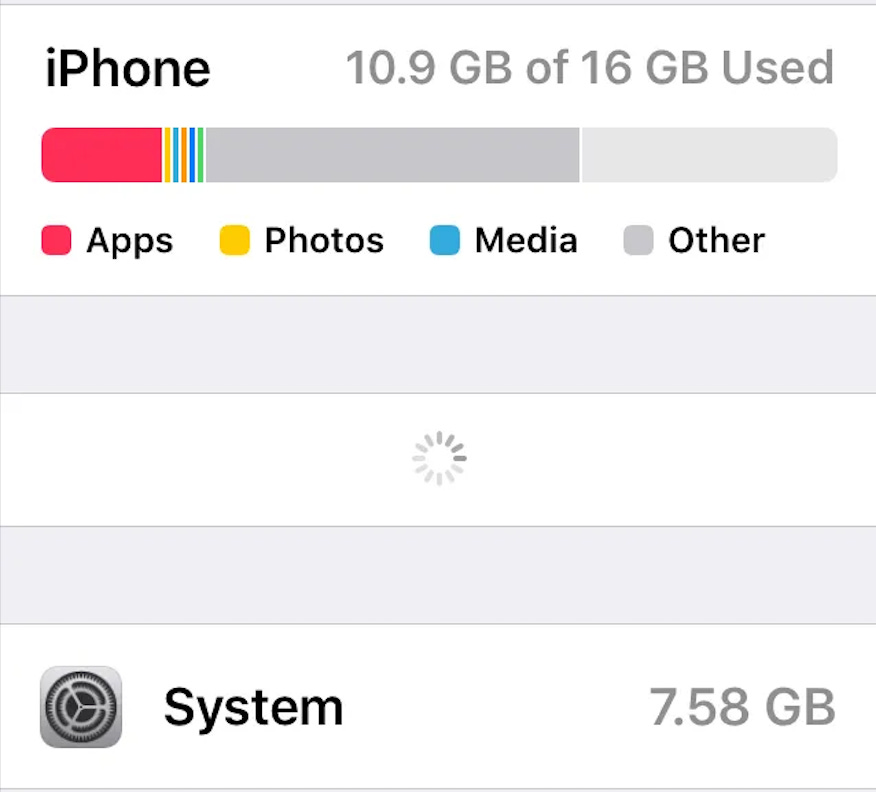
The 16MB addressing range ended up becoming critical: the Macintosh reserved much of the address space for non-negotiables like system software, ROM, expansion ports, I/O… leaving a pithy 4MB of computer memory shared between software applications.
If, in 2012, you ever looked, dismayed, at the storage held by iOS in your 16GB iPod Touch, you’ll know that the more things change, the more they stay the same.
With that boring chore out of the way, Apple and the Motorola 68k were good to go for the next 10 years.
1994
Chip family: PowerPC
Tech unlocked: Power Macintosh
The year is 1994.
Steve Jobs was ousted by Apple 9 years ago, and is busy with NeXT and Pixar.
Apple is losing relevance.
Their former bitter PC rival, IBM, is in the long, painful process of having its lunch eaten by Microsoft.

Intel and Bill Gates, who was more commonly known as “the devil” in the 1990s, had entered an unholy alliance referred to as Wintel, carving out a near-monopoly for both businesses.
Intel had just produced the greatest innovation since the transistor: giving their chip a cool name. The Pentium processor powered the Microsoft market-share munching machine. The x86 family boasted 100MHz clock speeds, high performance, unrivalled economies of scale, and the momentum of the Windows ecosystem. The Motorola 68000 chip family that carried the Macintosh into the 90s was failing to keep up.
With the computer world under threat from monopoly, Apple joined up with its longtime partner, Motorola, and an unlikely ally, IBM. The plan: use the power of friendship to fight the forces of capitalism. The AIM (Apple, IBM, Motorola) alliance was born.
They planned to counter-position themselves against the x86 heavy, backwards-compatible, very legacy CISC architecture. AIM deployed a RISCy tactic: PowerPC.
CISC vs. RISC
There are two opposing chip design philosophies:
CISC (Complex Instruction Set Computer)
RISC (Reduced Instruction Set Computer)
Each CPU, constrained by the actual physical layout of its circuitry, can perform a limited number of different operations or utilise a specific set of registers. This is their Instruction Set.

The two schools of thought create divergent approaches for designing a CPU:
CISC uses a complex instruction set to build tons of functionality into the CPU. You gain the power to perform complex multi-step processing with single instructions, like POLY (evaluate polynomial). While this is like magic, it also means lots of internal state in the processor. This can muck with performance if misused.
RISC applies the “keep it simple, stupid!” philosophy. CISC is a pain to develop. Compiler engineers and Rollercoaster Tycoon developers writing CISC assembly had to consult thick reference tomes to look up instructions they might need. RISC devs were laughing with a simpler instruction set cached fresh in their memory.
Pipelining
Your code is compiled down into machine code, fed into a CPU as a sequence of binary instructions, and executed sequentially. In the previous section, I mentioned the CPU is running operations every clock cycle. Let’s take a closer look.
CPUs run the fetch-decode-execute cycle on a loop. In short, in a single clock cycle, one of three things is done:
Fetch: The CPU fetches the next machine code instruction from memory.
Decode: The CPU’s control unit interprets the instruction to work out what it actually does.
Execute: The CPU executes the instruction, moving data between registers and memory, pushing bits through logic units, or shipping data out to memory.
Interleaving these instructions concurrently is called Pipelining.

With CISC, operations may not be consistent, with some complex multi-step instructions taking 10+ clock cycles to finish. This can make it tough to optimise performance as operations may not line up nicely.
On RISC CPUs, operations are more regular, and easier to line up concurrently. This means you can run 3 instructions for the price of one (clock cycle). Executing one, decoding the next, and fetching the one after. This means that, in ideal conditions, ~1 machine code operation executes per clock cycle.
Clock Speed
This is a lot of work to fit more instructions into a clock cycle. The 6502 ran at ~1 MHz in 1977, and by the 2000s, chips easily reached low-single-digit GHz.
Why not just sit back and push this number some more?
A CPU clock works like a metronome. Between two ticks, an electrical signal must move through a circuit, settle into a valid state, and be captured by a register. Max clock speed is bottlenecked by the slowest path through these circuits. There is an important relationship between the various attributes of an integrated circuit:
P = α × C × V² × fP = power
α = “activity factor”, loosely how much of the chip is busy at once
C = capacitance (proportional to transistor size)
V = voltage
f = frequency (clock speed)
In the 70s, 80s, and 90s, Moore’s Law carried the improvement, as the number of transistors on a chip doubled every couple of years.
With smaller transistors, capacitance scaled down. A smaller transistor also required drastically less voltage to switch from 0 to 1. On a smaller transistor, the critical path for signals shortens, so frequency can go up. C and V² go down; f goes up; cancelling out to yield a way higher clock speed for the same amount of power.
This free lunch was called Dennard scaling.
At a certain point, and this point was the early 2000s, V² became a problem at around 1 volt. You can’t lower it forever, because the semiconductor inside a transistor can’t switch reliably below a minimum threshold voltage. Now, you can’t raise frequency much without increasing power, heat, and melting the chip. This is the power wall.
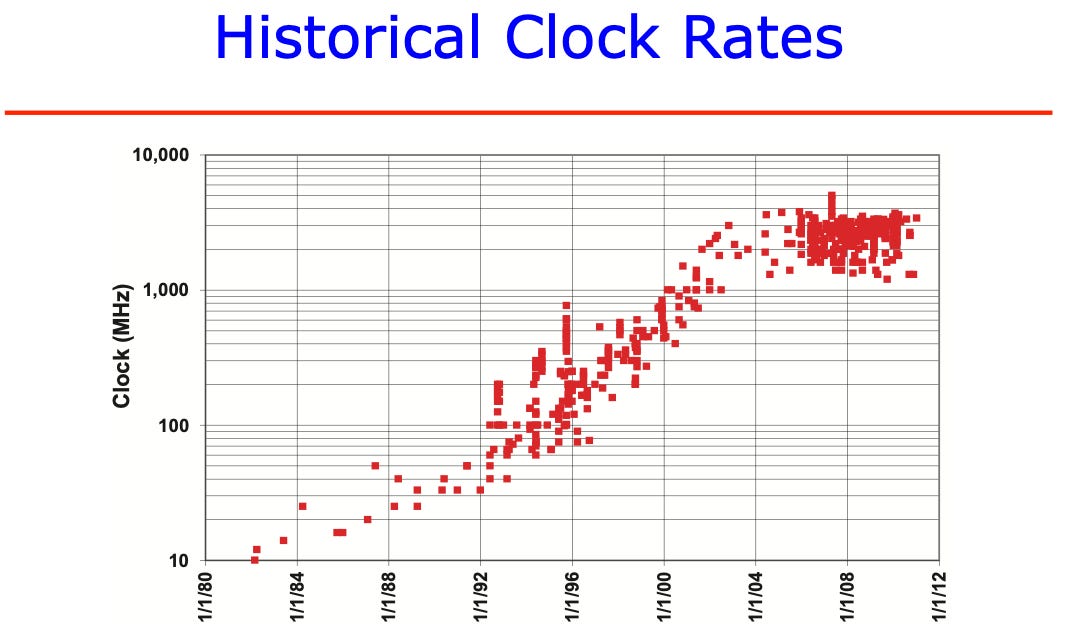


That’s why chips still run at low-single-digit GHz. It’s the whole reason that multi-core processors, alongside all these techniques, are all the rage.
The PowerPC Transition
Apple and the AIM alliance hatched their scheme. PowerPC, a modern RISC microprocessor architecture, was built to compete directly with the dominant Intel x86 architecture.
PowerPC promised better efficiency, i.e., more CPU operations per watt of electricity. Because Apple controlled both software and hardware, they could optimise their OS for this processor architecture.
Now they just had to migrate their entire developer ecosystem. Apple applied two tactics to smooth this over:
An emulator was developed where PowerPC Macs could emulate the 68k CPU. This translated instructions from one instruction set architecture to another in real-time. This, unsurprisingly, incurs a significant performance cost (of about 35%). Fortunately, since the PowerPC CPUs were so much more powerful, emulation wasn’t usually a massive issue for consumers who were upgrading their hardware (recall this is back when people bought one computer a decade, and they got 2x fast every 2 years).
Apple also introduced “fat binaries” for the transition period, which frankly doesn’t sound very PC. Picture a CD-ROM containing a program compiled with machine code for both 68k and PowerPC architectures, making it simple to ship on both platforms.
In the era when 80MB was a decent hard drive, this was pretty annoying, so a cottage industry of binary stripping tools spawned so end-users only needed to save the one that worked on their device.
Overall, Apple’s migration was a success. Moving from 68k to PowerPC lent a massive performance boost. Emulation and fat binaries allowed the developer ecosystem to transition without everything breaking.
Unfortunately, the Wintel alliance was barely touched. Their market dominance grew to unprecedented levels with the release of Pentium and Windows 95. Windows grew into the default computing platform, tragically transforming school ICT curriculums the world over into “how to use Microsoft Office”.
Now that they had a solid hardware platform, Apple’s antiquated System 7 Mac OS became the primary headwind. Internal projects to create a modern competitor to Windows had failed, which meant an acquisition was the only way out of a tailspin. Just buy a new OS, bro.
This laid the groundwork for Apple’s purchase of NeXT and the return of Steve Jobs.