

RevenueCat has a neat business model: Take an enormously painful hassle (managing in-app subscriptions), abstract it into something bearable, and charge devs a cool 1% for the service. Classic painkiller.
This abstraction is where the value lies.
$10bn worth of value (so far!).
When tens of thousands of devs are relying on you to make money, the stakes can’t get much higher. Consequently, the RevenueCat iOS SDK is one of the most battle-hardened open-source projects out there.
Therefore, we can learn a lot about SDK design principles by analysing it:
Backwards compatibility as a top-level constraint
Façade-first design for public APIs
Sensible defaults and progressive disclosure of complexity
Careful layering of dependencies
Relentless logging, diagnostics, and profiling
Orchestration between services for complex flows
Offline-first correctness
“Invisible” performance characteristics
Friendly abstraction over janky third-party APIs
Keeping mindful of dev-ex (developer experience) every step of the way
We’re taking a deep-dive into the payments flow: how the SDK abstracts away the complexity of making purchases and setting up in-app subscriptions.
Sponsored Link
RevenueCat Paywalls: Build & iterate subscription flows faster
RevenueCat Paywalls just added a steady stream of new features: more templates, deeper customization, better previews, and new promo tools. Check the Paywalls changelog and keep improving your subscription flows as new capabilities ship.
(That’s right, I finally manifested my bit from 2023)
Contents
High-Level System Design
Consider the RevenueCat SDK at a basic level: how would you design such a thing? Don’t think about payments, subscriptions, entitlements, receipt validation, and paywalling yet.
It’s easier to start with a big box that abstracts away everything a user has to worry about.
Now consider: who are the big players involved?
There’s the client app, of course, who pays you money to use the SDK. Then, with a great big box, we can represent the SDK. The other major players are StoreKit, Apple’s own servers, and of course the RevenueCat backend itself, mostly all chatting to each other.
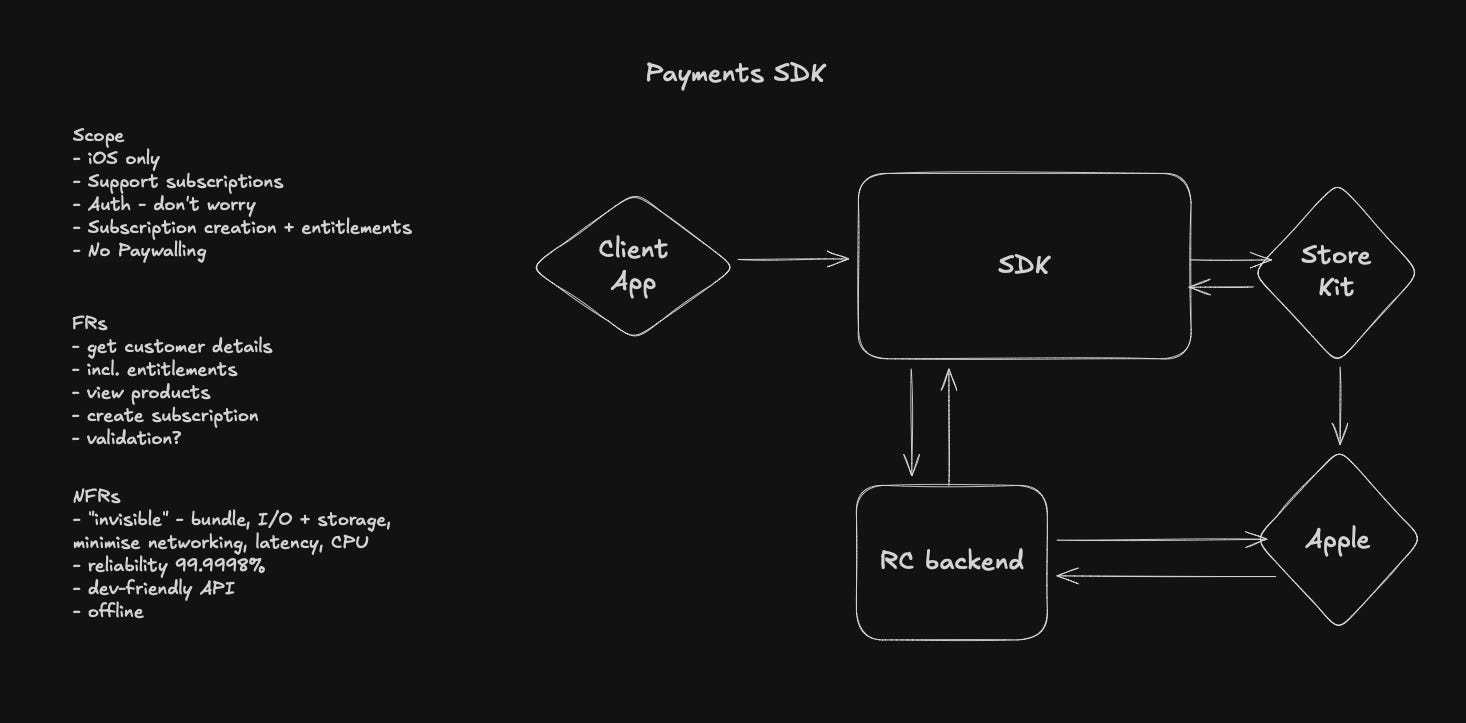
The SDK needs to abstract all the complexity away of creating a customer, displaying products on a paywall, talking to StoreKit during a purchase, updating and handling user entitlements, and posting transaction info to a server so everything links up cross-platform.
Inside the SDK, the architecture is loosely set up in layers, with very heavy usage of constructor injection to manage dependencies across all the classes. These dependencies are all initialised on SDK init, with lower level services injected into high level managers and orchestrators where needed.
For payments, the conceptual layers look a little like:
Façade layer containing Purchases, the public API surface
Orchestration layer where PurchasesOrchestrator coordinates everything
Managers layer containing business logic and services like OfferingsManager, CustomerInfoManager, and ProductsManager.
Infrastructure layer containing basic services like Backend, HTTPClient, and OperationDispatcher.
Let’s dive down into these layers in detail to see how the SDK handles payments.
There are a couple of useful keywords to clarify before we go too far into the guts of RevenueCat, because they come up a bunch:
Entitlements refers to the level of access and features the user has unlocked. For instance, whether they are on your free tier, your paid tier, or your founding members tier.
Products are the different individual things a user might buy; for example a free trial, a monthly membership, or a discounted annual or lifetime membership. They list separately on the App Store, Google Play, and Stripe (for web!).
Packages refers to equivalent products across platforms (basically this makes paywalling admin easier).
How to make a Purchase
There are actually two ways to make purchases via the SDK:
The default mode is using the built-in paywalls, which automatically display your offerings. Set up on the dashboard, and the SDK handles everything automatically.
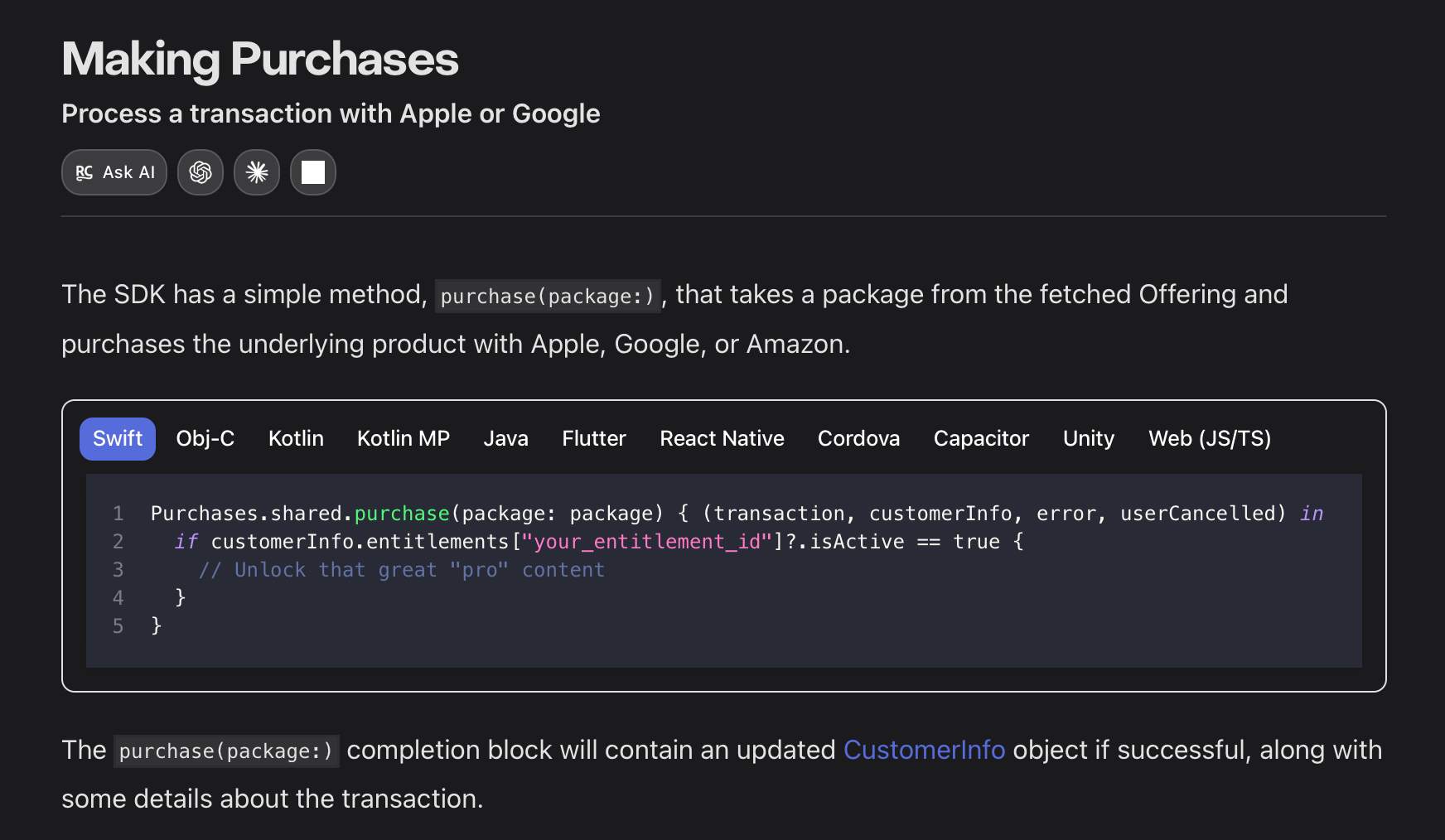
You can also manually tell the SDK to execute a purchase like this. I’m going to follow this one, because we can follow through the full public API:
The Façade Layer
Façade is a top-3 design pattern for me because I love the little accoutrements on the letter C there (apparently called a cedilla).
Purchases, the main object devs use to init and use the SDK, is this façade, a minimal developer-friendly API that distills the tasks of complex StoreKit integration, receipt validation, and entitlement management into a few simple function calls.
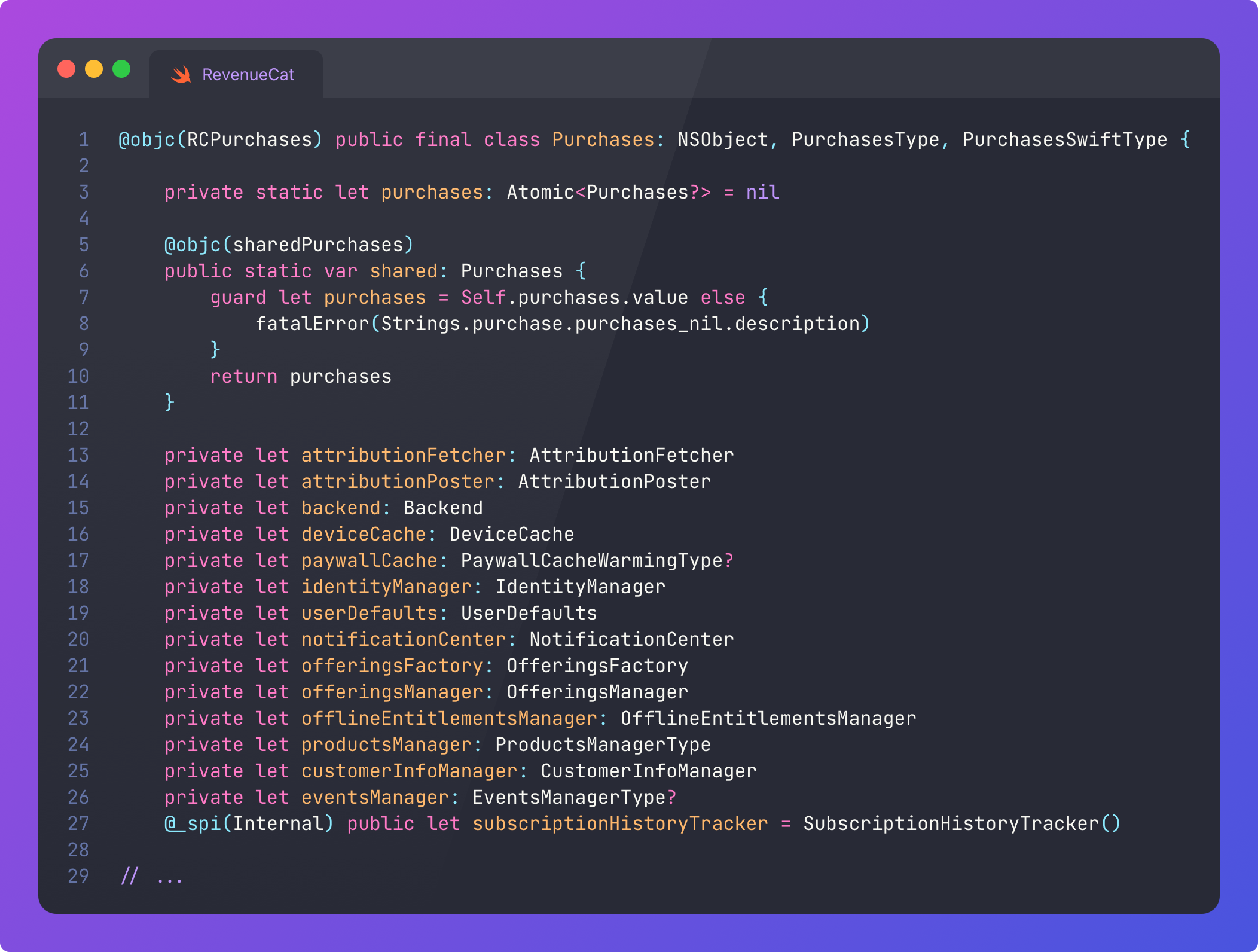
Woah, Nelly, that’s a lot of dependencies. And I redacted a lot. But we can spot also a few interesting SDK design techniques already:
If the SDK is not configured, it will fatalError() on access. This is a deliberate design choice: this makes it virtually impossible for the developer to mess up basic initialisation and misuse the SDK.
Note the @objc(RCPurchase) at the class declaration. This exposes the class to Objective-C, and provides a prefixed alternative name (because ObjC uses a global namespace). Objective-C compatibility is a must when you are working with thousands of iOS projects that might never migrate to Swift.
Purchases also serves as the root of the dependency graph, owning references to all the services, managers, and orchestrators used throughout the SDK. It applies manual constructor injection, which is preferable to introducing a third-party DI framework as a sub-dependency into every app shipped by your customers.
Configuration and Progressive Disclosure
Initialising the SDK reveals another interesting tidbit around progressive disclosure in API design, which is vital for your dev-ex.
Most devs will start by configuring their payments SDK with the API key only.
@objc(configureWithAPIKey:)
@discardableResult static func configure(withAPIKey apiKey: String) -> Purchases {
    Self.configure(withAPIKey: apiKey, appUserID: nil)
}
As you grow towards more advanced use cases, you might end up using this alternative function that allows for configuration:
@objc(configureWithConfigurationBuilder:)
@discardableResult static func configure(with builder: Configuration.Builder) -> Purchases {
    return Self.configure(with: builder.build())
}
This Configuration object offers more granular control over SDK behaviour:
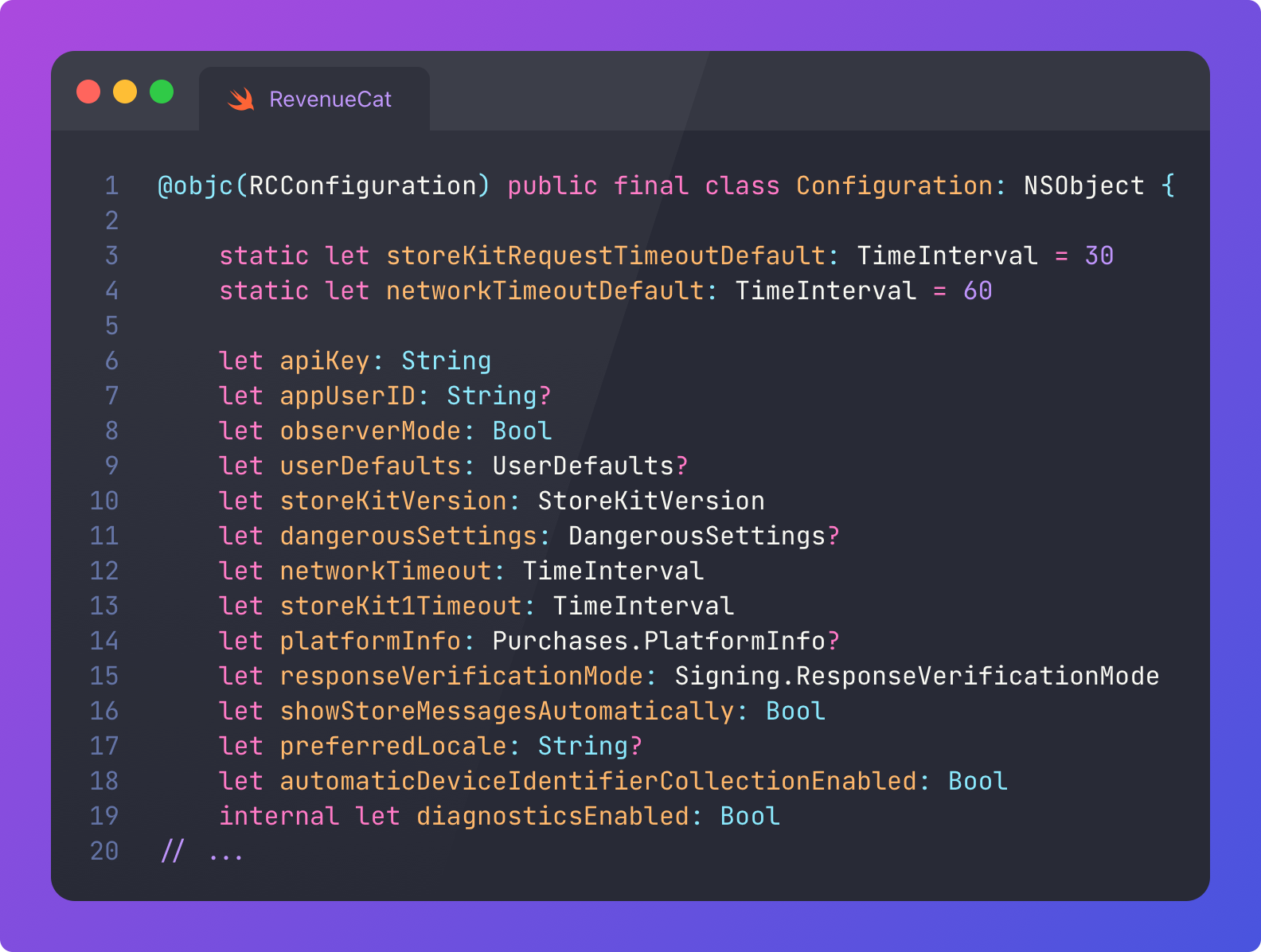
This means we can keep APIs simple while enabling customised behaviour for power users.
Consider a developer introducing this advanced configuration for the SDK to enforce response verification, hardcode StoreKit 2, and configure timeouts:
let config = Configuration.Builder(withAPIKey: apiKey)
    .with(observerMode: true)
    .with(storeKitVersion: .storeKit2)
    .with(responseVerificationMode: .enforced)
    .with(networkTimeout: 90)
    .with(storeKit1Timeout: 45)
    .with(preferredLocale: "fr_FR")
    .build()
Purchases.configure(with: config)
Without being able to apply this configuration at init, we would have to make the API surface far more complex, for example the basic purchase() API would require far more parameters:
try await Purchases.shared.purchase(
    product: product,
    observerMode: true,
    storeKitVersion: .storeKit2,
    responseVerificationMode: .enforced,
    networkTimeout: 90,
    storeKit1Timeout: 45,
    preferredLocale: "fr_FR"
)
Because this all lives in the configuration at init, the API can remain simple:
try await Purchases.shared.purchase(product: product)Configuration creep is also a problem, so you need to be thoughtful about how much should be configurable locally, vs how much can be set up on a dashboard somewhere. You need to carefully balance ease-of-use, flexibility, and actual customer needs.
Managing the Dependency Graph
The dependency graph is all wired up in the Purchases convenience initialiser: All the services, managers, and orchestrators get created here.
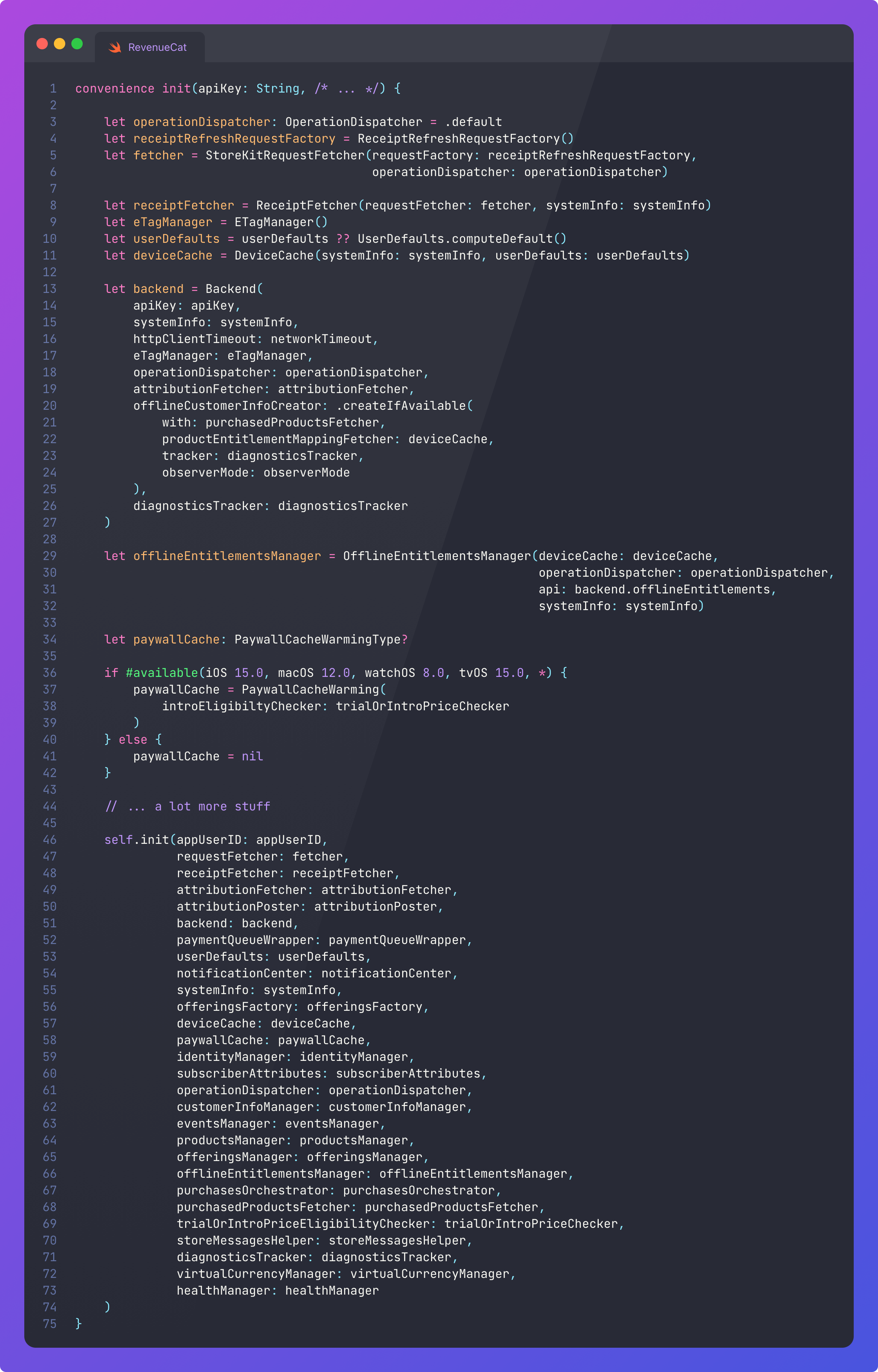
Because I’m not being paid by the letter, I redacted about 80% of the code.
The layered architecture I referred to isn’t enforced logically, but is kept safe by the compiler: it’s impossible accidentally create a cycle when using vanilla constructor injection, because your code just won’t compile.
So I suppose it’s less like a dependency graph, and more like a list of dependencies that are instantiated, one after the other, in the order they appear in this initialiser.
This is not trivial, however: you still need to carefully design each dependency to avoid cycles, ensuring each service has only what it needs.